

Il software di gestione delle spese per organizzazioni non profit aiuta la tua organizzazione a monitorare, controllare e rendicontare spese, donazioni e sovvenzioni, rispettando al contempo i requisiti specifici di conformità e contabilità dei fondi. Se stai cercando il miglior software di gestione delle spese per organizzazioni non profit, probabilmente ti servono strumenti che forniscano report accurati, supportino la trasparenza nei confronti dei donatori e ti aiutino a gestire i fondi vincolati senza aggiungere lavoro manuale.
Scegliere la piattaforma giusta può semplificare il rispetto degli obblighi normativi, mantenere informati gli stakeholder e garantire che ogni euro sia contabilizzato. In questa guida troverai una selezione curata di soluzioni progettate per affrontare le specifiche sfide finanziarie delle organizzazioni non profit, così potrai scegliere con sicurezza quella più adatta al tuo team.
Perché fidarsi dei nostri consigli sui software
6,700+
Reviews
20
Industry experts
16+
Evaluation factors
14
Years
Le nostre recensioni riflettono il nostro giudizio indipendente, non un discorso di vendita. Scopri come manteniamo la trasparenza.
Per questa guida, abbiamo valutato gli strumenti attraverso test pratici e ricerche indipendenti, assegnando un punteggio agli strumenti in base ai nostri criteri di selezione.
Le nostre recensioni riflettono il nostro giudizio editoriale umano, non un discorso di vendita.
Tabella comparativa dei software di gestione delle spese
Hai poco tempo? Salta l’approfondimento. Ecco un rapido confronto dei miei migliori software di gestione delle spese:
| Tool | Best For | Trial Info | Price | ||
|---|---|---|---|---|---|
| 1 | Ideale per il rilevamento automatico delle violazioni delle policy | Demo gratuita disponibile | Da $11,99/utente/mese (fatturazione annuale) | Website | |
| 2 | Ideale per controlli sulle spese collegati alle risorse umane su larga scala | Demo gratuita disponibile | Prezzi disponibili su richiesta | Website | |
| 3 | Ideale per l'elaborazione automatizzata dei conti fornitori | Piano gratuito + demo gratuita disponibile | Da $49/utente/mese | Website | |
| 4 | Ideale per report su donatori e fondi | Prova gratuita di 30 giorni | Da $30/mese | Website | |
| 5 | Ideale per la gestione delle donazioni multi-valuta | Prova gratuita di 30 giorni disponibile | Da $2.50/mese | Website | |
| 6 | Ideale per le funzionalità essenziali di contabilità gratuite | Prova gratuita di 30 giorni + piano gratuito disponibile | Da $15/mese | Website | |
| 7 | Ideale per il budgeting specifico del settore non profit | Prova gratuita di 15 giorni | Da $79/mese | Website | |
| 8 | Ideale per la scansione automatizzata delle ricevute | Non disponibile | Da $5/utente/mese | Website | |
| 9 | Ideale per strumenti integrati di contabilità dei fondi | Piano gratuito disponibile | A partire da $45/mese | Website | |
| 10 | Ideale per la gestione di fondi vincolati | Prova gratuita disponibile | $25/transaction (pay-as-you-go) | Website |


Recensioni dei software di gestione delle spese per organizzazioni non profit
Di seguito trovi le mie sintesi dettagliate dei software di gestione delle spese per organizzazioni non profit inclusi nella mia selezione. Le mie recensioni offrono una panoramica dettagliata delle funzionalità, dei casi d’uso migliori e delle integrazioni di ciascun software, per aiutarti a trovare quello più adatto alla tua organizzazione.
 Ideale per il rilevamento automatico delle violazioni delle policy
- Demo gratuita disponibile
- Da $11,99/utente/mese (fatturazione annuale)
Visit WebsiteCustomer Rating:4.6/5
Sage Expense Management offre rilevamento automatico delle violazioni delle policy e le indirizza per l'approvazione durante la riconciliazione delle carte di credito. Sage Expense Management (precedentemente Fyle) è una piattaforma di gestione delle spese per organizzazioni non profit che si occupa del monitoraggio delle transazioni con carta di credito, acquisizione delle ricevute, applicazione delle policy, approvazioni multilivello e integrazioni contabili con strumenti come QuickBooks, Sage Intacct e Xero.
Per chi è ideale Sage Expense Management?
Sage Expense Management è adatto ai team finanziari non profit che necessitano di monitoraggio delle spese a livello di sovvenzione e di registri delle spese pronti per l'audit.
Perché ho scelto Sage Expense Management
Sage Expense Management si è guadagnato un posto nella mia shortlist per il modo in cui gestisce l’applicazione delle policy prima che una violazione possa sfuggire al processo di approvazione. I controlli sulle violazioni in tempo reale segnalano, avvertono o bloccano una richiesta nel momento stesso in cui un dipendente inoltra una spesa che viola una regola, che si tratti di una ricevuta mancante in una categoria, di una spesa superiore al limite o di una transazione duplicata. Il livello di rilevamento delle frodi aggiunge un ulteriore controllo, intercettando automaticamente richieste duplicate, fittizie o inviate nei fine settimana al momento dell'inserimento.
Caratteristiche principali di Sage Expense Management
- Categorie di spesa personalizzate: Crea categorie di spesa specifiche per l'organizzazione che si collegano direttamente al tuo piano dei conti e alla struttura della contabilità dei fondi.
- Codifica per progetto e centro di costo: Assegna le spese a progetti, dipartimenti o centri di costo specifici già al momento dell'invio.
- Acquisizione delle ricevute da mobile: Scatta e carica le ricevute dall’app mobile con estrazione automatica dei dati di esercente, data e importo.
- Monitoraggio dei rimborsi ai dipendenti: Tieni traccia dello stato dei rimborsi dalla richiesta al pagamento in un'unica dashboard.
Integrazioni di Sage Expense Management
Sage Expense Management offre integrazioni bidirezionali con QuickBooks Online, QuickBooks Desktop, NetSuite, Sage Intacct, Sage 50, Xero e Sage 300 CRE. È disponibile una API per integrazioni personalizzate.
Pros and Cons
Pros:
- Notifiche in tempo reale tramite SMS sulle carte
- Monitora il budget a livello di sovvenzione
- Fatturazione solo per utenti attivi mensili
Cons:
- Sincronizzazione ritardata per le ricevute inviate via email
- Opzioni limitate per il formato di esportazione dei report
Learn more about Sage Expense Management (formerly Fyle): Ideale per controlli sulle spese collegati alle risorse umane su larga scala
- Demo gratuita disponibile
- Prezzi disponibili su richiesta
Visit WebsiteCustomer Rating:4.8/5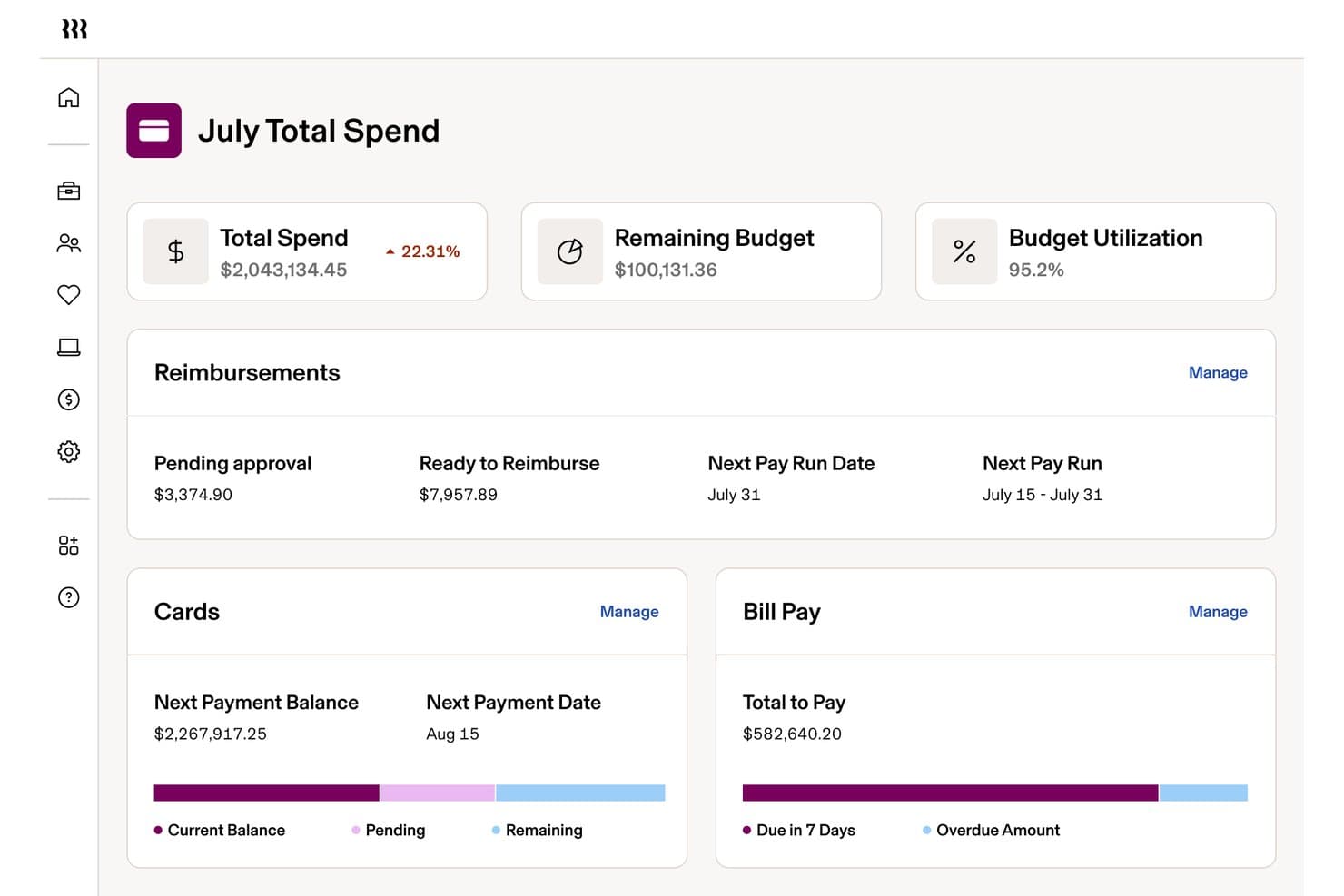
Rippling Spend monitora le spese mensili, i budget e i rimborsi delle organizzazioni non profit. Rippling Spend è una piattaforma per la gestione delle spese che unifica il monitoraggio delle spese, i controlli sulle carte aziendali, i flussi di rimborso e le integrazioni contabili all'interno di un sistema più ampio per le risorse umane e le buste paga.
Per chi è più adatto Rippling Spend?
Organizzazioni non profit di medie e grandi dimensioni che utilizzano già QuickBooks Online, NetSuite o Sage Intacct e necessitano di controlli di approvazione strettamente collegati alle risorse umane per una base di dipendenti stipendiati.
Perché ho scelto Rippling Spend
Ho incluso Rippling Spend tra le mie migliori scelte perché il suo motore di approvazione collegato alle risorse umane è davvero diverso da qualsiasi altra soluzione che abbia visto a questa scala. Quando un dipendente cambia ruolo o reparto, le policy di spesa e i controlli sulle carte si aggiornano automaticamente, senza che nessuno debba intervenire nel menu delle impostazioni. Inoltre, valuto molto positivamente l'applicazione dei controlli sulle carte prima dell'acquisto: le restrizioni per categoria e commerciante bloccano le transazioni non conformi al punto vendita, mantenendo il personale stipendiato delle organizzazioni non profit entro il budget prima ancora che l'addebito venga registrato.
Funzionalità principali di Rippling Spend
- Acquisizione delle ricevute basata sull'intelligenza artificiale: I dipendenti inviano le ricevute tramite inoltro email, messaggio di testo o caricamento da dispositivo mobile, e il sistema abbina e categorizza automaticamente ciascuna ricevuta.
- Rimborsi in più valute: Rippling elabora rimborsi in oltre 100 valute in più di 185 paesi, con conversione automatica delle valute e traduzione delle ricevute in lingue straniere.
- Gestione automatizzata del ciclo di vita delle carte: Le carte aziendali vengono emesse automaticamente durante l'inserimento dei dipendenti e revocate al termine del rapporto, mentre le policy di spesa si aggiornano automaticamente quando i dipendenti cambiano ruolo.
- Integrazioni contabili native: Rippling sincronizza bidirezionalmente QuickBooks Online, NetSuite, Xero e Sage Intacct, automatizzando la categorizzazione nella contabilità generale e riducendo le riconciliazioni manuali durante la chiusura contabile di fine mese.
Integrazioni di Rippling Spend
Rippling Spend offre integrazioni native con QuickBooks Online, NetSuite, Xero e Sage Intacct. Non dispone di integrazioni native documentate con Blackbaud, Aplos e QuickBooks Nonprofit.
Pros and Cons
Pros:
- Flussi di approvazione unificati per risorse umane e spese
- Acquisizione e abbinamento delle ricevute basati sull'intelligenza artificiale
- I controlli prima dell'acquisto si aggiornano al variare dei dipendenti
Cons:
- Nessuna contabilità per fondi vincolati o sovvenzioni
- Nessun rimborso per volontari o non dipendenti
Learn more about Rippling Spend: 3Ideale per l'elaborazione automatizzata dei conti fornitori
BILL
- Piano gratuito + demo gratuita disponibile
- Da $49/utente/mese
Visit WebsiteCustomer Rating:4.5/5
La dashboard di BILL mostra i saldi delle carte aziendali, il monitoraggio delle spese, i dettagli sui pagamenti e la gestione delle carte virtuali su visualizzazioni desktop e mobile per controllare le spese e i budget delle organizzazioni no-profit. BILL è una piattaforma cloud per l'automazione dei conti fornitori e la gestione delle spese che gestisce l'acquisizione delle fatture, i flussi di approvazione multilivello, il monitoraggio delle spese con carte aziendali e i pagamenti a fornitori nazionali e internazionali per le organizzazioni, incluse le no-profit.
Per Chi è Meglio BILL?
BILL è adatto a organizzazioni no-profit di piccole e medie dimensioni che necessitano di controlli strutturati sui conti fornitori, visibilità sulle spese e gestione dei pagamenti tra più dipartimenti o categorie di fondi.
Perché Ho Scelto BILL
Ho scelto BILL come uno dei migliori perché la sua acquisizione di fatture basata su intelligenza artificiale è davvero impressionante per i team AP delle no-profit. L'IA di BILL legge e codifica fatture con più voci con una precisione del 99%, gestisce automaticamente l'abbinamento PO a 2 e 3 vie, e instrada ogni fattura attraverso i flussi di approvazione personalizzati senza bisogno di intervento manuale. Per una no-profit che gestisce pagamenti a fornitori attraverso più programmi o centri di costo finanziati da sovvenzioni, quel livello di controllo automatico sull'intero ciclo AP—dalla ricezione della fattura al pagamento—è difficile da trovare in un'unica piattaforma.
Caratteristiche Principali di BILL
- Controlli su carte aziendali: Emissione di carte virtuali e fisiche con limiti di spesa per categoria e visibilità delle transazioni in tempo reale per tutto il team.
- Separazione delle mansioni: Assegnazione di ruoli distinti ad approvatori, pagatori e amministratori per mantenere i controlli interni e la prontezza agli audit.
- Acquisizione ricevute: Fotografa e allega le ricevute alle transazioni direttamente tramite l'app mobile di BILL.
- Pagamenti multi-metodo: Paga i fornitori tramite ACH, assegno, carta virtuale o bonifico internazionale da un'unica piattaforma.
Integrazioni di BILL
BILL offre una sincronizzazione bidirezionale nativa con QuickBooks Online, QuickBooks Desktop, QuickBooks Enterprise, Xero, Oracle NetSuite, Sage Intacct e Microsoft Dynamics, oltre al supporto per l'integrazione dati con Acumatica e altri ERP tramite modelli di file personalizzabili.
Pros and Cons
Pros:
- Catene di approvazione multilivello per i pagamenti delle fatture
- Estrazione dati dalle fatture tramite IA
- Carte aziendali gratuite con limiti di spesa
Cons:
- Nessun tracciamento o reportistica delle sovvenzioni integrata
- L'assistenza clienti si basa fortemente sulla chat
Learn more about BILL: Ideale per report su donatori e fondi
- Prova gratuita di 30 giorni
- Da $30/mese
Visit WebsiteCustomer Rating:4.4/5
Le organizzazioni non profit utilizzano QuickBooks per gestire donazioni, sovvenzioni e report con trasparenza. Le organizzazioni non profit che cercano una supervisione finanziaria chiara spesso scelgono QuickBooks per le sue funzionalità di contabilità specializzate. La piattaforma aiuta a gestire donazioni, sovvenzioni e allocazioni di fondi con strumenti progettati per i flussi di lavoro delle organizzazioni non profit. I team finanziari possono utilizzare QuickBooks per semplificare la reportistica e mantenere la trasparenza nei confronti di consigli direttivi e donatori.
Per chi è ideale QuickBooks?
QuickBooks è una scelta solida per i team finanziari delle organizzazioni non profit che devono gestire e rendicontare su donazioni, sovvenzioni ed equilibri di fondi.
Perché ho scelto QuickBooks
Ho scelto QuickBooks perché offre strumenti dedicati per tracciare donazioni, sovvenzioni ed equilibri di fondi, elementi essenziali per la reportistica delle organizzazioni non profit. La piattaforma consente di creare report specifici per donatori e fondi, facilitando la dimostrazione ai portatori di interesse di come i fondi siano stati allocati e spesi. Apprezzo inoltre che QuickBooks supporti il tracciamento per classe e località, così puoi suddividere spese e ricavi per programma, campagna o fonte di finanziamento. Queste funzionalità aiutano i team finanziari a mantenere trasparenza e responsabilità nella gestione finanziaria delle organizzazioni non profit.
Caratteristiche principali di QuickBooks
Altre caratteristiche che supportano la contabilità non profit e la gestione delle spese includono:
- Flussi bancari: Collega i tuoi conti bancari per importare e categorizzare automaticamente le transazioni per registri sempre aggiornati.
- Acquisizione delle ricevute: Carica e allega ricevute digitali alle spese tramite l'app mobile o l'interfaccia web.
- Piano dei conti personalizzato: Configura e gestisci un piano dei conti su misura per le esigenze delle non profit, inclusi fondi, sovvenzioni e programmi.
- Transazioni ricorrenti: Programma e automatizza inserimenti regolari di spese o ricavi per ridurre l'inserimento manuale dei dati.
Integrazioni di QuickBooks
Le integrazioni includono PayPal, Square, Shopify, Amazon, eBay, Etsy, SOS Inventory, QuickBooks Time e Gusto.
Pros and Cons
Pros:
- Supporta i controlli di audit per necessità di conformità
- Permette di allegare ricevute alle transazioni
- Offre la programmazione di transazioni ricorrenti
Cons:
- Mancano strumenti integrati per la gestione dei volontari
- Supporto limitato per multi-entità o capitoli
 5Ideale per la gestione delle donazioni multi-valuta
Xero
- Prova gratuita di 30 giorni disponibile
- Da $2.50/mese
Visit WebsiteCustomer Rating:4.4/5
Xero è una piattaforma di contabilità cloud che aiuta le organizzazioni non profit a gestire sovvenzioni e finanze in modo efficiente. I team finanziari delle organizzazioni non profit che cercano una piattaforma contabile flessibile e basata su cloud spesso si rivolgono a Xero. Il software piace alle organizzazioni che hanno bisogno di gestire sovvenzioni, donazioni e spese su più progetti o sedi. Xero aiuta le organizzazioni non profit a semplificare la contabilità, migliorare il controllo finanziario e rimanere organizzate durante la crescita.
Per chi è ideale Xero?
Xero è adatto a organizzazioni non profit di medie dimensioni che gestiscono donazioni internazionali e necessitano di capacità contabili multi-valuta.
Perché ho scelto Xero
Ho scelto Xero perché offre un supporto multi-valuta integrato, fondamentale per le organizzazioni non profit che ricevono donazioni o hanno spese in valute diverse. La piattaforma converte e traccia automaticamente le transazioni in valuta estera, così i team finanziari possono gestire i finanziamenti e le spese globali senza calcoli manuali. Apprezzo anche la possibilità di generare report che mostrano in tempo reale guadagni e perdite di cambio, aiutando le organizzazioni a mantenere trasparenza e conformità. Queste caratteristiche rendono Xero una scelta solida per le organizzazioni non profit con operazioni o basi di donatori internazionali.
Caratteristiche principali di Xero
Oltre alle sue funzionalità multi-valuta, Xero offre molte altre caratteristiche a supporto della gestione delle spese per le organizzazioni non profit:
- Riconciliazione bancaria: Abbina automaticamente le transazioni bancarie ai tuoi registri per mantenere i conti precisi e aggiornati.
- Gestione delle note spese: Consente a dipendenti e volontari di inviare spese per la revisione e il rimborso direttamente all’interno della piattaforma.
- Monitoraggio del budget: Imposta e monitora budget per diversi progetti, sovvenzioni o fondi per mantenere il controllo finanziario.
- Piano dei conti personalizzabile: Personalizza le categorie di conto in base alle esigenze specifiche di rendicontazione e conformità della tua organizzazione non profit.
Integrazioni di Xero
Le integrazioni includono Hubdoc, Syft, Stripe, Shopify, Gusto, Expensify e Capsule CRM.
Pros and Cons
Pros:
- Scatta ricevute da mobile per scansione automatica
- Report pronti per revisione per la fiducia dei donatori
- Utenti illimitati per consiglio e personale
Cons:
- Il piano base ha limiti stringenti sulle fatture
- Nessun supporto telefonico, solo email o chat
Learn more about Xero: Ideale per le funzionalità essenziali di contabilità gratuite
- Prova gratuita di 30 giorni + piano gratuito disponibile
- Da $15/mese
Visit WebsiteCustomer Rating:4.6/5
ZipBooks è un software di contabilità cloud per enti non profit, utile per monitorare facilmente spese e donazioni. ZipBooks offre un software di contabilità basato su cloud pensato per piccole organizzazioni non profit e realtà con budget limitati. È adatto a team che necessitano di strumenti semplici per monitorare le spese, gestire le donazioni e occuparsi della contabilità di base. La piattaforma aiuta a semplificare il controllo finanziario senza richiedere competenze avanzate di contabilità.
Per chi è più adatto ZipBooks?
ZipBooks è ideale per le piccole organizzazioni non profit che hanno bisogno delle funzioni essenziali di contabilità e monitoraggio delle spese senza un grande investimento economico.
Perché ho scelto ZipBooks
Ho scelto ZipBooks perché offre un piano davvero gratuito con le principali funzionalità contabili di cui molte piccole organizzazioni non profit hanno bisogno per gestire le spese. La piattaforma consente di monitorare le uscite, categorizzare le transazioni e generare semplici report finanziari senza dover passare a un piano a pagamento. Apprezzo anche il fatto che ZipBooks includa strumenti per la fatturazione e il monitoraggio dei donatori, che aiutano le organizzazioni non profit a tenere la contabilità in ordine. Per realtà con risorse limitate, queste funzionalità essenziali rendono possibile mantenere trasparenza e responsabilità senza costi aggiuntivi.
Funzionalità chiave di ZipBooks
Oltre alle sue principali funzionalità contabili, ho trovato anche diverse opzioni che aiutano le organizzazioni non profit a gestire più facilmente le proprie finanze:
- Riconciliazione bancaria: Abbina le transazioni del tuo conto bancario a quelle presenti su ZipBooks per mantenere i registri accurati.
- Monitoraggio del tempo: Traccia le ore fatturabili per personale o volontari direttamente sulla piattaforma.
- Fatturazione personalizzabile: Crea e invia fatture personalizzate con campi e opzioni di pagamento su misura.
- Reportistica di base: Genera report finanziari semplici, come conti economici e bilanci, utili per riunioni del consiglio o revisioni contabili.
Integrazioni di ZipBooks
Le integrazioni includono Square, Stripe e PayPal.
Pros and Cons
Pros:
- Categoriza automaticamente le spese con l'IA
- Sincronizzazione bancaria diretta per monitoraggio in tempo reale
- Sconti sui piani a pagamento per enti non profit
Cons:
- Funzionalità avanzate disponibili solo con abbonamento mensile
- Nessun sistema di gestione donatori integrato
Learn more about ZipBooks: Ideale per il budgeting specifico del settore non profit
- Prova gratuita di 15 giorni
- Da $79/mese
Visit WebsiteCustomer Rating:4.5/5
Aplos è un software di contabilità cloud per le organizzazioni non profit che gestiscono fondi e donazioni. Aplos è una piattaforma di gestione finanziaria basata su cloud progettata specificamente per organizzazioni non profit e realtà religiose. Si rivolge ai professionisti della finanza che necessitano di gestire contabilità per centri di costo, donazioni e conformità normativa in un unico luogo. La piattaforma aiuta le organizzazioni a monitorare i fondi vincolati, generare report specifici per il settore non profit e semplificare le attività contabili quotidiane.
Per chi è ideale Aplos?
Aplos è particolarmente adatto ai team finanziari di enti non profit che necessitano di strumenti di contabilità e budgeting dedicati, pensati per soddisfare i requisiti di compliance di questo settore.
Perché ho scelto Aplos
Ho scelto Aplos perché offre strumenti di budgeting progettati specificamente per le organizzazioni non profit, caratteristica rara tra le piattaforme di gestione delle spese. Il software ti consente di creare e gestire budget per fondo, programma o progetto, facilitando il monitoraggio separato di fondi vincolati e non vincolati. Inoltre, apprezzo che Aplos fornisca report in tempo reale sul confronto tra budget e consuntivo, così i team finanziari possono tenere sotto controllo le spese e adeguare le allocazioni secondo necessità. Queste funzioni aiutano le organizzazioni a mantenere la conformità e la trasparenza verso donatori ed enti finanziatori.
Funzionalità principali di Aplos
Altre caratteristiche che aiutano le organizzazioni non profit nella gestione delle finanze e delle operazioni includono:
- Contabilità per centri di costo: Monitora entrate e spese per fondo per garantire un'adeguata allocazione e reportistica su sovvenzioni e donazioni.
- Monitoraggio delle donazioni: Registra, ringrazia e rendiconta le donazioni con strumenti integrati di gestione dei donatori.
- Integrazione bancaria: Collega i conti bancari per un'importazione automatica delle transazioni e una riconciliazione più semplice.
- Registrazione agli eventi: Gestisci iscrizioni e pagamenti agli eventi direttamente dalla piattaforma.
Integrazioni di Aplos
Le integrazioni includono Gusto, PEX, Stripe, Keela, Raisely, DonorElf, Church Community Builder e Ramp.
Pros and Cons
Pros:
- Genera report finanziari pronti per la revisione contabile
- Supporto gratuito di esperti per i team non profit
- Monitora facilmente sovvenzioni e fondi vincolati
Cons:
- Reportistica complessa richiede un periodo di apprendimento
- Costi aggiuntivi per strumenti avanzati di budgeting
Learn more about Aplos: Ideale per la scansione automatizzata delle ricevute
- Non disponibile
- Da $5/utente/mese
Visit WebsiteCustomer Rating:4.5/5
Expensify è un software cloud per tracciare e controllare le spese di team. Expensify è una piattaforma di gestione delle spese basata sul cloud progettata per le organizzazioni che devono monitorare e controllare le spese tra team o progetti. I team finanziari delle organizzazioni non profit scelgono spesso Expensify per semplificare la rendicontazione delle spese, automatizzare l’applicazione delle politiche interne e ridurre l’inserimento manuale dei dati. La piattaforma aiuta le organizzazioni a rimanere pronte per le verifiche contabili e a mantenere la trasparenza nell’uso dei fondi.
Per chi è Expensify?
Expensify è un'ottima scelta per i team finanziari delle organizzazioni non profit che hanno bisogno di automatizzare il monitoraggio delle spese e la gestione delle ricevute tra diversi membri dello staff o volontari.
Perché ho scelto Expensify
Quello che distingue Expensify per il settore non profit è la sua scansione automatica delle ricevute, che elimina la scomodità dell’inserimento manuale dei dati e riduce gli errori nella rendicontazione delle spese. Ho scelto Expensify perché la sua tecnologia SmartScan consente agli utenti di scattare una foto di una ricevuta e avere i dettagli estratti automaticamente e abbinati alle spese. Questo è particolarmente utile per le organizzazioni non profit con team distribuiti o volontari che devono inviare ricevute ovunque si trovino. La piattaforma supporta anche l’applicazione automatica delle politiche interne, così i team finanziari possono garantire la conformità ai requisiti di finanziatori o donatori senza lavoro amministrativo extra.
Funzionalità principali di Expensify
Altre funzionalità che rendono Expensify utile per la gestione delle spese delle organizzazioni non profit includono:
- Flussi di approvazione multilivello: Instrada i report di spesa attraverso catene di approvazione personalizzabili per adattarsi ai controlli interni della tua organizzazione.
- Tracciamento di sovvenzioni e fondi: Associa le spese a specifiche sovvenzioni o fonti di finanziamento per facilitare la rendicontazione e la conformità.
- Riconciliazione della carta aziendale: Abbina automaticamente le transazioni della carta con le spese inviate per semplificare la chiusura di fine mese.
- Monitoraggio delle distanze percorse: Consente agli utenti di registrare e rimborsare i chilometri percorsi da volontari o dipendenti direttamente sulla piattaforma.
Integrazioni di Expensify
Le integrazioni includono QuickBooks, Xero, NetSuite, Uber, Lyft, Oracle e Workday.
Pros and Cons
Pros:
- SmartScan OCR è di altissimo livello per le ricevute
- Si sincronizza bene con QuickBooks e Xero
- L’app mobile semplifica il caricamento delle ricevute dei volontari
Cons:
- Il supporto AI Concierge è spesso generico
- Richiede pre-finanziamento per i vantaggi della carta
 Ideale per strumenti integrati di contabilità dei fondi
- Piano gratuito disponibile
- A partire da $45/mese

Springly è un software di contabilità per nonprofit per gestire fondi e monitorare le spese dei progetti. Springly offre alle organizzazioni nonprofit una piattaforma dedicata per gestire contabilità e spese in un unico posto. È progettata per i team che devono gestire fonti di finanziamento multiple e monitorare le spese attraverso progetti o programmi. Se la tua organizzazione richiede una chiara separazione dei fondi e una rendicontazione finanziaria trasparente, Springly risponde a queste esigenze con flussi di lavoro specifici per il nonprofit.
Per chi è ideale Springly?
Springly è adatto a organizzazioni nonprofit di piccole e medie dimensioni che devono gestire fondi multipli e monitorare le spese specifiche dei programmi.
Perché ho scelto Springly
Ho scelto Springly perché i suoi strumenti integrati per la contabilità dei fondi risolvono una sfida centrale per le nonprofit: gestire fondi vincolati e non vincolati con precisione. La piattaforma permette di creare e monitorare più fondi, assicurando che ogni donazione o sovvenzione sia allocata e rendicontata secondo le indicazioni dei donatori. Apprezzo il fatto che i flussi di lavoro contabili di Springly siano pensati per la conformità delle nonprofit, includendo funzionalità per tracciare le spese per progetto o programma. Questo semplifica il mantenimento della trasparenza per i team finanziari e il rispetto degli obblighi di rendicontazione senza soluzioni manuali alternative.
Caratteristiche principali di Springly
Altre funzionalità di Springly che supportano la gestione finanziaria delle nonprofit includono:
- Riconciliazione bancaria automatica: Questa funzione abbina le transazioni dal conto bancario ai registri contabili, riducendo l’inserimento manuale e gli errori.
- Piano dei conti personalizzabile: Puoi adattare il piano dei conti per riflettere la struttura unica e le esigenze di rendicontazione della tua organizzazione.
- Archiviazione documentale: Archivia e organizza ricevute, fatture e documenti di supporto direttamente nella piattaforma per un facile accesso durante le revisioni contabili.
- Gestione di soci e donatori: Monitora i dettagli di contatto, le donazioni e la cronologia delle interazioni sia per soci che per donatori in un unico posto.
Integrazioni di Springly
Le integrazioni includono QuickBooks.
Pros and Cons
Pros:
- Archiviazione integrata di ricevute e fatture
- Piano dei conti personalizzabile per nonprofit
- Strumenti integrati di gestione di donatori e soci
Cons:
- Le funzionalità di fatturazione sono basilari rispetto ai concorrenti
- Supporto limitato per multivaluta nelle organizzazioni nonprofit internazionali
Learn more about Springly: Ideale per la gestione di fondi vincolati
- Prova gratuita disponibile
- $25/transaction (pay-as-you-go)

Serenic Navigator è un software di gestione finanziaria per organizzazioni non profit e team del settore pubblico che si occupano di fondi e conformità. Serenic Navigator è una piattaforma di gestione finanziaria progettata specificamente per organizzazioni non profit ed enti del settore pubblico. Si rivolge ai team finanziari che devono gestire contabilità complessa dei fondi, gestione delle sovvenzioni e requisiti di conformità. Il software aiuta le organizzazioni a monitorare le spese, gestire i budget e mantenere trasparenza per stakeholder e revisori.
Per chi è pensato Serenic Navigator?
Serenic Navigator è una scelta solida per i team finanziari delle organizzazioni non profit che devono gestire restrizioni complesse dei fondi e la conformità alle sovvenzioni.
Perché ho scelto Serenic Navigator
Ho scelto Serenic Navigator perché è costruito appositamente per le organizzazioni non profit che necessitano di gestire fondi vincolati con precisione. La piattaforma permette di impostare strutture di fondi dettagliate, monitorare le spese in relazione a specifiche sovvenzioni o fonti di finanziamento, e applicare regole di spesa a livello di transazione. Apprezzo anche il supporto alla conformità grazie alla fornitura di chiare tracciabilità di audit e reportistica in tempo reale sui saldi dei fondi. Queste funzionalità facilitano notevolmente ai team finanziari non profit il garantire che ogni dollaro sia utilizzato secondo la volontà dei donatori e i requisiti normativi.
Funzionalità principali di Serenic Navigator
Altre funzionalità che rendono Serenic Navigator prezioso per la gestione delle spese delle organizzazioni non profit includono:
- Workflow di approvazione automatizzati: Instrada le richieste di spesa attraverso catene di approvazione multilivello e personalizzabili per mantenere i controlli interni.
- Strumenti di gestione budget: Imposta, monitora e adegua i budget per progetti, programmi o dipartimenti direttamente nella piattaforma.
- Allegato dei documenti: Allega ricevute, fatture e file di supporto alle transazioni per facilitare audit e archiviazione.
- Dashboard basati sui ruoli: Fornisci agli utenti dashboard personalizzate con dati finanziari e operativi in tempo reale, rilevanti per le loro responsabilità.
Integrazioni di Serenic Navigator
Le integrazioni native non sono attualmente elencate da Serenic Navigator.
Pros and Cons
Pros:
- Contabilità automatizzata dei fondi multi-ente
- Tracciabilità e report audit conformi a FASB
- Visibilità in tempo reale sui fondi dei donatori
Cons:
- L'interfaccia può sembrare datata ad alcuni utenti
- Richiede una formazione iniziale significativa
Learn more about Serenic Navigator:
Altri software di gestione delle spese per organizzazioni non profit
Ecco alcune opzioni aggiuntive di software di gestione delle spese per organizzazioni non profit che non sono entrate nella mia selezione, ma che vale comunque la pena prendere in considerazione:
- 11DATABASICSIdeale per il tracciamento della conformità alle sovvenzioni
- 12GivefrontIdeale per l’integrazione tra donazioni e spese
- 13ClickTimeIdeale per monitorare le spese specifiche per programma
- 14HarvestIdeale per visualizzare la spesa per progetto
Come Valuto il Software di Gestione Spese per Non Profit
Valuto ogni strumento su due livelli: i requisiti di base di cui un contabile dei fondi ha bisogno per conciliare fondi vincolati e prepararsi a un audit, e i fattori differenzianti che distinguono le soluzioni migliori.
Funzionalità Principali (Requisiti Fondamentali Per Questa Lista)
Quando seleziono gli strumenti per la mia lista, assegno a ciascuno un punteggio da 0 (non offre la funzionalità) a 5 (eccelle in quest’area) per ogni funzionalità principale elencata di seguito. Calcolo poi il punteggio totale dello strumento in percentuale. Ogni strumento deve ottenere almeno il 55% del punteggio totale per essere preso in considerazione.
- Tracciamento Spese per Fondi & Sovvenzioni: Verifico se le spese possono essere etichettate e suddivise tra specifiche sovvenzioni, programmi o fondi vincolati—ad esempio distribuendo un affitto d’ufficio condiviso su tre sovvenzioni federali in base alla percentuale.
- Acquisizione e Digitalizzazione delle Ricevute: Un buon strumento permette allo staff di scattare una foto della ricevuta di un pranzo in loco e utilizzare l’OCR per estrarre automaticamente fornitore, importo e data invece di richiedere l’inserimento manuale successivamente.
- Flussi di Approvazione Configurabili: Cerco flussi di approvazione multilivello che si adattino a scenari reali, come ad esempio inviare tutto ciò che supera una certa soglia al direttore finanziario mentre i responsabili di programma approvano acquisti giornalieri più piccoli.
- Integrazione con Sistemi Contabili: La piattaforma dovrebbe collegarsi con strumenti contabili effettivamente usati dalle organizzazioni non profit—Sage Intacct, QuickBooks, Blackbaud—with il corretto mapping delle dimensioni GL e dei fondi, non solo un generico esportazione CSV.
- Emissione e Controllo di Carte Aziendali: Valuto se lo strumento offre carte virtuali e fisiche con limiti di spesa e restrizioni sui fornitori, così che un coordinatore di programma possa utilizzare la propria carta solo presso fornitori approvati.
- Reportistica Pronta per Audit: I report dovrebbero includere tracce di audit complete con data e ora e dettagli dell’approvatore, oltre a formati esportabili in linea con ciò che revisori e finanziatori si aspettano durante le revisioni annuali o la preparazione del 990.
Una volta ottenuta una lista di strumenti che soddisfano questi criteri, considero cosa distingue ciascuna piattaforma.
Fattori Differenzianti (Cosa Distingue i Fornitori)
Ecco come confronto e metto a confronto i diversi fornitori:
Funzionalità Distintive
Qui sono molto rilevanti gli alert su budget vs. spese effettive—voglio ricevere notifiche in tempo reale quando la spesa di un programma si avvicina al limite della sovvenzione, in modo che i direttori finanziari possano correggere il percorso prima che la conformità diventi un problema. I flussi di rimborso dei volontari sono un altro fattore distintivo, poiché molte organizzazioni non profit devono gestire richieste di rimborso per chilometraggio e spese anticipate da parte di membri del consiglio non in busta paga. Per le organizzazioni con sedi o affiliati, valuto anche il consolidamento multi-ente per vedere quanto bene lo strumento unisce le spese di entità legali separate in una sola visualizzazione.
Oltre le Funzionalità
La struttura dei prezzi qui conta più che in altre categorie. Cerco piani specifici per non profit o sconti tramite programmi come TechSoup, poiché molte organizzazioni lavorano con budget derivanti da sovvenzioni che lasciano poco margine per alti costi per utente. L’integrazione nell’ecosistema ha anche un peso notevole—uno strumento che si sincronizza con Bloomerang o Salesforce NPSP oltre che col sistema contabile fa risparmiare tempo ai team finanziari evitando riconciliazioni manuali delle spese legate ai donatori. Valuto anche il supporto all’onboarding, perché un team finanziario di due persone in un’organizzazione non profit di medie dimensioni raramente ha capacità per un’implementazione autonoma di una nuova piattaforma.
Come scegliere un software di gestione delle spese per organizzazioni non profit
È facile perdersi in lunghi elenchi di funzionalità e strutture tariffarie complesse. Per aiutarti a rimanere concentrato mentre affronti il tuo processo di selezione del software, ecco una lista di fattori da tenere a mente:
| Fattore | Cosa considerare |
| Scalabilità | Il software sarà in grado di gestire la crescita della tua organizzazione, ad esempio un numero maggiore di utenti, programmi o sedi? Verifica i limiti di utenti e le possibilità di upgrade. |
| Integrazioni | Si collega nativamente ai tuoi sistemi di contabilità, raccolta fondi o CRM? Evita l'inserimento manuale dei dati verificando la disponibilità di integrazioni dirette. |
| Personalizzazione | Puoi adattare categorie, flussi di approvazione e report per rispecchiare la struttura della tua organizzazione non profit e i requisiti delle sovvenzioni? |
| Semplicità d'uso | Il personale e i volontari con diversi livelli di competenza tecnologica riusciranno a utilizzarlo con sicurezza? Cerca flussi di lavoro chiari e requisiti di formazione minimi. |
| Implementazione e avviamento | Quanto tempo occorrerà per essere operativi? Informati sul supporto alla migrazione, sulle risorse formative e sulle tempistiche abituali di avviamento. |
| Costo | Sono previsti sconti per le organizzazioni non profit, prezzi trasparenti o costi nascosti? Confronta il costo totale di proprietà, non solo le tariffe mensili. |
| Misure di sicurezza | Lo strumento offre crittografia dei dati, autorizzazioni utente e registri di audit per proteggere le informazioni finanziarie e dei donatori sensibili? |
| Requisiti di conformità | Il software ti aiuterà a rispettare gli standard di rendicontazione dell'IRS, delle sovvenzioni o dei donatori? Cerca controlli integrati e supporto per gli audit. |
Che cos'è il software di gestione delle spese per organizzazioni non profit?
Il software per la gestione delle spese per organizzazioni non profit è uno strumento digitale che aiuta le organizzazioni a monitorare, categorizzare e controllare le spese relative ai loro programmi, alle attività operative e alla raccolta fondi. Consente alle organizzazioni non profit di gestire ricevute, approvazioni e report in un unico luogo, favorendo la trasparenza e la conformità ai requisiti di donatori, sovvenzioni e normative. Questo software è progettato per rispondere alle specifiche esigenze di supervisione finanziaria delle organizzazioni non profit.
Funzionalità del software per la gestione delle spese per organizzazioni non profit
Quando selezioni un software per la gestione delle spese per organizzazioni non profit, presta attenzione alle seguenti funzionalità principali:
- Categorizzazione delle spese: Organizza le spese per programma, sovvenzione o progetto per garantire un monitoraggio e una rendicontazione accurati per ciascuna fonte di finanziamento.
- Acquisizione delle ricevute: Carica e archivia copie digitali delle ricevute, semplificando la documentazione delle spese e la preparazione per gli audit.
- Flussi di approvazione: Configura processi di approvazione a più fasi affinché le spese siano esaminate e autorizzate in conformità alle politiche della tua organizzazione.
- Monitoraggio del budget: Monitora in tempo reale le spese rispetto ai budget predefiniti per evitare di superare i limiti e supportare la pianificazione finanziaria.
- Monitoraggio di sovvenzioni e fondi: Assegna le spese a sovvenzioni specifiche o a fondi vincolati, aiutandoti a rispettare i requisiti dei donatori e gli accordi relativi alle sovvenzioni.
- Accesso multiutente: Consenti a dipendenti, volontari e membri del consiglio di amministrazione di inserire, esaminare o approvare le spese in base ai loro ruoli e permessi.
- Report personalizzabili: Genera report dettagliati adattati alle esigenze della tua organizzazione non profit, ad esempio per programma, finanziatore o anno fiscale.
- Integrazione con i sistemi contabili: Sincronizza i dati delle spese direttamente con il tuo software di contabilità per ridurre l'inserimento manuale e mantenere registri finanziari accurati.
- Traccia di audit: Mantieni una cronologia completa degli invii, delle approvazioni e delle modifiche alle spese per favorire la trasparenza e la conformità.
- Accesso da dispositivi mobili: Consenti agli utenti di inviare spese e ricevute da qualsiasi luogo utilizzando un dispositivo mobile, supportando il lavoro sul campo e i team da remoto.
Funzionalità AI comuni del software per la gestione delle spese per organizzazioni non profit
Oltre alle funzionalità standard del software per la gestione delle spese per organizzazioni non profit elencate sopra, molte di queste soluzioni stanno integrando l'AI con funzionalità come:
- Estrazione automatica dei dati dalle ricevute: L'AI analizza le ricevute caricate, riconosce dettagli chiave come data, fornitore e importo e compila automaticamente i moduli delle spese per ridurre l'inserimento manuale e gli errori.
- Rilevamento delle anomalie: L'AI monitora i modelli di spesa e segnala transazioni insolite o potenziali violazioni delle politiche, aiutando le organizzazioni a individuare tempestivamente errori o frodi.
- Categorizzazione intelligente delle spese: L'AI apprende dalle registrazioni precedenti per assegnare automaticamente le spese alle categorie corrette, migliorando l'accuratezza e facendo risparmiare tempo ai team finanziari.
- Avvisi predittivi sul budget: L'AI analizza le spese storiche e le tendenze attuali per prevedere quando un programma o una sovvenzione rischia di superare il budget, favorendo una gestione proattiva del budget.
- Query sulle spese in linguaggio naturale: L'AI consente agli utenti di porre domande sulle spese o sui budget in linguaggio semplice e di ricevere risposte immediate basate sui dati, rendendo la reportistica più accessibile.
Vantaggi del software per la gestione delle spese per organizzazioni non profit
L'implementazione di un software per la gestione delle spese per organizzazioni non profit offre diversi vantaggi al tuo team e alla tua organizzazione. Ecco alcuni dei vantaggi che puoi aspettarti:
- Maggiore trasparenza finanziaria: Il monitoraggio centralizzato delle spese e le tracce di audit semplificano la dimostrazione di una gestione responsabile ai donatori e ai finanziatori.
- Cicli di rimborso più rapidi: I flussi di approvazione automatizzati e l'acquisizione digitale delle ricevute accelerano il processo di rimborso per dipendenti e volontari.
- Rendicontazione accurata di sovvenzioni e fondi: L'assegnazione di tag specifici per le sovvenzioni e i report personalizzabili aiutano a garantire la conformità ai requisiti dei donatori e normativi.
- Riduzione dell'inserimento manuale dei dati: Le integrazioni con i sistemi contabili e l'estrazione dei dati basata sull'AI riducono al minimo le attività ripetitive e il rischio di errori.
- Supervisione del budget in tempo reale: Il monitoraggio in tempo reale del budget e gli avvisi predittivi aiutano a evitare di superare il budget e supportano una gestione finanziaria proattiva.
- Maggiore sicurezza e conformità: I permessi degli utenti, la crittografia dei dati e i controlli di conformità proteggono le informazioni sensibili e supportano la preparazione agli audit.
- Maggiore accessibilità per i team distribuiti: L'accesso da dispositivi mobili e il supporto multiutente consentono a dipendenti e volontari di inviare e approvare le spese da qualsiasi luogo.
Costi e prezzi del software di gestione delle spese per organizzazioni non profit
La scelta di un software di gestione delle spese per organizzazioni non profit richiede una conoscenza dei vari modelli di prezzo e dei piani disponibili. I costi variano in base alle funzionalità, alle dimensioni del team, ai componenti aggiuntivi e ad altri fattori. La tabella seguente riassume i piani più comuni, i relativi prezzi medi e le funzionalità generalmente incluse nelle soluzioni software di gestione delle spese per organizzazioni non profit:
Tabella di confronto dei piani per il software di gestione delle spese per organizzazioni non profit
| Tipo di piano | Prezzo medio | Funzionalità comuni |
| Piano gratuito | $0 | Monitoraggio di base delle spese, caricamento limitato delle ricevute, accesso per un singolo utente e report semplici. |
| Piano personale | $5-$13/utente/mese (oppure $15 - $45 fissi/mese) | Accesso multiutente, acquisizione delle ricevute, flussi di approvazione di base e report standard. |
| Piano aziendale | $15-$35/utente/mese (oppure $25 - $199 fissi/mese) | Flussi di approvazione avanzati, monitoraggio di sovvenzioni e fondi, integrazioni con software di contabilità e report personalizzati. |
| Piano per grandi organizzazioni | Personalizzato | Flussi di lavoro personalizzabili, controlli di sicurezza avanzati, assistenza dedicata, accesso API e gestione della conformità. |
Domande frequenti sul software di gestione delle spese per organizzazioni non profit
Ecco alcune risposte alle domande comuni sul software di gestione delle spese per organizzazioni non profit:
In che modo il software di gestione delle spese aiuta a garantire la conformità alle condizioni delle sovvenzioni?
Il software di gestione delle spese aiuta a garantire la conformità alle condizioni delle sovvenzioni consentendo di associare e monitorare le spese in base alla sovvenzione, limitare la spesa alle categorie approvate e generare report conformi ai requisiti dei finanziatori. In questo modo è più semplice documentare l’utilizzo dei fondi e prepararsi agli audit.
Le organizzazioni non profit possono utilizzare un software di gestione delle spese per i rimborsi ai volontari?
Sì, le organizzazioni non profit possono utilizzare un software di gestione delle spese per gestire i rimborsi ai volontari. La maggior parte delle soluzioni consente ai volontari di inviare le spese, caricare le ricevute e monitorare lo stato di approvazione, semplificando il rimborso dei costi sostenuti personalmente e la conservazione di registri accurati.
Cosa dovrebbero valutare le organizzazioni non profit quando esaminano la sicurezza di un software di gestione delle spese?
Le organizzazioni non profit dovrebbero cercare funzionalità come la crittografia dei dati, le autorizzazioni degli utenti, i registri di audit e le certificazioni di conformità. Queste misure di sicurezza contribuiscono a proteggere le informazioni finanziarie e sui donatori sensibili e a soddisfare i requisiti normativi e dei finanziatori.
È possibile integrare il software di gestione delle spese con i sistemi contabili delle organizzazioni non profit?
Sì, molte soluzioni software di gestione delle spese offrono integrazioni con i più diffusi sistemi contabili per organizzazioni non profit. Ciò riduce l’inserimento manuale dei dati, migliora la precisione e garantisce che i dati sulle spese confluiscano direttamente nei registri finanziari.
Quanto tempo occorre per implementare un software di gestione delle spese per un'organizzazione non profit?
I tempi di implementazione variano, ma la maggior parte delle organizzazioni non profit può iniziare nel giro di pochi giorni o di alcune settimane. Tra i fattori rilevanti rientrano le esigenze di migrazione dei dati, la formazione degli utenti e la complessità dei flussi di approvazione. Molti fornitori offrono assistenza e risorse per l’avvio al fine di velocizzare il processo.