

Enterprise spend management software helps your business control, track, and analyze company-wide expenses in one place. If you’re searching for the best enterprise spend management software, you’re likely looking to tighten controls, improve compliance, and gain real-time visibility into spending across departments and regions. With complex approval chains, global operations, and strict audit requirements, choosing the right platform can make or break your financial processes. In this guide, you’ll find a clear, practical breakdown of the top tools, so you can confidently pick the solution that fits your business needs in 2026.
Why Trust Our Software Recommendations
6,700+
Reviews
20
Industry experts
16+
Evaluation factors
14
Years
Our team has been testing and reviewing software since 2012. As finance leaders ourselves, we know how difficult—and important—it is to choose the right software.
For this guide, we evaluated tools using hands-on testing and independent research, scoring tools using our selection criteria.
Our reviews reflect our human editorial judgment, not a sales pitch.
Enterprise Spend Management Software Comparison Table
This comparison table summarizes pricing details for my top enterprise spend management software selections:
| Tool | Best For | Trial Info | Price | ||
|---|---|---|---|---|---|
| 1 | Best for simplified invoice digitization | 30-day free trial | From $49/user/month | Website | |
| 2 | Best for AI-powered spend data normalization | Free demo available | Pricing upon request | Website | |
| 3 | Best for real-time spend approvals | Free demo available | Pricing upon request | Website | |
| 4 | Best for integrated travel and expense tracking | Free plan available | Pricing upon request | Website | |
| 5 | Best for compliance with international payment rules | Free demo available | From $99/month | Website | |
| 6 | Best for custom approval hierarchies | 14-day free trial | From $3/user/month (billed annually) | Website | |
| 7 | Best with automated card controls | Free plan available | From $12/user/month | Website | |
| 8 | Best for telecom invoice reconciliation | Free demo available | Pricing upon request | Website | |
| 9 | Best for global policy enforcement at scale | Free demo available | Pricing upon request | Website | |
| 10 | Best for supplier collaboration workflows | Free plan available | Pricing upon request | Website |


Best Enterprise Spend Management Software Reviews
Below are my detailed summaries of the enterprise spend management software that made it onto my shortlist. My reviews offer a detailed look at the features, best use cases, and integrations of each platform to help you find the best one for you.
 1Best for simplified invoice digitization
BILL
- 30-day free trial
- From $49/user/month
Visit WebsiteCustomer Rating:4.5/5
BILL invoice summary view showing invoice actions, customer details, amount due, and payment status tracking within the platform’s enterprise spend management system. BILL is a spend management platform that combines AP automation, corporate card controls, expense tracking, and budget management in one place. Built for finance teams, BILL is a spend management platform covering AP automation, expense reporting, corporate card issuance, and payment processing. An AP automation and spend management platform, BILL brings together invoice processing, corporate cards, expense tracking, and multi-step approval workflows.
Who Is BILL Best For?
BILL is a good fit for small to midsize businesses with finance teams looking to centralize AP, expenses, and card spend without managing multiple disconnected tools.
Why I Picked BILL
I've included BILL in my top picks because its AI-powered invoice digitization is genuinely one of the most hands-off I've used. When a vendor emails an invoice to your dedicated AP address, BILL's OCR reads it, extracts the key fields, and auto-codes multi-line items—with great accuracy on field capture and a claimed significant reduction in manual coding time. I also like that it handles 2- and 3-way matching automatically, flagging duplicate POs and mismatches before they become payment errors.
BILL Key Features
- Multi-step approval workflows: Set up sequential or parallel approval chains for invoices and payments based on amount, department, or vendor.
- Corporate card spend controls: Issue virtual or physical BILL Divvy cards with preset spending limits and category restrictions per employee.
- Real-time budget tracking: Monitor spend against department or project budgets as transactions occur across cards and AP.
- Vendor management portal: Store vendor payment details, W-9s, and contact information in a centralized vendor directory.
BILL Integrations
BILL offers native two-way sync with QuickBooks Online, QuickBooks Pro/Premier, QuickBooks Enterprise, Xero, Oracle NetSuite, Sage Intacct, and Microsoft Dynamics. It also supports data integration with additional ERPs like Blackbaud, Acumatica, Sage 50, Sage 100, and FreshBooks through customizable file import/export templates. Beyond accounting syncs, BILL integrates with HR platforms, Slack, and offers an API platform for building custom integrations. Zapier support is not clearly documented as a native connection.
Pros and Cons
Pros:
- Real-time mobile receipt capture after transactions
- Automates invoice capture, approvals, and payments
- Supports ACH, wire, check, and card payments
Cons:
- Long support response times on complex issues
- Lacks a reliable three-way match process
Learn more about BILL: Best for AI-powered spend data normalization
- Free demo available
- Pricing upon request
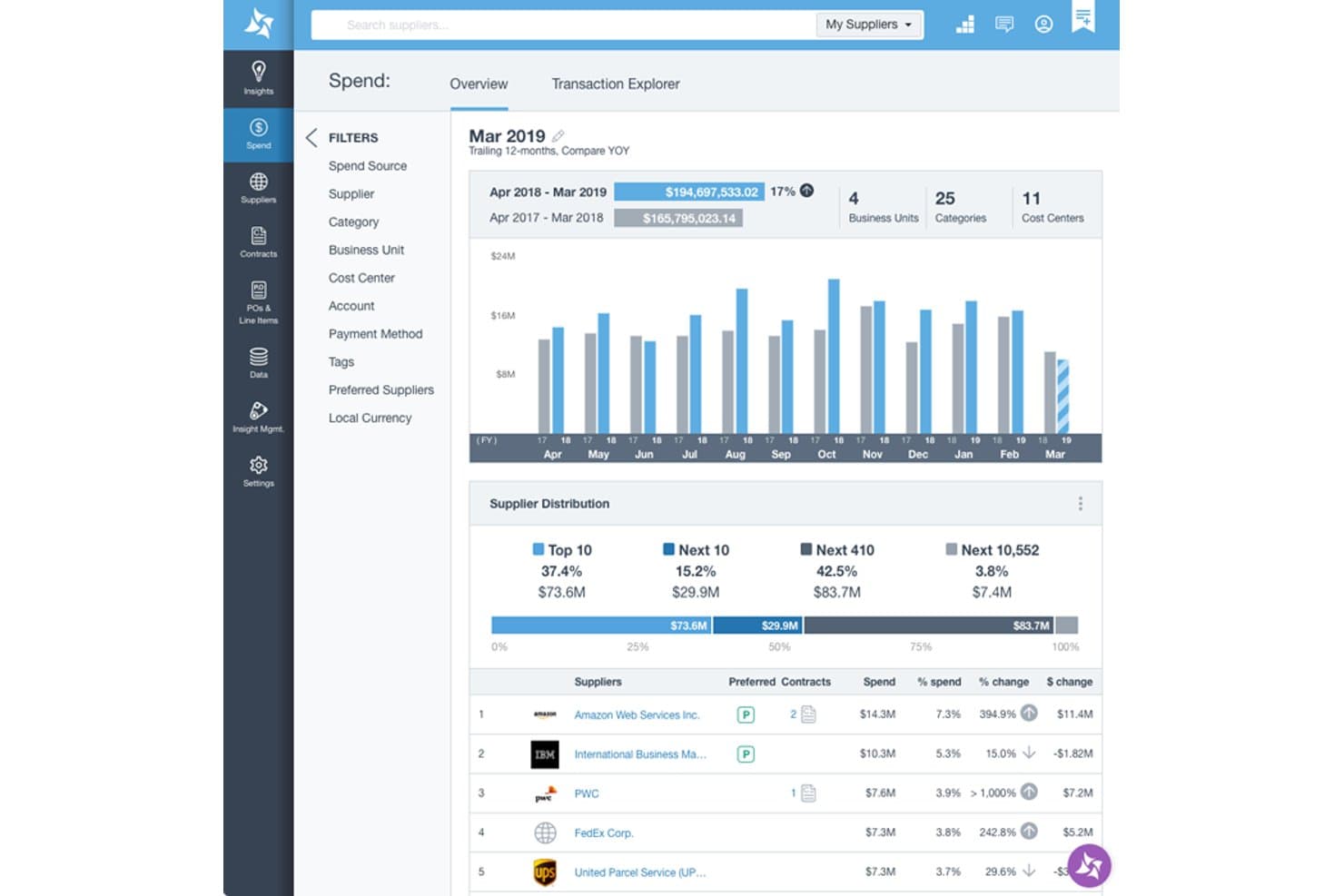
Suplari provides a spend overview dashboard with supplier distribution, YOY spend comparison, and top supplier rankings by spend percentage. Suplari is a procurement intelligence platform that uses AI to normalize, classify, and analyze spend data pulled from ERP, P2P, accounts payable, and expense systems across the enterprise.
Who Is Suplari Best For?
Suplari is a strong fit for procurement leaders at large enterprises managing complex, multi-source spend data across multiple ERPs or P2P systems.
Why I Picked Suplari
I picked Suplari because no other tool on my shortlist handles messy, multi-source spend data as cleanly. Its AI automatically classifies spend against UNSPSC or custom taxonomies and deduplicates suppliers into normalized parent-child hierarchies, without requiring an upfront data cleansing project. I like that it ingests data from multiple ERPs, P2P systems, and AP tools simultaneously, giving procurement teams a single, accurate view of spend within 90 days.
Suplari Key Features
- Contract Intelligence software: Extracts and centralizes key terms, dates, and obligations from contract documents for analysis and alerting.
- Procurement savings tracking: Monitors and quantifies realized versus projected savings on a per-project and category basis.
- Supplier risk monitor: Continuously checks supplier data for risk signals, compliance issues, and performance trends.
- No-code dashboard creation: Lets users build custom spend, supplier, or risk dashboards without requiring IT or developer resources.
Suplari Integrations
Suplari offers native integrations with SAP, Oracle, Workday, Coupa, Ariba, Snowflake, Microsoft Dynamics, and Databricks. An API is available for custom integrations.
Pros and Cons
Pros:
- Handles messy multi-source data well
- Fast time-to-value for spend visibility
- AI spend classification is highly accurate
Cons:
- Weak native AP automation capabilities
- Not a full procure-to-pay platform
Learn more about Suplari: Best for real-time spend approvals
- Free demo available
- Pricing upon request
Visit WebsiteCustomer Rating:4.7/5
Spendesk combines cards, expenses, invoices, approvals, and tracking. Spendesk is an enterprise spend management platform that combines company cards, invoice processing, expense tracking, approval workflows, and real-time spend monitoring in one system.
Who Is Spendesk Best For?
Spendesk is a good fit for finance teams at mid-sized companies that need centralized control over employee spending.
Why I Picked Spendesk
I picked Spendesk as one of the best because I can set up real-time spend approvals that notify managers instantly when a purchase request is made. My team uses the platform’s virtual and physical cards to control spending at the point of purchase, and I rely on its automated approval workflows to keep spend within policy without slowing down operations. I also like that I can track every transaction as it happens, which helps me stay on top of company-wide expenses.
Spendesk Key Features
- Invoice management: Upload, process, and match invoices directly in the platform.
- Receipt capture: Snap and attach receipts to transactions using the mobile app.
- Spending analytics dashboard: View categorized spend data and trends in real time.
- Multi-entity support: Manage spend across multiple subsidiaries or business units.
Spendesk Integrations
Spendesk offers native integrations with Xero, NetSuite, QuickBooks, Slack, Workday, SAP SuccessFactors, HiBob, BambooHR, Personio, and Google Workspace.
Pros and Cons
Pros:
- Multi-entity support for global organizations
- Virtual and physical cards for controlled spending
- Real-time spend approval notifications for managers
Cons:
- Limited approval workflow customization
- Reporting exports can be limited in format
Learn more about Spendesk: Best for integrated travel and expense tracking
- Free plan available
- Pricing upon request
Visit WebsiteCustomer Rating:4.7/5
Navan Expense offers a transaction dashboard with merchant spend tracking. Navan is an enterprise spend management platform that combines expense tracking, travel booking, policy controls, and real-time reporting in a single system.
Who Is Navan Best For?
Navan is a good fit for finance teams at mid-size and large companies that manage frequent employee travel and expense reporting.
Why I Picked Navan
I picked Navan as one of the best because I can manage both travel bookings and expense tracking in one place, which is rare among spend management tools. I use its real-time policy controls to enforce travel and expense rules automatically, and my team relies on its mobile app to capture receipts and submit expenses while on the go. I also like that Navan syncs travel itineraries directly with expense reports, so reconciliation is much faster for us.
Navan Key Features
- Virtual cards: Issue single-use or recurring virtual cards for employee purchases.
- Automated expense categorization: Expenses are automatically sorted into predefined categories.
- Custom approval workflows: Set up multi-level approval processes for spend requests.
- Real-time analytics dashboard: Monitor spend data and trends with up-to-date visual reports.
Navan Integrations
Navan offers native integrations with NetSuite, QuickBooks, Xero, Workday, and Oracle.
Pros and Cons
Pros:
- AI-powered fraud detection and spend insights
- Automated receipt capture from travel bookings
- Integrated travel booking and expense management
Cons:
- Travel focus may not suit non-travel-heavy companies
- Limited customization for complex approval workflows
Learn more about Navan: Best for compliance with international payment rules
- Free demo available
- From $99/month
Visit WebsiteCustomer Rating:4.5/5
Tipalti offers a centralized expense management dashboard. Tipalti is an enterprise spend management platform that centralizes expense processing, automates global payments, manages supplier onboarding, and enforces compliance with tax and regulatory requirements.
Who Is Tipalti Best For?
Tipalti is a strong fit for finance teams at multinational companies that need to manage complex global payment compliance.
Why I Picked Tipalti
I picked Tipalti as one of the best because I can automate global payments while staying compliant with local tax and regulatory requirements. My team uses its built-in tax form collection and validation to reduce risk when paying international vendors. I also rely on its payment screening and sanctions checks to help us avoid regulatory issues across multiple countries.
Tipalti Key Features
- Multi-entity management: Lets you manage expenses and payments across multiple subsidiaries or business units.
- Automated invoice capture: Extracts data from invoices and matches them to purchase orders.
- Custom approval workflows: Allows you to set up multi-level approval chains for expense reports.
- Real-time payment status tracking: Provides visibility into payment progress and settlement for each transaction.
Tipalti Integrations
Tipalti offers native integrations with NetSuite, QuickBooks Online, Sage Intacct, Xero, and Oracle.
Pros and Cons
Pros:
- Multi-entity and subsidiary management
- Automated tax compliance and validation tools
- Supports global payments in 190+ countries
Cons:
- Approval workflow options are basic
- Mobile app lacks advanced functionality
Learn more about Tipalti: Best for custom approval hierarchies
- 14-day free trial
- From $3/user/month (billed annually)
Visit WebsiteCustomer Rating:4.3/5
Zoho Expense offers an admin dashboard with spend summaries. Zoho Expense is an enterprise spend management platform that offers automated expense reporting, policy controls, multi-level approvals, and integrations with accounting and ERP systems.
Who Is Zoho Expense Best For?
Zoho Expense is a strong fit for finance teams at mid-sized and large organizations that need detailed control over expense approvals.
Why I Picked Zoho Expense
I picked Zoho Expense as one of the best because I can build custom, multi-level approval hierarchies that match our organization’s structure. My team uses its advanced workflow engine to set up conditional routing based on department, amount, or project. I also rely on its granular policy controls to enforce compliance at every approval stage.
Zoho Expense Key Features
- Corporate card management: Issue, track, and reconcile company card transactions within the platform.
- Mileage and per diem tracking: Capture and manage mileage and per diem expenses for employees.
- Multi-currency support: Submit and process expenses in multiple currencies for global teams.
- Audit trail: Maintain a detailed log of all expense actions and changes for compliance.
Zoho Expense Integrations
Zoho Expense offers native integrations with Zoho Books, Zoho CRM, QuickBooks Online, Xero, Sage Accounting, Oracle, and Microsoft 365.
Pros and Cons
Pros:
- Automated receipt scanning and expense categorization
- Strong policy enforcement and audit trails
- Custom approval workflows for complex hierarchies
Cons:
- Per diem and mileage rules are rigid
- Reimbursement process can be slow
Learn more about Zoho Expense: 7Best with automated card controls
Brex
- Free plan available
- From $12/user/month
Visit WebsiteCustomer Rating:4.5/5
Brex offers a compliance report dashboard with spend tracking. Brex is an enterprise spend management platform that offers corporate cards, automated expense tracking, spend controls, and real-time reporting in a unified system.
Who Is Brex Best For?
Brex is a strong fit for finance teams at fast-growing startups and tech companies that need automated card controls and centralized spend management.
Why I Picked Brex
I picked Brex as one of the best because I can set granular, automated card controls for every team and project, which helps me enforce spend policies without manual review. I use Brex to issue virtual and physical cards instantly, each with custom limits and merchant restrictions. My team relies on real-time transaction monitoring and automated receipt matching, so we catch out-of-policy spend right away.
Brex Key Features
- Expense policy automation: Set and enforce company-wide expense policies automatically.
- Multi-entity management: Manage spend across multiple subsidiaries or business units in one platform.
- ERP integrations: Sync transactions and expense data directly with accounting systems like NetSuite and QuickBooks.
- Mobile receipt capture: Upload and match receipts to transactions using the Brex mobile app.
Brex Integrations
Brex offers native integrations with NetSuite, QuickBooks, Xero, Sage Intacct, Oracle Fusion Cloud, Workday, SAP Concur, Slack, Google Workspace, and Zapier.
Pros and Cons
Pros:
- Multi-entity and subsidiary management
- Fast virtual and physical card issuance
- Automated card controls for every team
Cons:
- No built-in travel booking platform
- Limited international card acceptance
 Best for telecom invoice reconciliation
- Free demo available
- Pricing upon request
Visit WebsiteCustomer Rating:5/5
Lightyear offers a month-to-month telecom spend dashboard. Lightyear is a telecom expense management platform designed for enterprises to automate invoice processing, audit telecom bills, manage contracts, and centralize telecom vendor data.
Who Is Lightyear Best For?
Lightyear is a strong fit for telecom, IT, and finance teams at large enterprises managing high volumes of telecom invoices and vendor contracts.
Why I Picked Lightyear
I picked Lightyear as one of the best because I can automate telecom invoice reconciliation at scale, which is a pain point for large enterprises. I like that my team can audit telecom bills line by line, flag discrepancies, and centralize contract data for all telecom vendors. In practice, that means we can process high volumes of invoices and catch billing errors before they hit our GL.
Lightyear Key Features
- Automated GL coding: Assigns telecom expenses to the correct general ledger accounts automatically.
- Multi-currency support: Handles invoices and payments in multiple currencies for global operations.
- User permissions management: Lets you control access and approval rights for different team members.
- Document storage: Stores contracts, invoices, and supporting documents in a centralized digital repository.
Lightyear Integrations
Native integrations are not clearly documented.
Pros and Cons
Pros:
- Centralizes telecom contract management
- Flags billing discrepancies for review
- Automates telecom invoice data extraction
Cons:
- No automated payment processing feature
- Lacks built-in analytics dashboards
Learn more about Lightyear: Best for global policy enforcement at scale
- Free demo available
- Pricing upon request
Visit WebsiteCustomer Rating:4.2/5
Coupa offers an AI-powered insights dashboard displaying spend metrics, savings opportunities, and prescriptive recommendations for enterprise spend management. Coupa is an enterprise spend management platform designed for large organizations that need to manage procurement, expenses, invoicing, supplier relationships, and contract compliance in one unified system.
Who Is Coupa Best For?
Coupa is a good fit for large enterprises with complex global operations and strict policy requirements.
Why I Picked Coupa
I picked Coupa as one of the best because I can set up global policy controls that apply consistently across every business unit. I use its policy enforcement engine to automate compliance checks and approvals for complex, multi-country spend. The platform’s audit trails and configurable workflows let my team manage risk and enforce standards at scale.
Coupa Key Features
- Supplier management: Centralizes supplier onboarding, risk assessment, and performance tracking.
- Contract repository: Stores and organizes contracts for easy access and compliance monitoring.
- Expense reporting: Automates expense capture, categorization, and policy validation.
- Budget tracking: Provides real-time visibility into budget consumption and remaining spend.
Coupa Integrations
Coupa offers native integrations with SAP, Oracle, NetSuite, Workday, Salesforce, and has native integrations across the Microsoft ecosystem, including Microsoft 365 and Azure.
Pros and Cons
Pros:
- Real-time budget visibility and alerts
- Advanced audit trails for compliance tracking
- Global policy enforcement across multiple entities
Cons:
- Integration setup may require technical support
- Implementation process can be lengthy
Learn more about Coupa: Best for supplier collaboration workflows
- Free plan available
- Pricing upon request
Visit WebsiteCustomer Rating:3.8/5
Tradeshift unifies invoicing, procurement, and supplier workflows. Tradeshift is a cloud-based enterprise spend management platform that brings together e-invoicing, procurement, supplier management, and collaborative workflow tools for buyers and suppliers.
Who Is Tradeshift Best For?
Tradeshift is a good fit for procurement and finance teams at large enterprises managing complex supplier networks.
Why I Picked Tradeshift
I picked Tradeshift as one of the best because I can set up collaborative supplier workflows that let my team and vendors communicate, share documents, and resolve invoice issues directly in the platform. I use its supplier onboarding tools to bring new partners into our network quickly, and I rely on its real-time document exchange to keep procurement and accounts payable in sync. My team is able to automate supplier collaboration tasks that would otherwise require endless email threads.
Tradeshift Key Features
- E-invoicing automation: Automatically process and validate supplier invoices in multiple formats.
- Procurement catalog management: Centralize and manage supplier catalogs for easy purchasing.
- Spend analytics dashboard: Visualize and track spend data across suppliers and categories.
- Custom workflow builder: Design and automate approval workflows for procurement and finance processes.
Tradeshift Integrations
Native integrations are not publicly listed.
Pros and Cons
Pros:
- Supports multi-language and multi-currency transactions
- Real-time document collaboration with suppliers
- Supplier onboarding is automated and configurable
Cons:
- Reporting customization options are restricted
- Limited native integrations with third-party tools
Learn more about Tradeshift:
Other Enterprise Spend Management Software
Here are some additional enterprise spend management software options that didn’t make it onto my shortlist, but are still worth checking out:
- 11ControlHubBest for procurement automation in tech companies
- 12ExpensePointBest for multi-currency expense processing
- 13FraxionBest for audit-ready spend documentation
- 14PaylocityBest for payroll-linked expense reimbursement
- 15ProcurifyBest for spend requests with built-in budget visibility
- 16PleoBest for managing multi-entity business expenses
- 17SageBest for HR and payroll system integration
- 18RampBest with AI-powered spend insights
- 19PayhawkBest for ERP and accounting platform integrations
- 20EmburseBest for policy-driven expense automation
- 21SAP Concur ExpenseBest for mobile receipt capture and reporting
How I Evaluate Enterprise Spend Management Software
I evaluate each platform across two layers: core capabilities like 3-way invoice matching and multi-entity approvals, and the differentiators that separate the strongest options.
Core Functionality (Table Stakes For This List)
When I'm selecting tools for my list, I rank each one on a scale from 0 (does not offer the functionality) to 5 (excels in this area) for each core functionality listed below. Then, I calculate the tool's total score into a percentage. Each tool needs to achieve a minimum total score of 65% to be considered for inclusion.
- Procure-to-Pay Automation: I look at whether the platform covers the full lifecycle from requisition through PO creation, approval routing, and payment in a single connected workflow.
- AP & Invoice Processing: How invoices are captured, coded, and matched matters. I check for OCR, automated GL coding, and 2-way or 3-way matching against POs and receipts.
- Expense & Card Management: I evaluate whether the tool handles both corporate/virtual card issuance and employee expense reimbursements with built-in policy enforcement at submission.
- Budget Controls & Approvals: Multi-level approval chains tied to real-time budget checks are what I look for here, especially routing by cost center, department, or GL account.
- Spend Analytics & Reporting: Dashboards should consolidate PO, invoice, card, and expense data in one view. I check for drill-down capability across spend categories and entities.
- ERP & Financial System Integrations: The platform needs native, bi-directional connectors to major ERPs like NetSuite, SAP, Oracle, Workday, or Microsoft Dynamics for GL sync.
Once I have a list of tools that meet the criteria, I consider what sets each platform apart.
Differentiating Factors (What Sets Vendors Apart)
Here's how I compare and contrast different vendors:
Standout Features
AI-driven anomaly detection is a big differentiator. I look for tools that flag duplicate invoices, out-of-policy charges, and unusual spend patterns before payment goes out. For multinational organizations, global payment rails with built-in FX handling save the treasury team from juggling third-party services. Contract lifecycle management also adds real value—linking contracts to POs and invoices gives controllers direct visibility into spend-under-contract and upcoming renewals.
Beyond Features
Compliance certifications matter when your finance team handles sensitive payment data. I check for SOC 1 and SOC 2 Type II reports, audit trail depth, and segregation of duties controls—especially for SOX-regulated organizations. Pricing transparency is another factor I weigh carefully, since some vendors bundle card interchange revenue into their model while others charge per user or per transaction. I also evaluate implementation timelines, because a multi-entity rollout with ERP migration can stretch months if the vendor lacks structured onboarding support.
How to Choose Enterprise Spend Management Software
It’s easy to get bogged down in long feature lists and complex pricing structures. To help you stay focused as you work through your unique software selection process, here’s a checklist of factors to keep in mind:
| Factor | What to Consider |
| Scalability | Will the software handle your current and projected transaction volumes, entities, and user counts as your business grows? |
| Integrations | Does it connect natively to your ERP, accounting, HR, and banking systems, or will you need custom API work or middleware? |
| Customizability | Can you tailor workflows, approval chains, and reporting to match your organization’s policies and structure without heavy IT support? |
| Ease of use | Will finance and non-finance users be able to navigate the system quickly, or will you face resistance and require ongoing training? |
| Implementation and onboarding | How long will it take to get up and running, and what resources—internal or vendor-provided—are needed for a successful rollout? |
| Cost | Are pricing tiers transparent, and do they align with your usage patterns, user numbers, and expected ROI? |
| Security safeguards | Does the platform meet your organization’s data privacy, access control, and audit requirements, especially for sensitive financial data? |
| Support availability | Will you have access to responsive support during your business hours, and is there a dedicated contact for urgent issues? |
What Is Enterprise Spend Management Software?
Enterprise spend management software is a digital platform that helps organizations control, track, and analyze company-wide expenses, procurement, and vendor payments. These systems centralize spend data, automate approval workflows, and enforce policy compliance. Finance teams use them to optimize visibility, reduce manual errors, and support strategic decision-making across multiple departments and business units.
Features
Here are the core features any great enterprise spend management software should have:
- Automated invoice processing: Digitizes and extracts data from invoices, matches them to purchase orders, and routes them for approval to reduce manual entry and errors.
- Expense policy enforcement: Applies company spending rules automatically, flagging out-of-policy transactions and requiring additional approvals or documentation when needed.
- Real-time spend analytics: Provides dashboards and reports that show current and historical spending by category, department, vendor, or project for better decision-making.
- Multi-entity and multi-currency support: Manages expenses across subsidiaries, business units, and currencies, consolidating data for global organizations.
- Integration with ERP and accounting systems: Connects directly to your core financial platforms to sync transactions, GL codes, and vendor data without manual uploads.
- Role-based access controls: Lets you set permissions for users based on their roles, ensuring sensitive financial data is only accessible to authorized staff.
- Mobile receipt capture: Allows employees to snap photos of receipts and submit expenses from their smartphones, speeding up reimbursement and reducing lost paperwork.
- Automated approval workflows: Routes spend requests and invoices through customizable approval chains, ensuring compliance and timely processing.
- Audit trail and compliance tracking: Logs every action taken in the system, supporting internal audits and regulatory compliance with detailed records.
- Vendor management tools: Centralizes vendor contracts, payment terms, and performance data to help you negotiate better rates and monitor supplier relationships.
Benefits
Implementing enterprise spend management software provides several benefits for your team and your business. Here are a few you can look forward to:
- Greater financial visibility: Centralized dashboards and real-time analytics give you a clear view of spending across departments, projects, and entities.
- Improved policy compliance: Automated enforcement of expense policies and approval workflows helps ensure every transaction follows company rules.
- Faster invoice and expense processing: Automated data extraction, mobile receipt capture, and digital approvals reduce manual work and speed up reimbursement cycles.
- Reduced risk of errors and fraud: Audit trails, role-based access, and automated checks help prevent duplicate payments, unauthorized spending, and compliance issues.
- Simplified multi-entity management: Multi-currency and multi-entity support make it easier to manage expenses for global operations and consolidate financial data.
- Better vendor relationships: Centralized vendor management tools help you track contracts, monitor performance, and negotiate more favorable terms.
- Stronger audit readiness: Detailed logs and compliance tracking make it easier to prepare for internal and external audits.
Costs and Pricing
Selecting enterprise spend management software requires an understanding of the various pricing models and plans available. Costs vary based on features, team size, add-ons, and more. The table below summarizes common plans, their average prices, and typical features included in enterprise spend management software solutions:
Plan Comparison Table for Enterprise Spend Management Software
| Plan Type | Average Price | Common Features |
| Free Plan | $0 | Basic expense tracking, limited users, manual data entry, and email support. |
| Personal Plan | $5-$15/user/month | Individual expense reporting, mobile receipt capture, basic approval workflows, and simple analytics. |
| Business Plan | $20-$40/user/month | Automated invoice processing, policy enforcement, integrations with accounting systems, and multi-user access. |
| Enterprise Plan | $50-$100/user/month | Advanced analytics, multi-entity and multi-currency support, custom workflows, dedicated support, and audit trails. |
FAQs
Here are some answers to common questions about enterprise spend management software:
How does enterprise spend management software help with compliance?
An all-in-one spend management solution enforces company policies automatically and maintains detailed audit trails. This helps your team stay compliant with internal controls and external regulations by flagging exceptions to spending limits, preventing overspending, and providing documentation for audits.
Can these systems handle multiple currencies and entities?
Yes, most enterprise spend management solutions support multi-currency and multi-entity management. This is essential for finance leaders at global organizations who need to consolidate expenditures and reporting across different subsidiaries while maintaining complete spend visibility across the entire supply chain.
What integrations should I look for in enterprise spend management software?
Look for integrations with your ERP and AP automation tools to create an end-to-end procure-to-pay workflow. These connections reduce manual data entry, help manage recurring subscriptions, and provide a single source of truth that allows the CFO to access real-time data for accurate forecasting.
How long does it take to implement enterprise spend management software?
Implementation timelines vary, but most business spend management solutions take several weeks to a few months. Factors include data migration, strategic sourcing of vendor information, and the complexity of AI-driven features that assist with benchmarking against historical data.
What kind of support is available for enterprise users?
Enterprise plans usually offer dedicated account managers and priority support to ensure significant cost savings through efficient tool adoption. Some vendors also provide onboarding assistance to help with sourcing activities and custom training sessions for teams managing complex procurement tasks.