Los programas de informes financieros ayudan a los equipos a automatizar y agilizar la elaboración de los principales estados financieros, incluidos los informes de ingresos, los balances y los resúmenes de flujo de caja. Para los directores financieros y analistas financieros del sector tecnológico, la herramienta adecuada reduce el trabajo manual, facilita el cumplimiento normativo y proporciona datos precisos para tomar decisiones más rápidas y fundamentadas.
Como experto en software digital con experiencia en gestión financiera, he trabajado estrechamente con equipos de finanzas atrapados entre unas expectativas cada vez mayores y unos sistemas limitados. Entiendo el reto de extraer informes limpios y coherentes de fuentes dispersas, así como la presión que surge cuando la dirección necesita respuestas rápidas. Tanto si estás definiendo la estrategia como si estás inmerso en los datos, necesitas un programa que trabaje contigo, no en tu contra.
Por eso pasé horas probando las principales plataformas y estudiando los comentarios de los usuarios. Los programas de informes financieros de esta lista están diseñados para resolver los problemas a los que te enfrentas a diario, desde acortar los ciclos de elaboración de informes hasta mejorar la claridad, para que puedas centrarte en impulsar los resultados.
Por qué confiar en nuestras recomendaciones de software
6,700+
Reviews
20
Industry experts
16+
Evaluation factors
14
Years
Nuestras reseñas reflejan nuestro criterio independiente, no un discurso de ventas. Descubra cómo mantenemos la transparencia.
Para esta guía, evaluamos las herramientas mediante pruebas prácticas e investigación independiente, puntuando las herramientas según nuestros criterios de selección.
Nuestras reseñas reflejan nuestro criterio editorial humano, no un discurso de ventas.
Tabla comparativa de programas de informes financieros
Para empezar, recopilé información sobre los precios de cada herramienta. Así se comparan en cuanto a costes:
| Tool | Best For | Trial Info | Price | ||
|---|---|---|---|---|---|
| 1 | Ideal para datos de pagos a proveedores | Demo gratuita disponible | Precios bajo solicitud | Website | |
| 2 | Ideal para la previsión financiera | Demo gratuita disponible | Precios a consultar | Website | |
| 3 | Ideal para reporting financiero empresarial | Demostración gratuita disponible | Precio bajo consulta | Website | |
| 4 | Mejor con presupuestación y facturación integradas | Prueba gratuita de 14 días | Desde $10/usuario/mes | Website | |
| 5 | Mejor para informes listos para presentación | Prueba gratuita de 30 días | Desde $19/mes | Website | |
| 6 | Mejor con IA preentrenada para captura de facturas | Demo gratuita disponible | Precios disponibles previa solicitud | Website | |
| 7 | Ideal para agentes de IA personalizados adaptados a los equipos | Demostración gratuita disponible | Precios bajo consulta | Website | |
| 8 | Ideal para la gestión automatizada de gastos | Plan gratuito + prueba gratis de 30 días + demo gratuita disponible | Desde $15/usuario/mes | Website | |
| 9 | Mejor para startups | Prueba gratuita de 30 días disponible | Desde $13/mes | Website | |
| 10 | Mejor para grandes organizaciones | Demostración gratuita disponible. | Desde $149 por mes | Website |


Análisis de los mejores programas de informes financieros
Estos son los mejores programas de informes para la gestión financiera disponibles en el mercado. Repasaré las ventajas y desventajas de cada herramienta, sus funciones y sus casos de uso ideales.
 Ideal para datos de pagos a proveedores
- Demo gratuita disponible
- Precios bajo solicitud
Visit WebsiteCustomer Rating:4.5/5
El panel de Payout ofrece seguimiento y gestión en tiempo real de facturas y pagos. Payouts.com es una plataforma especializada que ayuda a las empresas a automatizar y gestionar operaciones financieras como pagos, relaciones con proveedores y facturación. Está especialmente dirigida a compañías en los sectores de marketing de afiliados, economía de influencers y publicidad digital, integrándose sin problemas con sistemas de seguimiento como Tune, Affise y CJ Affiliate.
Por qué elegí Payouts: Sus capacidades de automatización de pagos permiten a las empresas gestionar pagos a gran escala de manera eficiente, asegurando que creadores, influencers y socios reciban sus pagos a tiempo y sin errores. Al integrarse directamente con sistemas de seguimiento como Tune y Affise, ofrece una visión consolidada de todas las transacciones, brindando datos financieros precisos para trabajar. Estos datos financieros se respaldan con paneles en tiempo real y funcionalidades de reportes personalizados. Además, la conciliación automática de facturas elimina la necesidad de hacer conciliaciones manuales. Al automatizar este proceso, Payouts reduce errores y agiliza el flujo de cuentas por pagar.
Características destacadas e integraciones
Características destacadas incluyen una sincronización avanzada de datos que garantiza que tus sistemas financieros y la plataforma Payouts estén siempre alineados, proporcionando precisión en los informes en tiempo real. La plataforma también ofrece ejecución eficiente de pagos con un solo clic, lo que te permite pagar a cualquier persona, en cualquier lugar, con un esfuerzo mínimo. Además, Payouts.com admite diversas opciones de pago, incluyendo transferencias bancarias tradicionales, billeteras electrónicas y criptomonedas.
Las integraciones incluyen PayPal, Venmo, Payoneer, impact.com, CJ Affiliate, Everflow, Zelle, Priority, Tune, System1 y NetSuite.
Pros and Cons
Pros:
- Automatización integral de los procesos de cuentas por pagar
- Múltiples métodos de pago
- Permite escalar operaciones
Cons:
- Puede requerir tiempo para una personalización completa
- Puede que no se integre con todos los sistemas existentes
Learn more about Payouts: Ideal para la previsión financiera
- Demo gratuita disponible
- Precios a consultar
Visit WebsiteCustomer Rating:4.6/5
Phocas permite a los usuarios personalizar sus paneles para obtener visibilidad total de los indicadores y el rendimiento financieros. Phocas es un software de inteligencia empresarial y análisis financiero diseñado para proporcionar a las organizaciones capacidades completas de análisis de datos, visualización e informes. Está específicamente adaptado para empresas que buscan mejorar sus procesos de toma de decisiones basadas en datos, ya que se integra con varias fuentes de datos, incluidos sistemas ERP, software CRM y otras bases de datos.
Por qué elegí Phocas: Elegí Phocas porque ofrece estados financieros personalizables, incluidos balances, cuentas de resultados e informes de flujo de efectivo, que pueden adaptarse a las necesidades específicas de cualquier organización. La capacidad de la plataforma para generar informes financieros en tiempo real garantiza que las empresas siempre tengan información actualizada a su alcance. Además, Phocas ofrece funciones para la previsión financiera, lo que permite a los usuarios crear predicciones detalladas basadas en datos históricos y análisis de tendencias.
Funciones destacadas e integraciones
Funciones destacadas incluyen herramientas colaborativas que permiten a los usuarios compartir informes y paneles con los miembros del equipo, herramientas de visualización de datos para transformar datos financieros complejos en gráficos, tablas y paneles intuitivos, y una función de IA que permite a los usuarios hacer preguntas y recibir rápidamente percepciones e informes relevantes.
Integraciones incluyen Oracle, QAD, MAM Software, Khaos Control, SYSPRO, Retail Express, Sympac, Microsoft, Acumatica, Xero, Epicor, IFS, Sage, Accolent, MYOB, Enapps, Kerridge, SAP, Datafile, Netsuite y más.
Pros and Cons
Pros:
- Amplia personalización de informes y paneles
- Datos y análisis en tiempo real
- Capacidades de previsión
Cons:
- La configuración e implementación pueden requerir mucho tiempo
- Curva de aprendizaje para nuevos usuarios que desean aprovechar al máximo las funciones
Learn more about Phocas: 3Ideal para reporting financiero empresarial
Vena
- Demostración gratuita disponible
- Precio bajo consulta
Visit WebsiteCustomer Rating:4.5/5
Un informe de variación de P&L en Vena que muestra el presupuesto frente al rendimiento real de cada mes, acumulado en el año y del año completo, por departamento. Para quienes buscan una solución fiable de reporting financiero, Vena surge como una herramienta versátil diseñada para optimizar tus procesos financieros. Se conecta sin problemas con varios sistemas de Libro Mayor y ERP, eliminando el trabajo manual en hojas de cálculo y mejorando la precisión de tus informes. Con su interfaz fácil de usar y plantillas personalizables, Vena te permite concentrarte en el análisis estratégico y la toma de decisiones, lo que la convierte en una opción ideal para empresas de diversos sectores.
Por qué elegí Vena
Elegí Vena por su capacidad única de aprovechar Excel, una herramienta con la que muchos profesionales de finanzas ya están familiarizados, para mejorar los procesos de reporte financiero. Vena se integra perfectamente con diversos sistemas financieros, automatizando las tareas de elaboración de informes y reduciendo la entrada manual de datos, lo que ahorra mucho tiempo. Con las plantillas de Excel preconfiguradas, posibilita informes dinámicos y modelado financiero, facilitando a tu equipo la realización de análisis en profundidad y la toma de decisiones. Al ofrecer una base de datos centralizada en la nube y flujos de trabajo colaborativos, Vena garantiza la precisión y seguridad de los datos, posicionándose como una solución ideal para organizaciones que buscan optimizar su reporting financiero.
Características clave de Vena
Además de sus capacidades potenciadas con Excel, Vena ofrece una gama de funciones que mejoran la experiencia de reporting financiero para tu equipo.
- Creación dinámica de informes: Esta función te permite generar informes en tiempo real con diseños personalizables, permitiéndote enfocarte en los indicadores clave del negocio que más importan para tu organización.
- Integración de datos: Vena se integra sin problemas con varias fuentes de datos, incluidos sistemas ERP, lo que garantiza que tu información financiera esté siempre actualizada y sea accesible desde una sola plataforma.
- Flujos de trabajo automatizados: Con flujos de trabajo automatizados, puedes agilizar el proceso de distribución y aprobación de informes, reduciendo la intervención manual y los posibles errores.
- Plantillas personalizables: Vena ofrece una biblioteca de plantillas preconfiguradas que puedes adaptar a tus necesidades específicas de reporting, permitiendo consistencia y eficiencia en los informes financieros.
Integraciones de Vena
Las integraciones incluyen NetSuite, QuickBooks, varios sistemas de Libro Mayor, sistemas ERP y la capacidad de importar datos desde Excel, archivos CSV y almacenamiento en la nube.
Pros and Cons
Pros:
- Aprovecha la interfaz familiar de Excel
- Plantillas e informes preconfigurados
- Suele implementarse rápidamente
Cons:
- Algunos problemas de compatibilidad con Mac
- No tiene aplicación móvil
Learn more about Vena: Mejor con presupuestación y facturación integradas
- Prueba gratuita de 14 días
- Desde $10/usuario/mes
Visit WebsiteCustomer Rating:4.6/5
El panel de Productive muestra gastos de la empresa, facturas impagadas, asignación de recursos e informes financieros mensuales. Productive es una plataforma de automatización de servicios profesionales e informes financieros que reúne presupuestación, facturación, planificación de recursos, modelado de escenarios y análisis para equipos financieros.
¿Para quién es mejor Productive?
Productive es ideal para líderes de finanzas y equipos de operaciones en empresas de servicios profesionales que necesitan informes financieros unificados y gestión de proyectos.
Por qué elegí Productive
Elegí Productive como uno de los mejores porque puedo gestionar la presupuestación y la facturación directamente junto con los informes financieros. Me gusta que mi equipo pueda configurar presupuestos de proyectos, hacer seguimiento de los valores reales y generar facturas sin salir de la plataforma. En la práctica, eso significa que mantenemos todos los datos financieros conectados, lo cual nos ayuda a evitar la conciliación manual entre sistemas.
Características clave de Productive
- Constructor de escenarios: Modela previsiones de ingresos y resultados de proyectos usando escenarios personalizables.
- Planificación de recursos con filtrado por IA: Asigna miembros del equipo a proyectos según habilidades, disponibilidad y carga de trabajo.
- Paneles financieros personalizados: Crea paneles a medida para visualizar KPIs, márgenes y el rendimiento financiero.
- Seguimiento de la rentabilidad: Supervisa en tiempo real la rentabilidad de proyectos y clientes con análisis detallados.
Integraciones de Productive
Productive ofrece integraciones nativas con Xero, QuickBooks Online, Slack, Google Calendar y HubSpot. También se conecta con Zapier y dispone de API para integraciones personalizadas.
Pros and Cons
Pros:
- Seguimiento de la rentabilidad a nivel de proyecto y cliente
- Paneles financieros personalizados para monitoreo de KPIs
- Asignación de recursos e información de utilización impulsadas por IA
Cons:
- Consolidación avanzada limitada para grupos con múltiples entidades
- Sin registro de auditoría integrado para cambios financieros
Learn more about Productive: Mejor para informes listos para presentación
- Prueba gratuita de 30 días
- Desde $19/mes
Visit WebsiteCustomer Rating:4/5
El panel de vista general del negocio en QuickBooks Online proporciona acceso rápido a las métricas financieras clave y a información relevante. QuickBooks Online es un software de contabilidad basado en la nube diseñado para pequeñas y medianas empresas, que ofrece una amplia gama de herramientas de gestión financiera como facturación, seguimiento de gastos, gestión de nóminas y preparación de impuestos.
Por qué elegí QuickBooks Online: Proporciona informes listos para presentaciones que pueden adaptarse a las necesidades específicas de los interesados, lo cual es crucial para la precisión en las presentaciones financieras. Estos informes están respaldados por información en tiempo real disponible a través de los estados financieros y un panel de flujos de ingresos, que ofrece una vista dinámica de la salud financiera de la empresa. La capacidad de monitorear las tendencias de flujo de efectivo y crear paneles personalizados para los indicadores clave de desempeño (KPI) también impulsa decisiones informadas basadas en datos.
Características destacadas e integraciones
Las características destacadas incluyen la facturación y el pago de facturas automatizados, lo que reduce el tiempo dedicado a tareas rutinarias, y herramientas para la colaboración y gestión de datos. Otras funciones incluyen el seguimiento de la rentabilidad de proyectos y la gestión de inventarios, que son vitales para empresas que manejan tanto productos como servicios.
Las integraciones incluyen Amazon Business, PayPal, Square, Etsy, eBay, Shopify, Google Sheets, Salesforce, Stripe, HubSpot y Mailchimp.
Pros and Cons
Pros:
- Los usuarios pueden personalizar los informes financieros para satisfacer necesidades empresariales específicas
- Bueno para negocios en expansión
- Compatible con una amplia gama de aplicaciones
Cons:
- Las reglas de alimentación bancaria pueden causar errores
- Potencial de errores en el libro mayor general debido a problemas de autocompletado
Learn more about QuickBooks Online: Mejor con IA preentrenada para captura de facturas
- Demo gratuita disponible
- Precios disponibles previa solicitud
Visit WebsiteCustomer Rating:4.8/5
DOKKA ayuda a los equipos financieros a procesar facturas más rápido al extraer datos clave, validar entradas y sincronizar con sistemas contables. DOKKA es una plataforma de gestión de documentos financieros impulsada por IA, diseñada para equipos financieros y directores financieros que necesitan automatizar la captura de facturas, simplificar flujos de trabajo y mantener registros listos para auditoría en entornos empresariales complejos.
¿Para quién es mejor DOKKA?
DOKKA es ideal para equipos financieros de organizaciones medianas y grandes que necesitan flujos de trabajo de documentos automatizados e integración con sistemas ERP.
Por qué elegí DOKKA
Elegí DOKKA como uno de los mejores porque su IA preentrenada para la captura de facturas permite que mi equipo extraiga datos de líneas de las facturas con casi ninguna configuración manual. Me gusta que DOKKA reconozca una amplia variedad de formatos de facturas desde el primer momento, así que podemos procesar documentos de proveedores sin crear plantillas personalizadas. En la práctica, eso significa que obtenemos datos precisos y estructurados en nuestros flujos de informes mucho más rápido.
Características clave de DOKKA
- Gestión automatizada de documentos: Almacene, organice y recupere documentos financieros en un espacio digital centralizado.
- Automatización del flujo de aprobación: Envíe facturas y documentos a través de procesos de aprobación personalizables y de varios pasos.
- Seguimiento de la trazabilidad de auditoría: Mantenga un registro detallado de todas las acciones y cambios realizados en los documentos para el cumplimiento.
- Integración con ERP: Conecte DOKKA directamente con los principales sistemas ERP para una sincronización de datos en tiempo real.
Integraciones de DOKKA
DOKKA ofrece integraciones nativas con SAP, NetSuite, QuickBooks, Priority, Sage y Zapier. También hay una API disponible para integraciones personalizadas.
Pros and Cons
Pros:
- Trazabilidad integrada para seguimiento del cumplimiento
- Soporte multi-entidad para informes de grupo
- Colaboración en documentos en tiempo real para equipos financieros
Cons:
- Personalización limitada de analíticas y paneles
- Las opciones de flujo de aprobación pueden ser rígidas
Learn more about DOKKA: Ideal para agentes de IA personalizados adaptados a los equipos
- Demostración gratuita disponible
- Precios bajo consulta
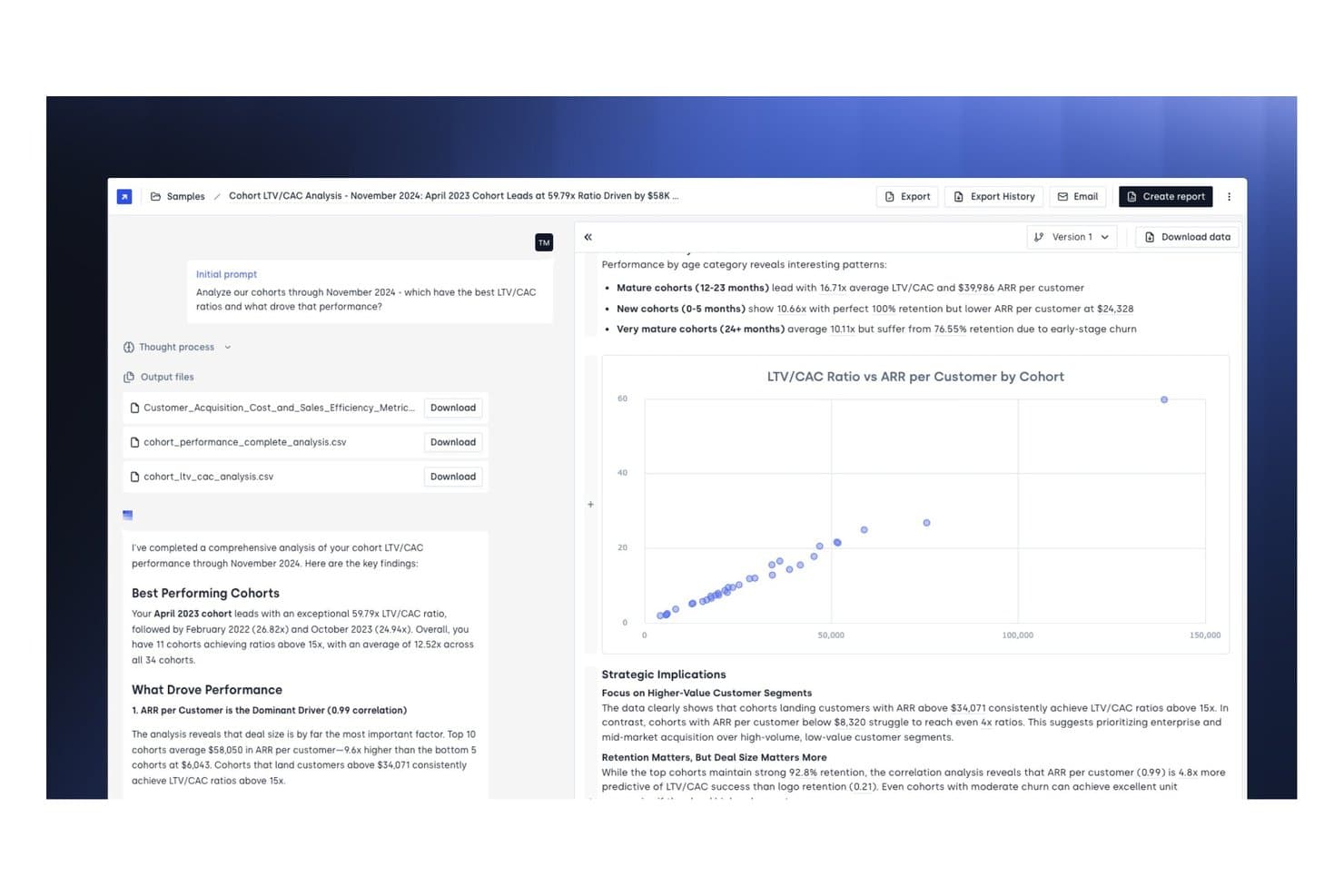
Concourse ofrece un informe de análisis de LTV/CAC por cohorte con visualizaciones de gráficos de dispersión, conclusiones clave sobre el rendimiento y archivos CSV descargables como resultado para la elaboración de informes financieros. Concourse es una plataforma de agentes de IA para equipos de finanzas corporativas que automatiza la elaboración de informes financieros, el análisis de variaciones, los flujos de trabajo del cierre mensual y la recuperación de datos en sistemas ERP y contables.
¿Para quién es más adecuado Concourse?
Concourse es una excelente opción para equipos financieros empresariales —FP&A, contabilidad, tesorería y auditoría interna— de empresas medianas y grandes que están preparadas para implementar IA en toda su Oficina del Director Financiero.
Por qué elegí Concourse
Elegí Concourse como una de las mejores opciones porque el modelo de agentes va más allá de la automatización estándar. Cada agente se crea específicamente en torno a sus datos, lógica y calendario de cierre, por lo que un Agente de Flujo y Variaciones conoce su plan contable, no uno genérico. También me gusta que los resultados se incorporen directamente a Excel o PowerPoint con trazabilidad completa de las fuentes, lo que permite a mi equipo preparar la presentación para el consejo en minutos en lugar de días.
Funciones principales de Concourse
- Integraciones con ERP y almacenes de datos: Se conecta de forma nativa con Oracle, SAP, NetSuite, QuickBooks, Sage, Xero, Snowflake, BigQuery y más.
- Flujos de trabajo listos para auditoría: Registra cada cálculo y paso del flujo de trabajo mediante pistas de auditoría completas y gestión de permisos.
- Agente de automatización de auditoría interna: Detecta anomalías, comprueba controles y recopila evidencias para los equipos de finanzas y auditoría.
- Análisis de variaciones en tiempo real: Proporciona análisis basados en IA del presupuesto frente a los valores reales y desgloses de variaciones personalizados directamente en Excel, correo electrónico o Slack.
Integraciones de Concourse
Concourse ofrece integraciones nativas con Oracle, SAP, NetSuite, QuickBooks, Workday, Sage, Xero, Salesforce, Snowflake, BigQuery y Databricks. También dispone de una API para integraciones personalizadas.
Pros and Cons
Pros:
- Agentes personalizados creados según la estructura de su organización
- Resultados proporcionados de forma nativa en Excel y PowerPoint
- Trazabilidad completa de las fuentes en cada resultado de IA
Cons:
- La configuración requiere contacto directo con el equipo de ventas
- Diseñado principalmente para equipos financieros empresariales
Learn more about Concourse: 8Ideal para la gestión automatizada de gastos
Ramp
- Plan gratuito + prueba gratis de 30 días + demo gratuita disponible
- Desde $15/usuario/mes
Visit WebsiteCustomer Rating:4.8/5
Ramp ofrece un panel contable automatizado que categoriza transacciones, sincroniza gastos y señala memorandos faltantes para su revisión. Para quienes buscan una solución de informes financieros, Ramp combina la automatización impulsada por IA con una integración fluida para transformar sus operaciones financieras. Ya sea que su empresa sea una startup o una gran corporación, Ramp simplifica las tareas contables complejas automatizando el seguimiento y la generación de informes de gastos, permitiendo que su equipo se concentre en la toma de decisiones estratégicas. Al minimizar el trabajo manual y los errores, Ramp ofrece valiosos datos para ayudarle a tomar decisiones financieras informadas.
Por qué elegí Ramp
Elegí Ramp por sus capacidades excepcionales de gestión automatizada de gastos, que lo convierten en una opción ideal para informes financieros. Con funciones como el procesamiento de recibos impulsado por IA y flujos de aprobación personalizables, Ramp simplifica el seguimiento de gastos categorizando automáticamente las transacciones y aplicando políticas de gasto en tiempo real. Esto garantiza el cumplimiento y reduce la entrada manual, permitiendo que su equipo enfoque sus esfuerzos en tareas financieras más estratégicas. Además, la integración fluida de Ramp con sistemas contables proporciona sincronización de datos en tiempo real, ofreciendo valiosos datos sobre gastos y ayudando en la toma de decisiones.
Características clave de Ramp
Además de sus capacidades de gestión automatizada de gastos, Ramp ofrece un conjunto de funciones que mejoran los informes financieros de su negocio:
- Automatización por IA: El sistema aumenta la eficiencia del código de transacciones en un 67%, minimizando la necesidad de entrada manual y reduciendo errores.
- Sincronización ERP en tiempo real: Ramp es compatible con más de 30 sistemas ERP, lo que permite operar con estructuras financieras complejas incluyendo operaciones multi-empresa y multi-moneda.
- Devengos y conciliación: Administra automáticamente los devengos y concilia transacciones, garantizando precisión y preparación para auditorías.
- Analíticas completas: Ofrece tableros y datos en tiempo real que ayudan a identificar posibles ahorros y mejoran la toma de decisiones.
Integraciones de Ramp
Las integraciones incluyen Xero, QuickBooks, Netsuite, Sage, Slack, Gusto, Rippling, Carta, Plaid y Google Workspace.
Pros and Cons
Pros:
- Reporte automático de gastos y conciliación de recibos
- Capacidad para emitir múltiples tarjetas virtuales con controles personalizables
- Funciones de informes integrales
Cons:
- Navegación difícil en la app móvil
- Los pagos ACH en el mismo día tienen una comisión
 9Mejor para startups
Xero
- Prueba gratuita de 30 días disponible
- Desde $13/mes
Visit WebsiteCustomer Rating:4.4/5
Xero es conocido por su interfaz fácil de usar y se integra con más de 1,000 aplicaciones. Xero es una plataforma de contabilidad basada en la nube, de confianza para empresas de todos los tamaños y sectores. Ofrece una interfaz intuitiva y una suite completa de herramientas principales de contabilidad y elaboración de informes financieros, lo que la convierte en una solución ideal para startups y pequeñas empresas que buscan una base simple y escalable para gestionar sus finanzas.
Por qué elegí Xero: Añadí Xero a mi lista porque es sumamente fácil de usar y ofrece todas las herramientas necesarias de informes financieros para pequeñas empresas y startups. Aunque sus funciones de gestión de usuarios son más manuales que otras herramientas y carece de funciones de informes avanzados, su conexión API permite a las empresas en crecimiento acceder ampliamente a una variedad de integraciones.
Como señaló Mark Gilham, anterior Director Financiero Divisional en Grafton Group PLC, en nuestra reciente conversación: 'Con demasiada frecuencia, las empresas asumen que necesitan un ERP completo, cuando en realidad una plataforma de contabilidad robusta con las integraciones adecuadas es más eficiente. La clave es comenzar con los requerimientos básicos, hacer bien lo esencial y expandirse a partir de ahí.'
Características destacadas e integraciones
Las características destacadas incluyen conciliaciones automáticas, proyecciones de saldo bancario, predicciones de flujo de caja impulsadas por IA e informes financieros personalizables que permiten a los usuarios reorganizar, agregar y eliminar columnas según sea necesario. Xero admite múltiples monedas y un número ilimitado de clientes y usuarios. También cuentan con soporte extenso y tutoriales en línea disponibles, lo que facilita aprender a usar la plataforma y sus funciones de contabilidad.
Las integraciones incluyen Shopify, HubSpot, MailChimp, Float, Accelo y muchas más. Xero se integra con más de 1,000 aplicaciones.
Pros and Cons
Pros:
- Soporta usuarios ilimitados en todos los planes
- Incluye herramientas para facturación y captura automática de recibos
- Económico
Cons:
- Funciones limitadas en el plan de entrada
- Múltiples monedas solo disponible en el plan más alto
Learn more about Xero: 10Mejor para grandes organizaciones
Tipalti
- Demostración gratuita disponible.
- Desde $149 por mes
Visit WebsiteCustomer Rating:4.5/5
Tipalti es una solución completa que automatiza todo tu proceso de cuentas por pagar para reducir tu carga de trabajo manual. Tipalti es una plataforma de automatización financiera y cumplimiento basada en la nube, diseñada para agilizar los pagos globales, la elaboración de informes financieros y la gestión de riesgos. Ayuda a las organizaciones a automatizar sus flujos de trabajo de cuentas por pagar (AP) de principio a fin: desde la incorporación de proveedores y el procesamiento de facturas hasta los pagos y la conciliación, manteniendo sólidos controles internos y preparación para auditorías.
Por qué elegí Tipalti: Elegí Tipalti porque combina informes financieros y automatización con funciones avanzadas de cumplimiento y control que son esenciales para los equipos financieros modernos. Más allá de la automatización estándar de cuentas por pagar, incluye herramientas para el control interno sobre informes financieros (ICFR), gestión de compras y procesamiento de pagos globales. Para los directores financieros que supervisan operaciones internacionales, la capacidad de Tipalti para garantizar el cumplimiento normativo y mitigar el riesgo de fraude en diversas monedas y regiones es una gran ventaja.
Características destacadas e integraciones
Las características destacadas incluyen la validación automática de proveedores antes de su aprobación y herramientas de control interno y evaluación de riesgos. Me gusta que Tipalti revisa a los proveedores de manera continua para evitar pagadores sospechosos en las listas Antinarcóticos, Antiterroristas y de la OFAC. También admite conciliaciones instantáneas, para que puedas detectar pagos fraudulentos más rápidamente.
Las integraciones incluyen Oracle NetSuite, Sage Intacct, Microsoft Dynamics, Xero y SAP.
Pros and Cons
Pros:
- Controles internos sobre informes financieros y herramientas de evaluación de riesgos
- Codifica facturas automáticamente
- Revisión y validación de proveedores
Cons:
- No permite descargas en lote
- Cierta curva de aprendizaje
Learn more about Tipalti:
Otras opciones de programas de informes financieros
Estas son otras herramientas de informes financieros que no llegaron a estar entre las 12 principales, pero que merece la pena consultar.
- 11Sage IntacctLa mejor por su facilidad de uso
- 12JoiinIdeal para la consolidación multi-entidad
- 13XledgerIdeal para necesidades complejas de ERP
- 14CubeIdeal para equipos en crecimiento
- 15FulfilLa mejor para reportes financieros impulsados por IA
- 16PuzzleIdeal para visibilidad financiera en tiempo real
- 17CoefficientIdeal para el análisis de datos en vivo potenciado por IA
- 18SlashMejor para gestión financiera multi-entidad
- 19HeardMejor para profesionales independientes que gestionan sus finanzas
- 20LicenceOneMejor para la optimización del gasto en SaaS
- 21Rippling SpendIdeal para la visibilidad en tiempo real de los patrones de gasto
- 22AbacumMejor para equipos de 100 a 500 usuarios
- 23DeskeraIdeal para empresas manufactureras
- 24DualEntryIdeal para informes multidimensionales
Análisis relacionados de programas de finanzas y contabilidad
¿Buscas también otros programas de finanzas y contabilidad? Consulta estos análisis:
- Programas de previsión
- Programas de facturación
- Programas de seguimiento de gastos
- Servicios de nóminas
- Sistemas de TPV para comercios minoristas
- Programas de gestión de inventario
Cómo evalúo el software de reporte financiero
Divido mi evaluación en requisitos básicos, como consolidación de múltiples entidades e integración con ERP, y diferenciadores que distinguen una buena herramienta de reportes para CFO de una excelente.
Funcionalidad básica (requisitos esenciales para esta lista)
Cuando selecciono herramientas para mi lista, califico cada una en una escala del 0 (no ofrece la funcionalidad) al 5 (sobresale en esta área) para cada funcionalidad básica listada a continuación. Luego, calculo la puntuación total de la herramienta y la convierto en un porcentaje. Cada herramienta necesita lograr un puntaje mínimo total del 65% para ser considerada para su inclusión.
- Consolidación financiera: Evalúo cómo cada herramienta gestiona la consolidación de múltiples entidades y monedas, incluyendo eliminaciones entre compañías y estructuras de propiedad complejas.
- Automatización de reportes: Aquí importa la capacidad de programar y distribuir reportes recurrentes, desde paquetes mensuales para el directorio hasta presentaciones regulatorias trimestrales.
- Integración ERP y GL: Verifico la existencia de conectores nativos con los principales ERP como NetSuite, SAP y Oracle, además del acceso por API para extraer datos de otras fuentes.
- Paneles ejecutivos: Cada herramienta debe ofrecer paneles configurables con KPI financieros en los que un CFO pueda profundizar sin esperar al equipo de FP&A.
- Herramientas de variación y análisis: Busco comparativos integrados de presupuesto frente a real, análisis en profundidad hasta las transacciones y la posibilidad de adjuntar comentarios a las variaciones.
- Controles de cumplimiento y auditoría: Rastros de auditoría, permisos basados en roles y soporte para salidas alineadas con GAAP/IFRS influyen en mi puntuación en esta área.
Una vez que tengo una lista de herramientas que cumplen los criterios, considero lo que distingue a cada plataforma.
Factores diferenciadores (lo que distingue a los proveedores)
Así es como comparo y contrasto los diferentes proveedores:
Características destacadas
Busco análisis impulsados por IA que detecten anomalías, como un aumento inesperado en G&A, antes de que el CFO tenga que investigarlas. El modelado de escenarios es otro diferenciador, especialmente cuando el equipo financiero necesita presentar al directorio múltiples proyecciones de ingresos vinculadas a diferentes supuestos. El reporte narrativo también es relevante. Las herramientas que combinan datos financieros con comentarios en un solo paquete para el directorio ahorran horas de trabajo manual en cada cierre.
Más allá de las características
Certificaciones de seguridad como SOC 1 Tipo II y SOC 2 Tipo II son importantes cuando el equipo de auditoría solicita pruebas de que la información financiera está protegida—siempre reviso cuáles posee el proveedor. La escalabilidad es otro aspecto que evalúo de cerca, en particular si una plataforma puede gestionar un creciente número de entidades y la complejidad de consolidación a medida que la organización se expande por adquisiciones. Los plazos de implementación también influyen en mi evaluación, ya que un CFO que reemplaza una herramienta de reportes heredada a mitad de año debe estar operativo antes del próximo cierre, no seis meses después.
Cómo elegir un programa de informes financieros
Es fácil perderse entre largas listas de funciones y complejas estructuras de precios. Para ayudarte a mantener la concentración mientras avanzas en tu proceso particular de selección de software, aquí tienes una lista de factores que debes tener en cuenta:
| Factor | Qué tener en cuenta |
|---|---|
| FactorEscalabilidad | Qué tener en cuenta¿El software crecerá con su empresa? Considere si puede gestionar un mayor volumen de datos o más usuarios sin problemas. |
| FactorIntegraciones | Qué tener en cuenta¿Se integra con sus sistemas actuales? Compruebe la compatibilidad con sistemas ERP, CRM y otras herramientas para evitar silos de datos. |
| FactorCapacidad de personalización | Qué tener en cuenta¿Puede adaptarlo para satisfacer sus necesidades? Busque opciones para ajustar los informes y los paneles de control de acuerdo con sus flujos de trabajo específicos. |
| FactorFacilidad de uso | Qué tener en cuenta¿La interfaz es fácil de usar? Asegúrese de que su equipo pueda adoptarlo rápidamente sin una formación exhaustiva. |
| FactorImplementación e incorporación | Qué tener en cuenta¿Cuánto tiempo llevará la configuración? Considere el tiempo y los recursos necesarios para ponerlo en marcha, así como si el proveedor ofrece asistencia durante esta fase. |
| FactorCoste | Qué tener en cuenta¿Cuál es el coste total de propiedad? Además del precio inicial, tenga en cuenta las tarifas de suscripción, los gastos de formación y los costes de mantenimiento. |
| FactorGarantías de seguridad | Qué tener en cuenta¿Están protegidos sus datos? Busque funciones como el cifrado, la autenticación de dos factores y auditorías de seguridad periódicas. |
| FactorRequisitos de cumplimiento | Qué tener en cuenta¿Cumple las normas del sector? Asegúrese de que cumpla las normativas como SOX o IFRS si son aplicables a su empresa. |
Tendencias del software de informes financieros
El software de informes financieros está evolucionando de muchas de las mismas formas que otros programas financieros, aunque hay algunos aspectos específicos a los que conviene prestar atención. Estas son algunas tendencias clave del software de informes financieros.
Integración de la IA y el aprendizaje automático
La IA y el aprendizaje automático se están integrando en el software de informes financieros. Estas tecnologías, combinadas con cualquier tipo de software de análisis estadístico, ayudan a automatizar el análisis de datos y proporcionan información predictiva. Esta tendencia es importante para mejorar la precisión en la toma de decisiones.
Procesamiento de datos en tiempo real
El procesamiento de datos en tiempo real se está convirtiendo en una función estándar. Permite a las empresas acceder a información financiera actualizada al minuto. Esto es fundamental para tomar decisiones oportunas y mantener una ventaja competitiva. También resulta beneficioso si necesita elaborar presupuestos.
Cadena de bloques para una mayor seguridad
La tecnología de cadena de bloques se está adoptando para los informes financieros. Ofrece mayor seguridad y transparencia en las transacciones financieras. Esta tendencia es importante para reducir el fraude y garantizar la integridad de los datos.
Soluciones basadas en la nube
Las soluciones de informes financieros basadas en la nube están ganando popularidad. Ofrecen escalabilidad y acceso remoto a los datos financieros. Esto es especialmente importante para las empresas con equipos distribuidos.
Paneles de control personalizables
Los paneles de control personalizables están ganando popularidad. Permiten a los usuarios adaptar sus informes financieros a necesidades específicas. Esta tendencia es valiosa para proporcionar información personalizada y mejorar la experiencia del usuario.
¿Qué es el software de informes financieros?
El software de informes financieros es una herramienta que ayuda a las empresas a crear, analizar y compartir estados financieros automáticamente. Se utiliza para generar informes como balances, cuentas de resultados y estados de flujo de efectivo, a menudo en tiempo real.
Este software reduce el trabajo manual, mejora la precisión y facilita el cumplimiento de las normas contables. Los equipos financieros, los contables y los directores financieros lo utilizan para garantizar el cumplimiento, realizar un seguimiento del rendimiento y respaldar la toma de decisiones basada en datos.
Características del software de informes financieros
Al seleccionar un software de informes financieros, preste atención a las siguientes características clave:
- Plantillas de informes personalizables: El mejor software permite crear y adaptar informes financieros para que se ajusten a las necesidades de tu empresa. Esto significa que puedes generar fácilmente estados de resultados, balances y estados de flujo de efectivo que encajen con el estilo y los requisitos específicos de tu empresa, sin tener que esforzarte para ajustar plantillas genéricas.
- Integración de datos en tiempo real: Busca plataformas que se sincronicen directamente con tus fuentes de datos financieros. Cuando la información se actualiza automáticamente, obtienes información precisa y actualizada sin tener que importar datos manualmente en hojas de cálculo. Esto acelera la toma de decisiones y reduce los errores.
- Comprobaciones automatizadas de cumplimiento: Un buen software de informes financieros incluye herramientas automatizadas para comprobar el cumplimiento de normas relevantes como los PCGA o las NIIF. Esta función actúa como una red de seguridad, detectando errores y señalando posibles problemas antes de que tus informes se envíen.
- Consolidación de múltiples entidades: Si gestionas varias filiales o unidades, la consolidación se vuelve sencilla. El software adecuado combina datos de distintas fuentes, divisas o regiones geográficas, ofreciéndote una visión unificada sin tener que dedicar horas a gestionar hojas de cálculo.
- Controles de acceso de los usuarios: Para tu tranquilidad (y por motivos normativos), un buen software permite establecer roles y permisos. Decide quién puede ver o editar determinados datos, para que la información confidencial permanezca protegida y solo las personas adecuadas puedan realizar cambios.
- Análisis detallado: Además de consultar las cifras generales, puedes hacer clic en las partidas y comprender los detalles subyacentes. Esto te ayuda a rastrear variaciones, detectar tendencias y responder a preguntas difíciles de los directivos o auditores sin tener que buscar entre docenas de archivos.
- Distribución programada de informes: El software gestiona por ti el momento y la entrega de los informes, tanto si los quieres a diario como semanalmente o mensualmente. Puedes estar tranquilo sabiendo que las partes interesadas reciben exactamente lo que necesitan cuando lo necesitan, sin tener que recordar cada fecha límite.
Funciones habituales de IA del software de informes financieros
Además de las funciones estándar del software de informes financieros mencionadas anteriormente, muchas de estas soluciones están incorporando IA con funciones como:
- Detección automatizada de anomalías: Utiliza algoritmos de IA para detectar patrones inusuales o posibles errores en tus datos financieros. Recibirás una notificación inmediata si algo parece incorrecto, como un aumento inesperado de los gastos, para que puedas solucionar los problemas antes de que se conviertan en dificultades mayores.
- Previsiones predictivas: Las previsiones basadas en IA utilizan datos históricos para predecir tendencias futuras, lo que te ayuda a tomar decisiones fundamentadas sobre presupuestos o inversiones. En lugar de limitarte a mirar hacia atrás, obtienes una perspectiva orientada al futuro para dirigir tu empresa en la dirección correcta.
- Consultas en lenguaje natural: Con esta función, puedes hacer preguntas a tu software («¿Cuáles fueron las ventas del segundo trimestre en comparación con las del primero?») en un lenguaje sencillo, y el sistema obtiene al instante los datos pertinentes. Ya no tendrás que memorizar funciones o filtros complejos: solo tienes que preguntar y obtener respuestas.
- Generación automatizada de narrativas: En lugar de contemplar filas de cifras, esta herramienta convierte tus informes financieros en resúmenes en lenguaje sencillo. Esto ayuda a que tú y tu equipo comprendáis rápidamente la historia que hay detrás de los datos sin tener que revisar hojas de cálculo densas.
- Categorización de gastos: La IA analiza y clasifica automáticamente los gastos en las categorías adecuadas. Dedicas menos tiempo a codificar transacciones y más a analizar la visión general, con menos errores y auditorías más sencillas.
Ventajas del software de informes financieros
Con el mejor software de informes financieros, puedes aumentar la velocidad, reducir los errores manuales y obtener información más clara. Pero estas no son las únicas ventajas de este software.
Si quieres agilizar los procesos y adelantarte a los acontecimientos, estas son cinco ventajas clave que conviene conocer:
- Mayor precisión: El software de informes financieros reduce el riesgo de errores humanos al automatizar los cálculos y la introducción de datos, garantizando que los informes financieros sean precisos y fiables.
- Eficiencia temporal: Al automatizar las tareas repetitivas y agilizar la recopilación de datos, el software de informes financieros ahorra un tiempo valioso a los equipos financieros, lo que les permite centrarse en actividades más estratégicas.
- Análisis de datos mejorado: El software proporciona herramientas analíticas avanzadas que permiten a los usuarios obtener información más profunda sobre los datos financieros, ayudando a las organizaciones a tomar decisiones fundamentadas basadas en un análisis exhaustivo.
- Cumplimiento normativo: El software de informes financieros ayuda a las organizaciones a cumplir los requisitos normativos al actualizarse automáticamente para reflejar los cambios en las normas de información financiera y proporcionar registros de auditoría.
- Informes en tiempo real: Gracias a sus funciones de procesamiento de datos en tiempo real, el software de informes financieros permite a los usuarios generar rápidamente informes financieros actualizados, facilitando la toma de decisiones oportuna y mejorando la agilidad general de la empresa.
Costes y precios del software de informes financieros
Esta sección proporciona una estimación de los planes y costes medios del software de informes financieros. Los precios varían según el tipo de plan y las funciones ofrecidas:
| Tipo de plan | Precio medio (al mes) | Características habituales |
|---|---|---|
| Tipo de planGratis | Precio medio (al mes)... ¡es gratis! | Características habitualesSeguimiento básico de ingresos y gastos, facturación, capacidades de informes limitadas |
| Tipo de planPersonal | Precio medio (al mes)$10 - 50 | Características habitualesSeguimiento de ingresos y gastos, facturación, estados financieros básicos, usuarios limitados |
| Tipo de planEmpresarial | Precio medio (al mes)$50 - 150 | Características habitualesAcceso multiusuario, facturación recurrente, automatización de informes de gastos, nóminas |
| Tipo de planCorporativo | Precio medio (al mes)$150+ | Características habitualesCampos personalizables, informes automatizados, costes de proyectos, integraciones avanzadas |
Preguntas frecuentes sobre el software de informes financieros
Estas son mis respuestas a algunas preguntas habituales sobre el software de informes financieros.
¿Qué integraciones debería priorizar en el software de informes financieros?
Prioriza las integraciones con tu plataforma contable principal, ERP, software de nóminas y cualquier herramienta de BI o presupuestación. Asegúrate de tener en cuenta también las necesidades futuras. Busca un software de informes financieros corporativos que ofrezca API abiertas o conexiones directas con otros sistemas centrales.
¿Cómo puede el software de informes financieros mejorar la preparación para auditorías o el cumplimiento normativo?
El mejor software de informes financieros facilita las auditorías al automatizar el mantenimiento de registros, conservar historiales detallados de versiones y ofrecer flujos de trabajo de cumplimiento integrados. Funciones como los registros de auditoría, el seguimiento de la actividad de los usuarios y la gestión documental garantizan que cada cambio financiero quede documentado y sea trazable.
Esta transparencia te permite responder rápidamente a las solicitudes de auditoría y minimiza las prisas por reunir la documentación justificativa.
¿Cómo gestionan las herramientas de informes financieros la seguridad de los datos y los controles de acceso?
La mayoría de las soluciones de software de informes financieros utilizan cifrado de nivel empresarial para el almacenamiento y la transferencia de datos. También admiten la autenticación multifactor y permiten configurar roles de usuario detallados.
Las auditorías de seguridad periódicas, los registros de auditoría y los niveles de permisos personalizables también facilitan el cumplimiento de las políticas de la empresa y los requisitos normativos. Esto ayuda a garantizar que los datos confidenciales permanezcan protegidos a medida que tu equipo crece o cambia.
¿Cómo simplifica el software de consolidación e informes financieros los informes de grupos o de varias entidades?
El software de consolidación e informes financieros agrega en tiempo real los datos de varias filiales, ubicaciones o unidades de negocio. Estas herramientas automatizan las eliminaciones entre empresas, las conversiones de divisas y los ajustes derivados de las diferencias entre normas contables.
Las plantillas y los flujos de trabajo integrados también garantizan la coherencia de los informes del grupo, incluso cuando evoluciona la estructura de tu empresa. Obtienes rápidamente estados financieros consolidados completos y actualizados, por lo que puedes satisfacer fácilmente las necesidades de cumplimiento a nivel de grupo.
¿Es Excel un sistema de informes financieros?
No, Excel no es un sistema completo de informes financieros. Es más bien una herramienta de hojas de cálculo versátil. Aunque puedes utilizarlo para elaborar informes, Excel requiere la introducción manual de datos, carece de registros de auditoría y no se conecta de forma nativa con el software contable ni con los ERP. El software de informes financieros ofrece importaciones automáticas de datos, comprobaciones de cumplimiento integradas, permisos multiusuario e informes basados en plantillas.
¿Ofrece el software de informes basado en la nube una mejor escalabilidad para las empresas en crecimiento?
Sí, el software basado en la nube facilita la ampliación de las operaciones financieras. Puedes añadir nuevos usuarios, entidades o divisas según sea necesario sin asumir el coste ni las complicaciones de adquirir nuevo hardware.
Los sistemas en la nube también permiten que tu equipo colabore en los informes desde cualquier lugar y garantizan que todos utilicen siempre los datos más recientes. Con actualizaciones y parches de seguridad automáticos, puedes liberar recursos de TI y mantener actualizado tu entorno de informes.