Il software per la reportistica finanziaria aiuta i team ad automatizzare e semplificare la creazione dei principali rendiconti finanziari, inclusi i conti economici, gli stati patrimoniali e i riepiloghi dei flussi di cassa. Per i CFO e gli analisti finanziari del settore tecnologico, lo strumento giusto riduce il lavoro manuale, favorisce la conformità normativa e fornisce dati accurati per prendere decisioni più rapide e sicure.
In qualità di esperto di software digitali con una formazione nella gestione finanziaria, ho lavorato a stretto contatto con team finanziari alle prese con aspettative crescenti e sistemi limitati. Comprendo la difficoltà di ottenere report completi e coerenti da fonti frammentate e la pressione che si crea quando la dirigenza ha bisogno di risposte rapide. Che tu stia definendo la strategia o analizzando dati in profondità, hai bisogno di un software che lavori con te, non contro di te.
Per questo ho dedicato ore a testare le principali piattaforme e ad analizzare i feedback degli utenti. I software per la reportistica finanziaria presenti in questo elenco sono progettati per risolvere i problemi che affronti ogni giorno, dalla riduzione dei tempi di elaborazione dei report al miglioramento della chiarezza, così puoi concentrarti sul raggiungimento dei risultati.
Perché fidarsi dei nostri consigli sui software
6,700+
Reviews
20
Industry experts
16+
Evaluation factors
14
Years
Le nostre recensioni riflettono il nostro giudizio indipendente, non un discorso di vendita. Scopri come manteniamo la trasparenza.
Per questa guida, abbiamo valutato gli strumenti attraverso test pratici e ricerche indipendenti, assegnando un punteggio agli strumenti in base ai nostri criteri di selezione.
Le nostre recensioni riflettono il nostro giudizio editoriale umano, non un discorso di vendita.
Tabella comparativa dei software per la reportistica finanziaria
Per iniziare, ho raccolto le informazioni sui prezzi di ogni strumento. Ecco come si confrontano in termini di costi:
| Tool | Best For | Trial Info | Price | ||
|---|---|---|---|---|---|
| 1 | Ideale per i dati sui pagamenti ai fornitori | Demo gratuita disponibile | Prezzo su richiesta | Website | |
| 2 | Ideale per la previsione finanziaria | Demo gratuita disponibile | Prezzi su richiesta | Website | |
| 3 | Ideale per la reportistica finanziaria aziendale | Demo gratuita disponibile | Prezzo su richiesta | Website | |
| 4 | Ideale per chi cerca budgeting e fatturazione integrati | Prova gratuita di 14 giorni | Da $10/utente/mese | Website | |
| 5 | Ideale per report pronti per la presentazione | Prova gratuita di 30 giorni | A partire da $19/mese | Website | |
| 6 | Ideale con AI pre-addestrata per l’acquisizione delle fatture | Demo gratuita disponibile | Prezzo su richiesta | Website | |
| 7 | Ideale per agenti IA personalizzati su misura per i team | Demo gratuita disponibile | Prezzi disponibili su richiesta | Website | |
| 8 | Ideale per la gestione automatizzata delle spese | Piano gratuito + prova gratuita di 30 giorni + demo gratuita disponibile | Da $15/utente/mese | Website | |
| 9 | Ideale per startup | Prova gratuita di 30 giorni disponibile | A partire da $13/mese | Website | |
| 10 | Ideale per grandi organizzazioni | Demo gratuita disponibile. | A partire da $149 al mese | Website |


Recensioni dei migliori software per la reportistica finanziaria
Ecco i migliori strumenti software per la reportistica della gestione finanziaria disponibili sul mercato. Analizzerò i pro e i contro di ogni strumento, le sue funzionalità e i casi d’uso ideali.
 Ideale per i dati sui pagamenti ai fornitori
- Demo gratuita disponibile
- Prezzo su richiesta
Visit WebsiteCustomer Rating:4.5/5
La dashboard di Payout offre monitoraggio e gestione in tempo reale di fatture e pagamenti. Payouts.com è una piattaforma specializzata che supporta le aziende nell’automatizzare e gestire le operazioni finanziarie come pagamenti, relazioni con i fornitori e fatturazione. Si rivolge in particolare alle società attive nel marketing di affiliazione, nell’economia degli influencer e nella pubblicità digitale, integrandosi perfettamente con sistemi di tracciamento come Tune, Affise e CJ Affiliate.
Perché ho scelto Payouts: Le sue capacità di automazione dei pagamenti consentono alle aziende di gestire pagamenti su larga scala in modo efficiente, garantendo che creatori, influencer e partner vengano pagati puntualmente e senza errori. Integrandosi direttamente con sistemi di tracciamento come Tune e Affise, offre una visione consolidata di tutte le transazioni, fornendo dati finanziari precisi su cui lavorare. Questi dati sono supportati da dashboard in tempo reale e possibilità di reportistica personalizzata. Inoltre, l’abbinamento automatico delle fatture elimina la necessità di riconciliazione manuale. Automatizzando questo processo, Payouts riduce gli errori e velocizza il flusso di lavoro dei conti da pagare.
Caratteristiche principali e integrazioni
Caratteristiche principali includono una sincronizzazione dati avanzata che garantisce l’allineamento costante tra i sistemi finanziari e la piattaforma Payouts, offrendo risultati sempre aggiornati nei report. La piattaforma offre anche l’esecuzione efficiente di pagamenti con un solo clic, consentendo di pagare chiunque, ovunque, con il minimo sforzo. Inoltre, Payouts.com supporta diverse opzioni di pagamento, incluse bonifici bancari tradizionali, eWallet e criptovalute.
Le integrazioni includono PayPal, Venmo, Payoneer, impact.com, CJ Affiliate, Everflow, Zelle, Priority, Tune, System1 e NetSuite.
Pros and Cons
Pros:
- Automazione completa dei processi di contabilità fornitori
- Diversi metodi di pagamento
- Supporta la crescita delle operazioni
Cons:
- Potrebbe essere necessario del tempo per una completa personalizzazione
- Potrebbe non integrarsi con tutti i sistemi esistenti
Learn more about Payouts: Ideale per la previsione finanziaria
- Demo gratuita disponibile
- Prezzi su richiesta
Visit WebsiteCustomer Rating:4.6/5
Phocas consente agli utenti di personalizzare i dashboard per ottenere piena visibilità sulle metriche e sulle prestazioni finanziarie. Phocas è un software di business intelligence e analisi finanziaria progettato per offrire alle organizzazioni capacità complete di analisi dei dati, visualizzazione e reporting. È specificamente pensato per le aziende che desiderano migliorare i propri processi decisionali basati sui dati, poiché si integra con varie fonti di dati, inclusi sistemi ERP, software CRM e altri database.
Perché ho scelto Phocas: Ho scelto Phocas perché offre bilanci personalizzabili, inclusi stati patrimoniali, conti economici e rendiconti finanziari, che possono essere adattati alle specifiche esigenze di qualsiasi organizzazione. La capacità della piattaforma di generare report finanziari in tempo reale garantisce che le aziende abbiano sempre a disposizione informazioni aggiornate. Inoltre, Phocas offre funzionalità di previsione finanziaria, permettendo agli utenti di creare previsioni dettagliate basate su dati storici e sull’analisi delle tendenze.
Caratteristiche principali e integrazioni
Le caratteristiche principali includono strumenti collaborativi che consentono agli utenti di condividere report e dashboard con i membri del team, strumenti di visualizzazione dei dati per trasformare dati finanziari complessi in grafici, tabelle e dashboard intuitive, e una funzione AI che permette agli utenti di porre domande e ricevere rapidamente approfondimenti e report pertinenti.
Le integrazioni includono Oracle, QAD, MAM Software, Khaos Control, SYSPRO, Retail Express, Sympac, Microsoft, Acumatica, Xero, Epicor, IFS, Sage, Accolent, MYOB, Enapps, Kerridge, SAP, Datafile, Netsuite e altri ancora.
Pros and Cons
Pros:
- Ampie personalizzazioni per report e dashboard
- Dati e analisi in tempo reale
- Capacità di previsione
Cons:
- L’impostazione e la configurazione possono richiedere tempo
- Curva di apprendimento per i nuovi utenti che vogliono sfruttare tutte le funzionalità
Learn more about Phocas: 3Ideale per la reportistica finanziaria aziendale
Vena
- Demo gratuita disponibile
- Prezzo su richiesta
Visit WebsiteCustomer Rating:4.5/5
Un report sulle variazioni di conto economico in Vena che mostra la performance mensile, da inizio anno e annuale su budget rispetto al reale tra i vari dipartimenti. Per chi cerca una soluzione affidabile per la reportistica finanziaria, Vena si presenta come uno strumento versatile progettato per semplificare i processi finanziari. Si integra perfettamente con diversi sistemi di contabilità generale e ERP, eliminando la fatica del lavoro manuale con i fogli di calcolo e migliorando la precisione dei tuoi report. Grazie alla sua interfaccia intuitiva e ai modelli personalizzabili, Vena ti permette di concentrarti sull'analisi strategica e sulle decisioni, rendendolo una scelta ideale per le aziende di diversi settori.
Perché ho scelto Vena
Ho scelto Vena per la sua capacità unica di sfruttare Excel, uno strumento già familiare a molti professionisti della finanza, per migliorare i processi di reportistica finanziaria. Vena si integra facilmente con vari sistemi finanziari, automatizzando le attività di reportistica e riducendo l'inserimento manuale dei dati, risparmiando così tempo prezioso. Con modelli Excel preconfigurati, consente una reportistica dinamica e la creazione di modelli finanziari, facilitando l'analisi approfondita e le decisioni del tuo team. Offrendo un database centralizzato nel cloud e flussi di lavoro collaborativi, Vena assicura precisione e sicurezza dei dati, posizionandosi come la soluzione ideale per le organizzazioni che vogliono ottimizzare la reportistica finanziaria.
Caratteristiche principali di Vena
Oltre alle sue funzionalità basate su Excel, Vena offre una serie di caratteristiche che migliorano l'esperienza del tuo team nella reportistica finanziaria.
- Creazione dinamica dei report: Questa funzione permette di generare report in tempo reale con layout personalizzabili, consentendo di concentrarsi sulle metriche aziendali più rilevanti per la tua organizzazione.
- Integrazione dei dati: Vena si integra senza problemi con diverse fonti dati, inclusi i sistemi ERP, assicurando che i tuoi dati finanziari siano sempre aggiornati e accessibili da un'unica piattaforma.
- Flussi di lavoro automatizzati: Grazie ai flussi di lavoro automatizzati, puoi semplificare la distribuzione e l'approvazione dei report, riducendo l'intervento manuale e i potenziali errori.
- Modelli personalizzabili: Vena offre una libreria di modelli preconfigurati che puoi adattare alle tue esigenze di reportistica, garantendo coerenza ed efficienza nella produzione dei report finanziari.
Integrazioni di Vena
Le integrazioni includono NetSuite, QuickBooks, diversi sistemi di contabilità generale, sistemi ERP e la possibilità di importare dati da Excel, file CSV e archivi cloud.
Pros and Cons
Pros:
- Sfrutta la familiare interfaccia di Excel
- Modelli e report preconfigurati
- Generalmente rapido da implementare
Cons:
- Alcuni problemi di compatibilità con Mac
- Nessuna app mobile
Learn more about Vena: Ideale per chi cerca budgeting e fatturazione integrati
- Prova gratuita di 14 giorni
- Da $10/utente/mese
Visit WebsiteCustomer Rating:4.6/5
La dashboard di Productive mostra le spese aziendali, le fatture non pagate, l'allocazione delle risorse e i report finanziari mensili. Productive è una piattaforma di reporting finanziario e automazione dei servizi professionali che riunisce budgeting, fatturazione, pianificazione delle risorse, modellazione di scenari e analisi per i team finanziari.
Per chi è ideale Productive?
Productive è ideale per i responsabili finanziari e i team operativi di studi di servizi professionali che necessitano di un reporting finanziario unificato e della gestione dei progetti.
Perché ho scelto Productive
Ho scelto Productive come uno dei migliori perché posso gestire budgeting e fatturazione direttamente insieme al reporting finanziario. Mi piace che il mio team possa impostare i budget di progetto, monitorare i dati effettivi e generare fatture senza mai uscire dalla piattaforma. In pratica, questo significa che manteniamo tutti i nostri dati finanziari collegati, evitando così la riconciliazione manuale tra diversi sistemi.
Funzionalità chiave di Productive
- Scenario builder: Modella previsioni di ricavi e risultati dei progetti utilizzando scenari personalizzabili.
- Pianificazione delle risorse con filtro AI: Assegna i membri del team ai progetti in base a competenze, disponibilità e carico di lavoro.
- Dashboard finanziari personalizzati: Crea dashboard su misura per visualizzare KPI, margini e prestazioni finanziarie.
- Monitoraggio della redditività: Monitora in tempo reale la redditività di progetti e clienti con analisi dettagliate.
Integrazioni di Productive
Productive offre integrazioni native con Xero, QuickBooks Online, Slack, Google Calendar e HubSpot. Si collega anche con Zapier e fornisce un'API per integrazioni personalizzate.
Pros and Cons
Pros:
- Monitoraggio della redditività a livello di progetto e cliente
- Dashboard finanziari personalizzati per il monitoraggio dei KPI
- Allocazione delle risorse e analisi dell'utilizzo potenziate da AI
Cons:
- Consolidamento avanzato limitato per gruppi multi-azienda
- Nessuna traccia di audit integrata per i cambiamenti finanziari
Learn more about Productive: Ideale per report pronti per la presentazione
- Prova gratuita di 30 giorni
- A partire da $19/mese
Visit WebsiteCustomer Rating:4/5
Il cruscotto panoramico dell'azienda in QuickBooks Online offre un accesso rapido alle principali metriche e informazioni finanziarie. QuickBooks Online è un software di contabilità basato su cloud, pensato per piccole e medie imprese, che offre una vasta gamma di strumenti per la gestione finanziaria come fatturazione, monitoraggio delle spese, gestione delle paghe e preparazione delle tasse.
Perché ho scelto QuickBooks Online: Fornisce report pronti per le presentazioni che possono essere personalizzati per soddisfare le esigenze specifiche delle parti interessate, un aspetto cruciale per la precisione nelle presentazioni finanziarie. Questi report sono supportati da approfondimenti in tempo reale disponibili tramite bilanci finanziari e un cruscotto dei flussi di ricavi, offrendo una visione dinamica della salute finanziaria dell'azienda. La possibilità di monitorare le tendenze del flusso di cassa e creare cruscotti personalizzati per indicatori chiave di performance (KPI) facilita inoltre decisioni informate e basate sui dati.
Caratteristiche principali e integrazioni
Le caratteristiche principali includono fatturazione e pagamenti automatizzati, riducendo il tempo dedicato ad attività di routine, e strumenti per la collaborazione e la gestione dei dati. Altre funzionalità comprendono il monitoraggio della redditività dei progetti e la gestione dell'inventario, aspetti fondamentali per le aziende che gestiscono sia prodotti che servizi.
Le integrazioni includono Amazon Business, PayPal, Square, Etsy, eBay, Shopify, Google Sheets, Salesforce, Stripe, HubSpot e Mailchimp.
Pros and Cons
Pros:
- Gli utenti possono personalizzare i report finanziari in base alle esigenze specifiche dell'azienda
- Adatto per aziende in crescita
- Compatibile con un'ampia gamma di app
Cons:
- Le regole del feed bancario possono causare errori
- Possibilità di errori nel libro mastro generale a causa di problemi di auto-compilazione
Learn more about QuickBooks Online: Ideale con AI pre-addestrata per l’acquisizione delle fatture
- Demo gratuita disponibile
- Prezzo su richiesta
Visit WebsiteCustomer Rating:4.8/5
DOKKA aiuta i team finanziari a processare le fatture più rapidamente estraendo i dati chiave, validando le voci e sincronizzando con i sistemi contabili. DOKKA è una piattaforma di gestione documentale finanziaria basata sull’intelligenza artificiale, ideata per team finanziari e CFO che necessitano di automatizzare l’acquisizione delle fatture, semplificare i flussi di lavoro e mantenere registri conformi agli audit in contesti aziendali complessi.
Per chi è ideale DOKKA?
DOKKA è particolarmente adatta ai team finanziari di aziende di medie e grandi dimensioni che richiedono flussi di lavoro documentali automatizzati e integrazione ERP.
Perché ho scelto DOKKA
Ho scelto DOKKA tra le migliori soluzioni perché la sua AI pre-addestrata per l’acquisizione delle fatture consente al mio team di estrarre dati voce per voce con praticamente nessuna configurazione manuale. Apprezzo che DOKKA riconosca una vasta gamma di formati di fattura già di default, consentendoci di processare documenti dei fornitori senza dover creare template personalizzati. In pratica, questo significa ottenere dati strutturati e precisi nei nostri flussi di reportistica in modo molto più rapido.
Caratteristiche chiave di DOKKA
- Gestione documentale automatizzata: Archivia, organizza e recupera documenti finanziari in un unico spazio di lavoro digitale centralizzato.
- Automazione dei workflow di approvazione: Instrada fatture e documenti attraverso processi di approvazione multi-step personalizzabili.
- Tracciamento audit trail: Mantieni un registro dettagliato di tutte le azioni e modifiche sui documenti per la conformità normativa.
- Integrazione ERP: Collega DOKKA direttamente ai principali sistemi ERP per una sincronizzazione dei dati in tempo reale.
Integrazioni di DOKKA
DOKKA offre integrazioni native con SAP, NetSuite, QuickBooks, Priority, Sage e Zapier. È inoltre disponibile un API per integrazioni personalizzate.
Pros and Cons
Pros:
- Audit trail integrato per il monitoraggio della conformità
- Supporto multi-entità per la reportistica di gruppo
- Collaborazione documentale in tempo reale per team finanziari
Cons:
- Analisi e personalizzazione dashboard limitate
- Le opzioni di workflow di approvazione possono essere rigide
Learn more about DOKKA: Ideale per agenti IA personalizzati su misura per i team
- Demo gratuita disponibile
- Prezzi disponibili su richiesta
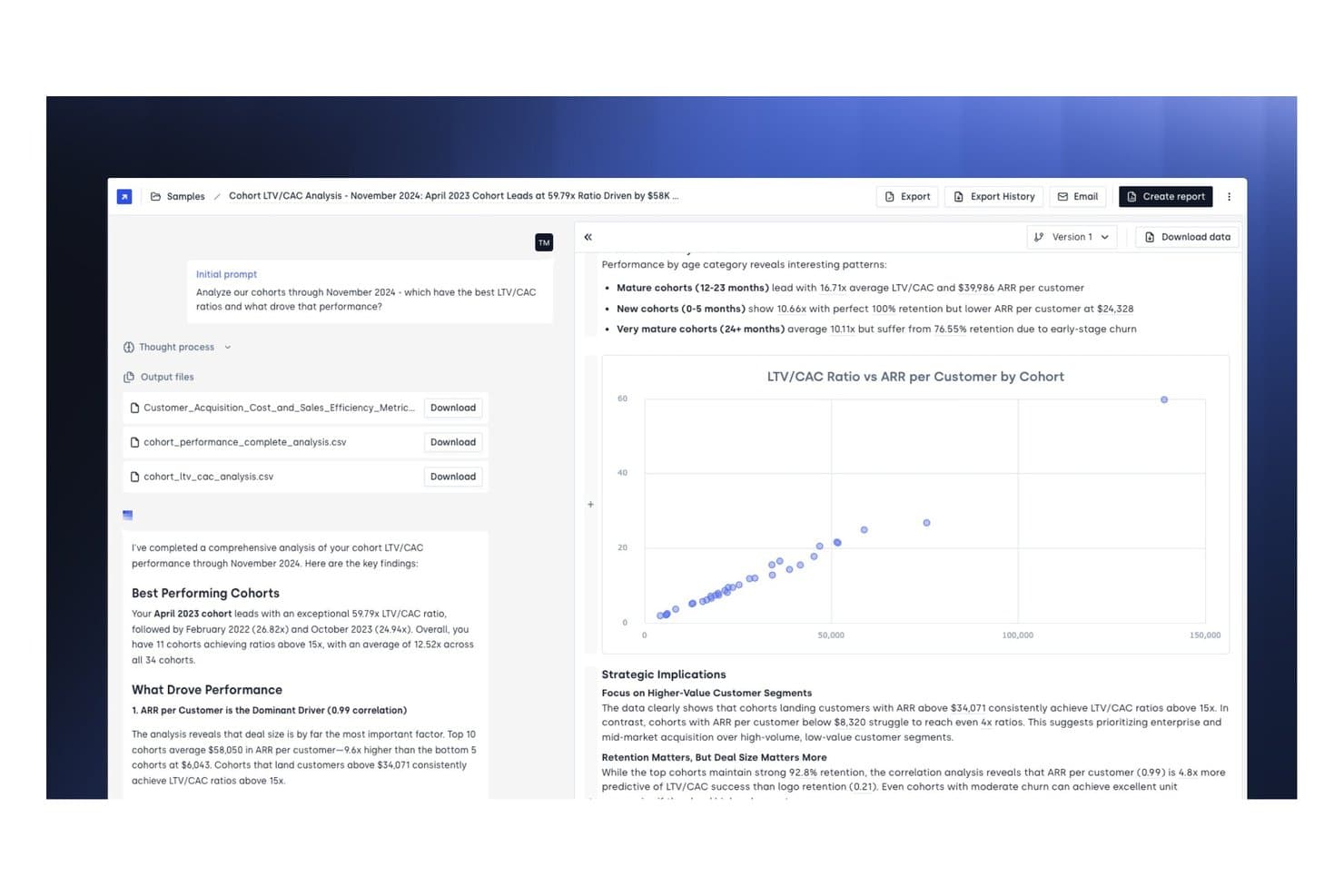
Concourse offre un report di analisi LTV/CAC per coorte con visualizzazioni a dispersione, principali risultati sulle prestazioni e file CSV scaricabili per la reportistica finanziaria. Concourse è una piattaforma di agenti IA per i team di finanza aziendale che automatizza la reportistica finanziaria, l'analisi degli scostamenti, i flussi di lavoro di chiusura di fine mese e il recupero dei dati tra sistemi ERP e contabili.
Per chi è più adatto Concourse?
Concourse è particolarmente adatto ai team finanziari aziendali—FP&A, contabilità, tesoreria e revisione interna—di aziende di medie e grandi dimensioni pronte a implementare l'IA in tutta l'area del CFO.
Perché ho scelto Concourse
Ho scelto Concourse come una delle migliori soluzioni perché il modello basato sugli agenti va oltre l'automazione standard disponibile sul mercato. Ogni agente viene creato su misura in base ai dati, alla logica e al calendario di chiusura specifici dell'azienda, quindi un agente per flussi e scostamenti conosce il vostro piano dei conti, non uno generico. Apprezzo anche il fatto che i risultati vengano trasferiti direttamente in Excel o PowerPoint con piena tracciabilità delle fonti, rendendo la preparazione delle presentazioni per il consiglio di amministrazione un'attività che il mio team può completare in pochi minuti anziché in giorni.
Funzionalità principali di Concourse
- Integrazioni con ERP e magazzini dati: Si connette nativamente a Oracle, SAP, NetSuite, QuickBooks, Sage, Xero, Snowflake, BigQuery e altri sistemi.
- Flussi di lavoro pronti per la revisione: Tiene traccia di ogni calcolo e passaggio del flusso di lavoro con registri di audit completi e gestione delle autorizzazioni.
- Agente di automazione della revisione interna: Segnala anomalie, verifica i controlli e raccoglie elementi probativi per i team finanziari e di revisione.
- Analisi degli scostamenti in tempo reale: Fornisce analisi basate sull'IA del budget rispetto ai dati effettivi e suddivisioni personalizzate degli scostamenti direttamente in Excel, tramite e-mail o Slack.
Integrazioni di Concourse
Concourse offre integrazioni native con Oracle, SAP, NetSuite, QuickBooks, Workday, Sage, Xero, Salesforce, Snowflake, BigQuery e Databricks. È inoltre disponibile un'API per le integrazioni personalizzate.
Pros and Cons
Pros:
- Agenti personalizzati creati in base alla struttura della vostra organizzazione
- Risultati forniti nativamente in Excel e PowerPoint
- Piena tracciabilità delle fonti per ogni risultato dell'IA
Cons:
- La configurazione richiede un contatto diretto con il reparto vendite
- Progettato principalmente per i team finanziari aziendali
Learn more about Concourse: 8Ideale per la gestione automatizzata delle spese
Ramp
- Piano gratuito + prova gratuita di 30 giorni + demo gratuita disponibile
- Da $15/utente/mese
Visit WebsiteCustomer Rating:4.8/5
Ramp offre una dashboard di contabilità automatizzata che categorizza le transazioni, sincronizza le spese e segnala le note mancanti per la revisione. Per chi cerca una soluzione per la rendicontazione finanziaria, Ramp combina l'automazione guidata dall'IA con un'integrazione senza soluzione di continuità per trasformare le operazioni finanziarie della tua azienda. Che la tua azienda sia una startup o una grande impresa, Ramp semplifica le attività contabili complesse automatizzando la gestione e la rendicontazione delle spese, consentendo al tuo team di concentrarsi su decisioni strategiche. Riducendo al minimo il lavoro manuale e gli errori, Ramp offre preziose analisi per aiutarti a prendere decisioni finanziarie informate.
Perché ho scelto Ramp
Ho scelto Ramp per le sue eccezionali capacità di gestione automatizzata delle spese, che lo rendono una scelta ideale per la rendicontazione finanziaria. Con funzionalità come l'elaborazione delle ricevute alimentata dall'IA e i flussi di approvazione personalizzabili, Ramp semplifica la gestione delle spese categorizzando automaticamente le transazioni e applicando le politiche di spesa in tempo reale. Questo garantisce la conformità e riduce l'immissione manuale dei dati, permettendo al team di concentrarsi su attività finanziarie più strategiche. Inoltre, l'integrazione perfetta di Ramp con i sistemi contabili assicura la sincronizzazione dei dati in tempo reale, offrendo preziose analisi sui costi e supportando decisioni finanziarie informate.
Caratteristiche principali di Ramp
Oltre alle sue capacità di gestione automatizzata delle spese, Ramp offre una serie di funzionalità che migliorano la rendicontazione finanziaria per la tua azienda:
- Automazione con IA: il sistema aumenta l'efficienza della codifica delle transazioni del 67%, riducendo la necessità di inserimento manuale e limitando gli errori.
- Sincronizzazione ERP in tempo reale: Ramp è compatibile con oltre 30 sistemi ERP e supporta strutture finanziarie complesse come operazioni multi-ente e multi-valuta.
- Ratei e riconciliazioni: gestisce automaticamente ratei e riconcilia le transazioni, garantendo precisione e prontezza per eventuali audit.
- Analitiche complete: fornisce dashboard e analisi in tempo reale che aiutano a individuare possibili risparmi e migliorare il processo decisionale.
Integrazioni di Ramp
Le integrazioni includono Xero, QuickBooks, Netsuite, Sage, Slack, Gusto, Rippling, Carta, Plaid e Google Workspace.
Pros and Cons
Pros:
- Rendicontazione e abbinamento delle ricevute automatizzati
- Possibilità di emettere più carte virtuali con controlli personalizzabili
- Funzionalità di reportistica completa
Cons:
- Navigazione nell'app mobile difficoltosa
- I pagamenti ACH nello stesso giorno prevedono una commissione
 9Ideale per startup
Xero
- Prova gratuita di 30 giorni disponibile
- A partire da $13/mese
Visit WebsiteCustomer Rating:4.4/5
Xero è noto per la sua interfaccia intuitiva e si integra con più di 1.000 app. Xero è una piattaforma di contabilità basata su cloud, affidabile per aziende di tutte le dimensioni e di tutti i settori. Offre un'interfaccia intuitiva e una suite completa di strumenti essenziali per la contabilità e la reportistica finanziaria, rendendolo una soluzione ideale per startup e piccole imprese che cercano una base semplice e scalabile per gestire le proprie finanze.
Perché ho scelto Xero: Ho aggiunto Xero alla mia lista perché è estremamente facile da usare e offre tutti gli strumenti di reportistica finanziaria necessari per piccole imprese e startup. Sebbene le sue funzioni di gestione utenti siano più manuali rispetto ad altri strumenti e manchino alcune funzionalità di reportistica avanzata, la connessione API di Xero consente alle aziende in crescita un'ampia accessibilità a diverse integrazioni.
Come ha sottolineato Mark Gilham, ex Direttore Finanziario Divisionale presso Grafton Group PLC, nella nostra recente conversazione: 'Troppo spesso le aziende pensano di aver bisogno di un ERP completo, quando in realtà una piattaforma di contabilità robusta con le giuste integrazioni è più efficiente. La chiave è partire dalle esigenze fondamentali, fare bene le cose basilari ed espandersi da lì.'
Funzionalità principali e integrazioni
Le funzionalità principali includono riconciliazioni automatiche, proiezioni del saldo bancario, previsioni di flusso di cassa alimentate dall’intelligenza artificiale e report finanziari personalizzabili che permettono agli utenti di riordinare, aggiungere o eliminare facilmente diverse colonne secondo necessità. Xero supporta più valute e un numero illimitato di clienti e utenti. Dispone inoltre di un ampio supporto e tutorial online, facilitando l'apprendimento della piattaforma e delle funzionalità contabili.
Le integrazioni includono Shopify, HubSpot, MailChimp, Float, Accelo e molte altre. Xero si integra con oltre 1.000 app.
Pros and Cons
Pros:
- Supporto utenti illimitato su tutti i piani
- Include strumenti di fatturazione e acquisizione automatica delle ricevute
- Conveniente
Cons:
- Funzionalità limitate nel piano base
- Più valute disponibili solo sul piano più alto
Learn more about Xero: 10Ideale per grandi organizzazioni
Tipalti
- Demo gratuita disponibile.
- A partire da $149 al mese
Visit WebsiteCustomer Rating:4.5/5
Tipalti è una soluzione completa che automatizza l’intero processo di gestione degli accounts payable per ridurre il carico di lavoro manuale. Tipalti è una piattaforma cloud per l'automazione finanziaria e la conformità, progettata per semplificare i pagamenti globali, la reportistica finanziaria e la gestione dei rischi. Aiuta le organizzazioni ad automatizzare l'intero processo dell'accounts payable (AP)—dall'onboarding dei fornitori alla gestione delle fatture, dai pagamenti alla riconciliazione—mantenendo solidi controlli interni e la prontezza per le attività di audit.
Perché ho scelto Tipalti: Ho scelto Tipalti perché unisce reportistica finanziaria e automazione con funzionalità avanzate di conformità e controllo, essenziali per i team finanziari moderni. Oltre alla classica automazione AP, include strumenti per i controlli interni sul reporting finanziario (ICFR), la gestione degli acquisti e l'elaborazione di pagamenti internazionali. Per i CFO che gestiscono operazioni internazionali, la capacità di Tipalti di garantire la conformità normativa e ridurre il rischio di frode tra valute e regioni è un grande vantaggio.
Funzionalità e integrazioni principali
Le funzionalità principali includono la validazione automatica dei fornitori prima dell'approvazione e strumenti per il controllo interno e la valutazione dei rischi. Apprezzo il fatto che Tipalti controlli i fornitori in modo continuo per evitare beneficiari sospetti presenti nelle liste Anti-Narcotici, Anti-Terrorismo e OFAC. Supporta anche la riconciliazione istantanea, così da individuare più rapidamente pagamenti fraudolenti.
Le integrazioni includono Oracle NetSuite, Sage Intacct, Microsoft Dynamics, Xero e SAP.
Pros and Cons
Pros:
- Controlli interni sul reporting finanziario e strumenti di valutazione dei rischi
- Codifica automatica delle fatture
- Controllo e validazione dei fornitori
Cons:
- Nessuna possibilità di download in batch
- Curva di apprendimento consistente
Learn more about Tipalti:
Altre opzioni di software per la reportistica finanziaria
Ecco alcuni altri strumenti per la reportistica finanziaria che non sono rientrati tra i primi 12, ma che vale comunque la pena prendere in considerazione.
- 11Sage IntacctIdeale per la facilità d'uso
- 12JoiinIdeale per il consolidamento multi-ente
- 13XledgerIdeale per esigenze ERP complesse
- 14CubeIdeale per team in crescita
- 15FulfilIdeale per report finanziari basati su IA
- 16PuzzleIdeale per una visibilità finanziaria in tempo reale
- 17CoefficientIdeale per analisi dei dati in tempo reale potenziata dall’IA
- 18SlashIdeale per la gestione finanziaria multi-ente
- 19HeardIdeale per professionisti autonomi che gestiscono le finanze
- 20LicenceOneIdeale per l'ottimizzazione della spesa SaaS
- 21Rippling SpendIdeale per la visibilità in tempo reale dei modelli di spesa
- 22AbacumIdeale per team da 100 a 500 utenti
- 23DeskeraIdeale per aziende manifatturiere
- 24DualEntryIdeale per la reportistica multidimensionale
Recensioni di software correlati per finanza e contabilità
Stai cercando anche altri software per la finanza e la contabilità? Dai un'occhiata a queste recensioni:
- Software per le previsioni
- Software per la fatturazione
- Software per il monitoraggio delle spese
- Servizi per la gestione delle paghe
- Sistemi POS per la vendita al dettaglio
- Software per la gestione dell'inventario
Come valuto i software di reporting finanziario
Sudo la mia valutazione in requisiti di base—come la consolidazione multi-entità e l'integrazione con ERP—e fattori distintivi che separano un buon strumento di reporting per CFO da uno eccellente.
Funzionalità principali (requisiti minimi per questa lista)
Quando seleziono gli strumenti per la mia lista, ne valuto ciascuno su una scala da 0 (non offre la funzionalità) a 5 (eccelle in quest'area) per ogni funzionalità principale elencata qui sotto. Poi calcolo il punteggio totale dello strumento in percentuale. Ogni tool deve raggiungere un punteggio totale minimo del 65% per essere preso in considerazione.
- Consolidamento finanziario: Valuto come ogni strumento gestisce la consolidazione multi-entità e multi-valuta, incluse le eliminazioni infragruppo e le strutture societarie complesse.
- Automazione dei report: Conta la possibilità di pianificare e distribuire report ricorrenti, dagli impacchettamenti mensili per il consiglio fino alle dichiarazioni trimestrali obbligatorie.
- Integrazione ERP & GL: Verifico la presenza di connettori nativi con i principali ERP come NetSuite, SAP e Oracle, oltre all’accesso API per estrarre dati da altre fonti.
- Dashboard esecutive: Ogni strumento dovrebbe offrire dashboard configurabili con KPI finanziari su cui un CFO possa approfondire senza dover attendere dal team FP&A.
- Strumenti di analisi e scostamento: Cerco funzionalità preimpostate per il confronto tra budget e consuntivo, possibilità di approfondire fino alle transazioni, e la capacità di allegare commenti agli scostamenti.
- Controlli di conformità e audit: Audit trail, permessi basati sui ruoli e supporto per output allineati a GAAP/IFRS sono tutti fattori che incidono sul punteggio in quest’area.
Dopo aver compilato l’elenco degli strumenti che rispettano i criteri, considero cosa distingue ciascuna piattaforma.
Fattori differenzianti (cosa distingue i fornitori)
Ecco come confronto i diversi fornitori:
Funzionalità distintive
Cerco insight basati su AI che segnalano anomalie—come un imprevisto aumento delle SG&A—prima che il CFO debba individuarle manualmente. Anche la modellizzazione degli scenari è un elemento differenziante, soprattutto quando il team finanziario deve presentare al consiglio proiezioni di ricavi legate a differenti ipotesi. Anche il reporting narrativo conta. Gli strumenti che uniscono dati finanziari e commenti in un unico pacchetto per il consiglio risparmiano ore di assemblaggio manuale ad ogni ciclo di chiusura.
Oltre le funzionalità
Le certificazioni sulla sicurezza come SOC 1 Type II e SOC 2 Type II sono importanti quando l’audit richiede una prova che i dati finanziari siano protetti—controllo sempre quali certificazioni possiede un fornitore. Valuto con attenzione anche la scalabilità, in particolare se una piattaforma può gestire un numero crescente di entità e complessità di consolidamento mentre l’azienda cresce tramite acquisizioni. Anche i tempi di implementazione influenzano la mia valutazione, poiché un CFO che sostituisce uno strumento legacy a metà anno deve essere operativo prima del prossimo ciclo di chiusura, non sei mesi dopo.
Come scegliere il software per la reportistica finanziaria
È facile perdersi in lunghi elenchi di funzionalità e strutture tariffarie complesse. Per aiutarti a rimanere concentrato mentre affronti il tuo processo di selezione del software, unico per le tue esigenze, ecco una lista di fattori da tenere a mente:
| Fattore | Considerazioni |
|---|---|
| FattoreScalabilità | ConsiderazioniIl software crescerà insieme alla tua azienda? Verifica se può gestire un aumento del volume di dati o del numero di utenti senza problemi. |
| FattoreIntegrazioni | ConsiderazioniSi integra con i sistemi esistenti? Verifica la compatibilità con i sistemi ERP, il CRM e altri strumenti per evitare silos di dati. |
| FattorePersonalizzazione | ConsiderazioniPuoi adattarlo alle tue esigenze? Cerca opzioni che consentano di modificare report e dashboard in base ai tuoi flussi di lavoro specifici. |
| FattoreFacilità d'uso | ConsiderazioniL'interfaccia è intuitiva? Assicurati che il tuo team possa adottarla rapidamente senza una formazione approfondita. |
| FattoreImplementazione e onboarding | ConsiderazioniQuanto tempo richiederà la configurazione? Considera il tempo e le risorse necessari per iniziare a utilizzarlo e se il supporto del fornitore è disponibile durante questa fase. |
| FattoreCosto | ConsiderazioniQual è il costo totale di proprietà? Oltre al prezzo iniziale, considera i costi di abbonamento, formazione e manutenzione. |
| FattoreMisure di sicurezza | ConsiderazioniI tuoi dati sono protetti? Cerca funzionalità come la crittografia, l'autenticazione a due fattori e audit di sicurezza regolari. |
| FattoreRequisiti di conformità | ConsiderazioniRispetta gli standard del settore? Assicurati che sia conforme alle normative come SOX o IFRS, se applicabili alla tua azienda. |
Tendenze dei software di rendicontazione finanziaria
I software di rendicontazione finanziaria si stanno evolvendo in molti degli stessi modi degli altri software finanziari, anche se ci sono alcuni aspetti specifici a cui prestare attenzione. Ecco alcune tendenze chiave nei software di rendicontazione finanziaria.
Integrazione dell'IA e dell'apprendimento automatico
L'IA e l'apprendimento automatico vengono integrati nei software di rendicontazione finanziaria. Queste tecnologie, insieme a qualsiasi tipo di software per l'analisi statistica, aiutano ad automatizzare l'analisi dei dati e a fornire previsioni utili. Questa tendenza è importante per migliorare l'accuratezza del processo decisionale.
Elaborazione dei dati in tempo reale
L'elaborazione dei dati in tempo reale sta diventando una funzionalità standard. Consente alle aziende di accedere a informazioni finanziarie aggiornate all'ultimo minuto. Questo è fondamentale per prendere decisioni tempestive e mantenere un vantaggio competitivo. È inoltre utile se devi creare budget.
Blockchain per una maggiore sicurezza
La tecnologia blockchain viene adottata per la rendicontazione finanziaria. Offre maggiore sicurezza e trasparenza nelle transazioni finanziarie. Questa tendenza è importante per ridurre le frodi e garantire l'integrità dei dati.
Soluzioni basate sul cloud
Le soluzioni di rendicontazione finanziaria basate sul cloud sono in crescita. Offrono scalabilità e accesso remoto ai dati finanziari. Questo è particolarmente importante per le aziende con team distribuiti.
Dashboard personalizzabili
Le dashboard personalizzabili stanno diventando sempre più diffuse. Consentono agli utenti di adattare i report finanziari alle proprie esigenze specifiche. Questa tendenza è preziosa per offrire informazioni personalizzate e migliorare l'esperienza degli utenti.
Che cos'è un software di rendicontazione finanziaria?
Un software di rendicontazione finanziaria è uno strumento che aiuta le aziende a creare, analizzare e condividere automaticamente i rendiconti finanziari. Viene utilizzato per generare report come bilanci, conti economici e rendiconti finanziari, spesso in tempo reale.
Questo software riduce il lavoro manuale, migliora l'accuratezza e supporta la conformità agli standard contabili. I team finanziari, i contabili e i CFO lo utilizzano per garantire la conformità, monitorare le prestazioni e supportare processi decisionali basati sui dati.
Funzionalità dei software di rendicontazione finanziaria
Quando scegli un software di rendicontazione finanziaria, presta attenzione alle seguenti funzionalità chiave:
- Modelli di report personalizzabili: I migliori software consentono di creare e personalizzare i report finanziari in base alle esigenze della propria azienda. Ciò significa poter generare facilmente conti economici, stati patrimoniali e report sui flussi di cassa adattati allo stile e ai requisiti specifici dell'azienda, senza più dover lottare per modificare modelli generici.
- Integrazione dei dati in tempo reale: Cerca piattaforme che si sincronizzino direttamente con le tue fonti di dati finanziari. Quando le informazioni si aggiornano automaticamente, ottieni dati accurati e aggiornati senza dover importare manualmente i fogli di calcolo. Questo accelera il processo decisionale e riduce gli errori.
- Controlli automatizzati di conformità: I migliori software per la reportistica finanziaria includono strumenti automatizzati per verificare la conformità agli standard pertinenti, come GAAP o IFRS. Questa funzionalità funge da rete di sicurezza, rilevando gli errori e segnalando i potenziali problemi prima che i report vengano distribuiti.
- Consolidamento di più entità: Se gestisci diverse controllate o unità, il consolidamento diventa semplice. Il software giusto combina dati provenienti da fonti, valute o aree geografiche diverse, offrendo una visione unificata senza dover passare ore a rielaborare fogli di calcolo.
- Controlli degli accessi degli utenti: Per maggiore tranquillità e per motivi normativi, un buon software consente di impostare ruoli e autorizzazioni. Decidi chi può visualizzare o modificare determinati dati, così le informazioni sensibili rimangono protette e solo le persone autorizzate possono apportare modifiche.
- Analisi dettagliata: Oltre a esaminare semplicemente i numeri complessivi, puoi fare clic sulle singole voci e comprenderne i dettagli sottostanti. Questo ti aiuta a ricostruire le variazioni, individuare le tendenze e rispondere alle domande più complesse di dirigenti o revisori senza dover cercare in decine di file.
- Distribuzione programmata dei report: Il software gestisce per te la pianificazione e l'invio dei report, sia che tu li desideri con cadenza giornaliera, settimanale o mensile. Puoi stare tranquillo sapendo che gli interessati riceveranno esattamente ciò di cui hanno bisogno, quando ne hanno bisogno, senza dover ricordare ogni scadenza.
Funzionalità comuni di intelligenza artificiale dei software per la reportistica finanziaria
Oltre alle funzionalità standard dei software per la reportistica finanziaria elencate sopra, molte di queste soluzioni stanno integrando l'intelligenza artificiale con funzionalità come:
- Rilevamento automatizzato delle anomalie: Utilizza algoritmi di intelligenza artificiale per individuare schemi insoliti o potenziali errori nei dati finanziari. Riceverai una notifica immediata se qualcosa non sembra corretto, come un aumento imprevisto delle spese, così potrai affrontare i problemi prima che si trasformino in difficoltà più grandi.
- Previsioni predittive: Le previsioni basate sull'intelligenza artificiale utilizzano i dati storici per prevedere le tendenze future, aiutandoti a prendere decisioni informate in materia di budget o investimenti. Invece di guardare soltanto al passato, ottieni una prospettiva orientata al futuro per guidare la tua azienda nella direzione giusta.
- Interrogazione in linguaggio naturale: Con questa funzionalità puoi porre domande al software ("Quali sono state le vendite nel secondo trimestre rispetto al primo trimestre?") in linguaggio semplice e il sistema recupera immediatamente i dati pertinenti. Non dovrai più memorizzare funzioni o filtri complessi: basta chiedere per ottenere le risposte.
- Generazione automatizzata di riepiloghi: Invece di fissare righe di numeri, questo strumento trasforma i report finanziari in riepiloghi in linguaggio semplice. In questo modo tu e il tuo team potete comprendere rapidamente il significato dei dati senza dover esaminare fogli di calcolo complessi.
- Categorizzazione delle spese: L'intelligenza artificiale analizza e classifica automaticamente le spese nelle categorie corrette. Dedichi meno tempo alla codifica delle transazioni e più tempo all'analisi del quadro generale, con meno errori e audit più semplici.
Vantaggi dei software per la reportistica finanziaria
Con il miglior software per la reportistica finanziaria puoi aumentare la velocità, ridurre gli errori manuali e ottenere informazioni più chiare. Tuttavia, questi non sono gli unici vantaggi di questo software.
Se vuoi semplificare i processi e mantenere un vantaggio competitivo, ecco cinque vantaggi fondamentali che vale la pena conoscere:
- Maggiore precisione: Il software per la reportistica finanziaria riduce il rischio di errore umano automatizzando i calcoli e l'inserimento dei dati, garantendo che i report finanziari siano accurati e affidabili.
- Efficienza del tempo: Automatizzando le attività ripetitive e semplificando la raccolta dei dati, il software per la reportistica finanziaria fa risparmiare tempo prezioso ai team finanziari, consentendo loro di concentrarsi su attività più strategiche.
- Analisi dei dati più approfondita: Il software offre strumenti analitici avanzati che consentono agli utenti di ottenere informazioni più dettagliate sui dati finanziari, aiutando le organizzazioni a prendere decisioni informate sulla base di un'analisi completa.
- Conformità normativa: Il software per la reportistica finanziaria aiuta le organizzazioni a mantenere la conformità ai requisiti normativi aggiornandosi automaticamente per riflettere le modifiche agli standard di reportistica finanziaria e fornendo tracce di controllo.
- Reportistica in tempo reale: Grazie alle funzionalità di elaborazione dei dati in tempo reale, il software per la reportistica finanziaria consente agli utenti di generare rapidamente report finanziari aggiornati, favorendo decisioni tempestive e migliorando l'agilità complessiva dell'azienda.
Costi e prezzi dei software per la reportistica finanziaria
Questa sezione fornisce una stima dei piani e dei costi medi del software di rendicontazione finanziaria. I prezzi variano in base al tipo di piano e alle funzionalità offerte:
| Tipo di piano | Prezzo medio (al mese) | Funzionalità comuni |
|---|---|---|
| Tipo di pianoGratuito | Prezzo medio (al mese)... è gratis! | Funzionalità comuniMonitoraggio di base di entrate e uscite, fatturazione, funzionalità di rendicontazione limitate |
| Tipo di pianoPersonale | Prezzo medio (al mese)$10 - 50 | Funzionalità comuniMonitoraggio di entrate e uscite, fatturazione, rendiconti finanziari di base, numero limitato di utenti |
| Tipo di pianoAziendale | Prezzo medio (al mese)$50 - 150 | Funzionalità comuniAccesso multiutente, fatturazione ricorrente, automazione della rendicontazione delle spese, gestione delle buste paga |
| Tipo di pianoGrandi aziende | Prezzo medio (al mese)$150+ | Funzionalità comuniCampi personalizzabili, rendicontazione automatizzata, determinazione dei costi dei progetti, integrazioni avanzate |
Domande frequenti sul software di rendicontazione finanziaria
Ecco le risposte ad alcune domande comuni sul software di rendicontazione finanziaria.
Quali integrazioni dovrei privilegiare nel software di rendicontazione finanziaria?
Dai priorità alle integrazioni con la tua principale piattaforma contabile, il tuo ERP, il software per le buste paga e qualsiasi strumento di BI o di definizione del budget. Assicurati di considerare anche le esigenze future. Cerca un software di rendicontazione finanziaria per grandi aziende che offra API aperte o connessioni dirette ad altri sistemi fondamentali.
In che modo il software di rendicontazione finanziaria può migliorare la preparazione agli audit o la conformità?
Il miglior software di rendicontazione finanziaria semplifica gli audit automatizzando la conservazione dei registri, mantenendo cronologie dettagliate delle versioni e offrendo flussi di lavoro integrati per la conformità. Funzionalità come i registri di audit, il monitoraggio delle attività degli utenti e la gestione dei documenti garantiscono che ogni modifica finanziaria sia documentata e tracciabile.
Questa trasparenza consente di rispondere rapidamente alle richieste di audit e riduce al minimo la corsa per raccogliere la documentazione di supporto.
In che modo gli strumenti di rendicontazione finanziaria gestiscono la sicurezza dei dati e i controlli degli accessi?
La maggior parte delle soluzioni software di rendicontazione finanziaria utilizza la crittografia di livello aziendale per l’archiviazione e il trasferimento dei dati. Supporta inoltre l’autenticazione a più fattori e consente di impostare ruoli utente dettagliati.
Gli audit di sicurezza periodici, i registri di audit e i livelli di autorizzazione personalizzabili facilitano inoltre il rispetto delle politiche aziendali e dei requisiti normativi. Ciò contribuisce a garantire la protezione dei dati riservati durante la crescita o il cambiamento del team.
In che modo il software di consolidamento e rendicontazione finanziaria semplifica la rendicontazione di gruppi o entità multiple?
Il software di consolidamento e rendicontazione finanziaria aggrega in tempo reale i dati provenienti da più società controllate, sedi o unità aziendali. Questi strumenti automatizzano le eliminazioni infragruppo, le conversioni valutarie e gli adeguamenti dovuti a diversi principi contabili.
I modelli e i flussi di lavoro integrati garantiscono inoltre la coerenza dei report di gruppo, anche quando la struttura aziendale evolve. Ottieni rapidamente rendiconti consolidati completi e aggiornati, così puoi soddisfare facilmente i requisiti di conformità a livello di gruppo.
Excel è un sistema di rendicontazione finanziaria?
No, Excel non è un sistema completo di rendicontazione finanziaria. È piuttosto uno strumento versatile per fogli di calcolo. Sebbene sia possibile utilizzarlo per i report, Excel richiede l’inserimento manuale dei dati, non dispone di percorsi di audit e non si collega nativamente ai software di contabilità o agli ERP. Il software di rendicontazione finanziaria offre importazioni automatiche dei dati, controlli di conformità integrati, autorizzazioni multiutente e report basati su modelli.
Il software di rendicontazione basato sul cloud offre una migliore scalabilità per le aziende in crescita?
Sì, il software basato sul cloud semplifica la scalabilità delle operazioni finanziarie. Puoi aggiungere nuovi utenti, entità o valute secondo necessità, senza i costi o la complessità di nuovo hardware.
I sistemi cloud consentono inoltre al team di collaborare sui report da qualsiasi luogo e garantiscono che tutti utilizzino sempre i dati più recenti. Grazie agli aggiornamenti automatici e alle patch di sicurezza, puoi liberare risorse IT e mantenere aggiornato il tuo ambiente di rendicontazione.