

10 Best Healthcare Accounting Software Reviewed In 2026

Best Healthcare Accounting Software Shortlist


Managing finances in the healthcare sector can be overwhelming, especially when you’re working with outdated healthcare accounting software. You deal with complex billing, strict compliance requirements, and the constant pressure to improve efficiency—all while navigating a system that feels clunky and outdated. These inefficiencies can weigh heavily on your team, leading to errors and missed opportunities for optimizing financial performance.
As a financial controller, I’ve worked closely with finance teams to address these exact challenges. My background in financial operations has given me a clear view of what works and what doesn’t. As such, I want to share that experience with you to help you navigate the options available.
I’ve personally tested and reviewed a range of healthcare accounting software to identify the tools that truly deliver value. My selections are based on practical knowledge of what CFOs need for effective financial management. These tools are chosen to help you upgrade your system, improve your team’s workflow, and keep your organization running smoothly.
Why Trust Our Software Recommendations
Our team has been testing and reviewing software since 2012. As finance leaders ourselves, we know how difficult—and important—it is to choose the right software.
For this guide, we evaluated tools using hands-on testing and independent research, scoring tools using our selection criteria.
Our reviews reflect our human editorial judgment, not a sales pitch.
Best Healthcare Accounting Software Summary
This comparison chart summarizes pricing details for my top healthcare accounting software selections to help you find the best one for your budget and business needs.
| Tool | Best For | Trial Info | Price | ||
|---|---|---|---|---|---|
| 1 | Best for AI-driven ERP & accounting automation | Free demo available | Pricing upon request | Website | |
| 2 | Best for comprehensive features | 30-day free trial | From $38/month | Website | |
| 3 | Best for integration options | 30-day free trial available | From $2.50/month | Website | |
| 4 | Best for freelancers and consultants | Free plan available | From $19/month | Website | |
| 5 | Best for real-time financial data | Free demo available | Pricing upon request | Website | |
| 6 | Best for automated bookkeeping | 14-day free trial | From $25/month | Website | |
| 7 | Best for mobile invoicing | Free trial available | From ₹217/user/month (billed annually) | Website | |
| 8 | Best for multi-location management | Free demo available | From $210/month (billed annually) | Website | |
| 9 | Best for scalability | Free product tour available | Pricing upon request | Website | |
| 10 | Best for payment automation | 30-day free trial | From $9/month | Website |
Best Healthcare Accounting Software Reviews
Below are my detailed summaries of the best healthcare accounting software that made it onto my shortlist. My reviews offer an in-depth look at the key features, pros & cons, integrations, and ideal use cases of each tool to help you find the best one for you.

Best for AI-driven ERP & accounting automation

DualEntry is an AI-native ERP and accounting platform that covers multi-entity management, general ledger, accounts payable and receivable, revenue recognition, close management, and budgeting in a single system.
Who Is DualEntry Best For?
DualEntry is a good fit for mid-market and pre-IPO finance teams that need to manage complex, multi-entity accounting operations in a single platform.
Why I Picked DualEntry
I've included DualEntry in my top picks because its AI-native architecture goes deeper than rule-based automation. What I find genuinely useful is the anomaly detection layer, which continuously monitors transactions in real time and flags exceptions before they reach the general ledger. That kind of always-on auditing is hard to get from a traditional ERP. I also like the AI-powered close management, where checklists auto-populate and variance analysis runs alongside daily reconciliation, so your team isn't scrambling to piece together the period-end picture from scratch.
DualEntry Key Features
- Multi-entity consolidation: Manage and consolidate financials across multiple legal entities, departments, or cost centers in a single ledger view.
- Revenue recognition: Automate recognition schedules to stay compliant with ASC 606 across different service lines or contract types.
- Accounts payable automation: Route invoices, apply approval workflows, and process vendor payments without manual data entry.
- Audit trail logging: Capture a complete, timestamped record of every transaction change and journal entry adjustment for compliance review.
Pros and Cons
Pros:
- Automated revenue recognition ensures compliance with standards
- Supports multi-entity and multi-currency operations
- Advanced AI features help with complex tasks
Cons:
- Customization options require careful setup
- Depth of the platform may not be suitable for smaller teams

Best for comprehensive features

QuickBooks is cloud-based accounting software that covers invoicing, expense tracking, payroll, financial reporting, cash flow forecasting, and bill management for small to mid-sized businesses, including healthcare practices managing billing and operations.
Who Is QuickBooks Best For?
QuickBooks is a strong fit for small to mid-sized healthcare practices that need a general accounting platform to handle day-to-day financial operations without a large finance team.
Why I Picked QuickBooks
I chose QuickBooks because it combines more financial management tools than other general accounting platforms. I particularly like the combination of class and location tracking, which lets my team break down revenue and expenses by department or clinic site without a separate reporting tool. The built-in payroll module handles healthcare-specific benefits such as medical, dental, and vision deductions, eliminating the need for multiple platforms to complete the close.
QuickBooks Key Features
- Invoicing and payment processing: Create and send customized invoices, accept online payments, and track outstanding balances from a single dashboard.
- Expense categorization: Tag and organize expenses by category, vendor, or custom field to keep operational costs clearly separated.
- Bank reconciliation: Match transactions directly against imported bank and credit card feeds to catch discrepancies during close.
- Cash flow forecasting: Project short-term cash positions using historical transaction data to anticipate gaps before they occur.
Pros and Cons
Pros:
- Mobile app for on-the-go management
- Strong tax management tools
- Automatic bank reconciliation
Cons:
- Limited customization for invoices
- Lacks industry-specific templates

Xero
Best for integration options
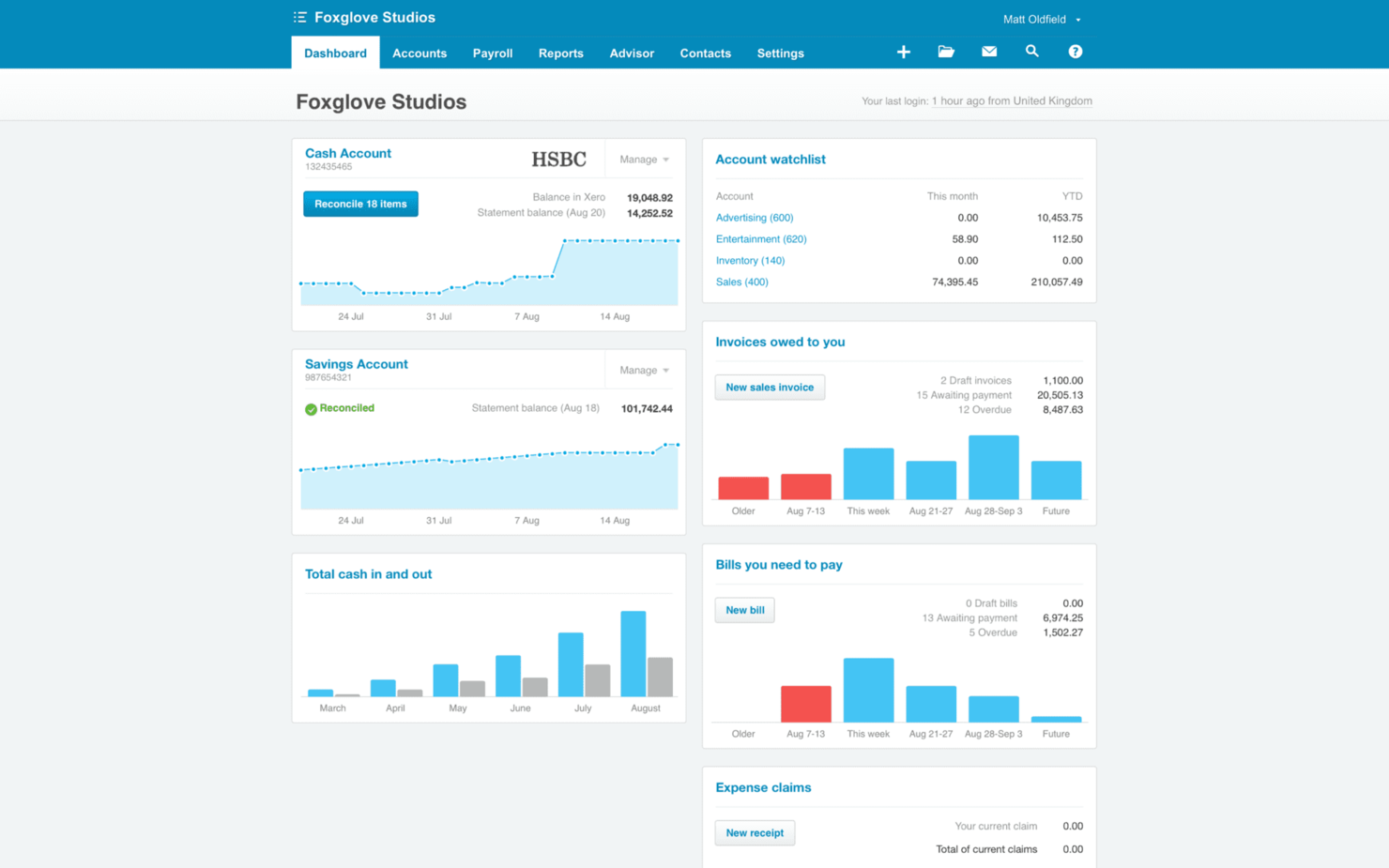
Xero is a cloud-based accounting platform that covers invoicing, bank reconciliation, expense tracking, payroll, inventory management, and financial reporting for small businesses and health professionals.
Who Is Xero Best For?
Xero is a good fit for small to mid-sized healthcare practices that need straightforward accounting tools without the complexity of enterprise-level financial systems.
Why I Picked Xero
I've included Xero in my top picks because the Xero App Store offers healthcare practices more connectivity options than most other accounting tools at this price point. You can connect practice management tools like Deputy for staff scheduling, Gusto for payroll, and Splose for allied health billing, with their data feeding directly into your Xero books. Patient appointment volume, staff hours, and payroll costs all reconcile in one place, eliminating manual data entry. The open API lets your developer build custom connections to EHR or practice software that doesn't have a native Xero integration.
Xero Key Features
- Bank reconciliation: Automatically matches bank transactions to invoices and bills, reducing manual data entry during monthly close.
- Expense claims: Track and categorize practice expenses by submitting receipts directly from the mobile app for faster reimbursement processing.
- Financial reporting: Generate profit and loss statements, balance sheets, and cash flow reports with customizable date ranges and tracking categories.
- Inventory tracking: Monitor medical supply stock levels and costs, with automatic updates when you create invoices or purchase orders.
Pros and Cons
Pros:
- Supports multi-currency transactions
- Can track multiple bank accounts
- Direct bank feeds for automatic updates
Cons:
- May require learning curve for new users
- No advanced project management features

Wave
Best for freelancers and consultants

Wave is a small business accounting platform that covers income and expense tracking, invoicing, online payments, and payroll for freelancers, solopreneurs, contractors, and consultants.
Who Is Wave Best For?
Wave is a good fit for self-employed healthcare professionals and independent consultants who need basic accounting tools without the overhead of enterprise software.
Why I Picked Wave
I've included Wave in my top picks because it's built specifically for solo operators, which maps well to independent healthcare consultants, therapists in private practice, or contract healthcare workers managing their own books. I like that Wave's double-entry accounting automatically categorizes bank transactions and organizes income and expenses in a single dashboard. The invoicing tool also lets you bill clients directly and accept online payments, so there's no need to juggle a separate billing tool.
Wave Key Features
- Receipt capture: Upload and attach receipts to transactions directly from the Wave mobile app for on-the-go expense tracking.
- Financial reporting: Generate profit and loss statements, balance sheets, and cash flow reports with month-over-month or year-over-year comparisons.
- Payroll processing: Run payroll for employees or contractors and have taxes calculated and filed automatically as an add-on service.
- Collaborator access: Invite your accountant, bookkeeper, or tax preparer to your account with dedicated access controls.
Pros and Cons
Pros:
- Simple interface for quick setup
- Automatic expense tracking from linked accounts
- Ability to create custom invoice templates
Cons:
- Limited customer support options
- Learning curve for new users with multiple features

Best for real-time financial data

SoftLedger is a cloud-based accounting platform for multi-entity organizations that includes a general ledger, accounts payable and receivable automation, real-time financial reporting, multi-entity consolidation, and cash flow management.
Who Is SoftLedger Best For?
SoftLedger is a good fit for multi-entity healthcare organizations, such as hospital networks, medical groups, or multi-location clinics, that need consolidated financial reporting across entities.
Why I Picked SoftLedger
SoftLedger is a top pick because real-time financial data is genuinely central to how it works—not a secondary feature. I like that its multi-entity consolidation runs in real-time, so when a hospital network needs an up-to-the-minute consolidated balance sheet across multiple clinic locations, it's available without waiting for a manual roll-up. Its open banking API also connects financial data at the transactional level, which means your cash position reflects what's actually happening right now.
SoftLedger Key Features
- Automated accounts payable: Manage vendor invoices, approvals, and payments within a single workflow without manual data entry.
- Revenue recognition: Recognize revenue across multiple service lines or contracts in line with ASC 606 standards.
- Automated intercompany eliminations: Automatically eliminate intercompany transactions when consolidating financials across multiple healthcare entities.
- Audit trail: Log every financial transaction and system change with a timestamped record to support compliance reviews and audits.
Pros and Cons
Pros:
- Real-time updates on financial transactions
- Flexible options for customizing financial reports
- Handles multi-entity consolidation automatically
Cons:
- Requires training for advanced reporting features
- May be complex for smaller teams

Puzzle
Best for automated bookkeeping

Puzzle is an AI-native accounting platform with automated bookkeeping, continuous reconciliation, and real-time financial reporting built for startups, SMBs, and accounting firms.
Who Is Puzzle Best For?
Puzzle is a good fit for early-stage and growth-stage startups that need accurate, real-time books without a full-time in-house accounting team.
Why I Picked Puzzle
Puzzle is one of my top picks because I love how its AI agents handle categorization and reconciliation continuously throughout the month, not just at close. So I don't have to manually reconstruct transaction history at month-end. I also rely on its "up to 98% automated" categorization, which drafts entries for review without requiring me to write any rules. Nothing posts to the ledger without approval, which keeps the books accurate without sacrificing control.
Puzzle Key Features
- Real-time cash and burn tracking: Monitor cash balances, burn rate, and runway from a live dashboard that updates as transactions sync.
- Month-end close checklist: Work through a structured close workflow with task assignments and sign-off tracking built into the platform.
- Accrual accounting support: Record accruals, prepayments, and adjusting journal entries directly within the ledger.
- Audit trail: Every transaction edit, categorization, and approval is logged with a timestamped history for review.
Pros and Cons
Pros:
- Automated bank reconciliations ensure accuracy
- AI-powered transaction categorization
- Real-time dashboards provide immediate financial insights
Cons:
- No healthcare-specific features
- Free trial requires users to connect a bank account

Best for mobile invoicing

myBillBook is a GST billing and invoicing platform built for small and medium businesses in India, covering invoice creation, inventory management, POS billing, e-invoicing, and e-way billing.
Who Is myBillBook Best For?
myBillBook is a good fit for small and medium business owners in India who need a straightforward billing and invoicing tool with GST compliance built in.
Why I Picked myBillBook
I've included myBillBook in my top picks because of how well its mobile app handles invoicing on the go. You can create a GST-compliant bill in under eight seconds directly from your phone, then share it instantly via WhatsApp or SMS without switching to a desktop. The app also supports multi-device login, so your billing data stays consistent whether you're working from a smartphone, tablet, or PC. I also like that invoice customization, including branded templates and thermal print formats, is fully available within the mobile app itself.
myBillBook Key Features
- Expense and purchase tracking: Log purchases, purchase returns, and expenses directly within the app to keep a running record of outgoings.
- Business reports: Generate sales, purchase, and stock summary reports to review financial activity across a given period.
- Staff attendance and payroll: Track staff hours and manage payroll from within the platform without a separate HR tool.
- Godown management: Manage inventory across multiple storage locations or warehouses from a single account.
Pros and Cons
Pros:
- Automatic tax calculation and invoicing
- Supports multiple languages
- Simple reporting tools
Cons:
- Limited customer support options
- May not scale well for large teams


Gravity is a cloud-based accounting platform built on Microsoft Power Platform that handles multi-entity financial management, AP automation, revenue recognition, and real-time reporting for healthcare organizations.
Who Is Gravity Best For?
Gravity is a good fit for growing healthcare organizations with multiple locations or entities that need consolidated financial visibility across their operations.
Why I Picked Gravity
Gravity earns its spot on my shortlist because its single-database architecture makes it well suited to healthcare groups managing multiple clinic locations or legal entities. Intercompany transactions post automatically, eliminating the manual reconciliation that burdens finance teams running separate books per site. I can also pull consolidated financial statements across all entities in real time, rather than waiting on month-end exports from each location.
Gravity Key Features
- AP automation: Capture and process vendor invoices using AI-powered data extraction with automated approval routing.
- Revenue recognition: Apply ASC 606-compliant recognition rules across service lines and patient billing arrangements.
- Role-based access controls: Restrict financial data visibility by entity, department, or user role with detailed audit trails.
- Fixed asset management: Track, depreciate, and report on medical equipment and facility assets across all locations.
Pros and Cons
Pros:
- Advanced reporting tools for better insights
- Integrates with major business applications
- No coding required for workflow creation
Cons:
- Initial setup can be time-consuming
- Some features require advanced configuration


Sage Intacct is a cloud-based accounting platform built for healthcare organizations, offering multi-entity financial management, revenue recognition, project accounting, and real-time reporting across clinical and administrative operations.
Who Is Sage Intacct Best For?
Sage Intacct is a strong fit for mid-size to large healthcare organizations managing multiple entities, locations, or service lines with complex financial reporting needs.
Why I Picked Sage Intacct
I picked Sage Intacct as one of the best because its architecture is genuinely built to grow with a healthcare organization. Adding a new clinic or rolling out a specialty service line doesn't become a technology project—you copy a chart of accounts template, apply the right dimensions, and the new entity is live with no server upgrades and no multi-week implementation. Built-in automation for recurring journal entries, allocations, and intercompany eliminations means you avoid lengthy IT projects as you grow. Dimensional accounting also plays a big role here—rather than managing thousands of general ledger accounts, you tag transactions with dimensions like location, department, payer type, provider, and service line for dynamic, granular reporting without the overhead.
Sage Intacct Key Features
- Revenue recognition automation: Automates ASC 606-compliant revenue recognition across payer contracts and service lines.
- Healthcare dashboards: Pre-built dashboards surface KPIs like cost per treatment, service line profitability, and payer mix in real time.
- Accounts payable automation: Captures, routes, and approves vendor invoices digitally, with three-way PO matching for procurement workflows.
- Project accounting: Tracks budgets, costs, and billing for clinical programs, grants, and capital projects separately from core financials.
Pros and Cons
Pros:
- Scales with growing business needs
- Multi-entity support is helpful
- Real-time data for faster decisions
Cons:
- Steep learning curve for new users
- May require some technical expertise

Plooto
Best for payment automation

Plooto is a payment automation platform for AP and AR that handles invoice management, approval workflows, multi-method payments, and two-way sync with accounting software.
Who Is Plooto Best For?
Plooto is a good fit for small to mid-sized healthcare organizations where the accounting team manages AP and AR manually and needs more control over payment approvals and reconciliation.
Why I Picked Plooto
I picked Plooto as one of the best because of how much of the AP cycle it handles without requiring manual intervention. In healthcare, where you're regularly processing payments to suppliers, contractors, and service vendors, Plooto's automated invoice management uses OCR capture to pull invoice data and route it for approval—without anyone keying in data by hand. I also like its multi-step approval workflows, which let you set up controls so no payment leaves without the right sign-off. That kind of audit trail matters in healthcare finance, where internal controls aren't optional.
Plooto Key Features
- Pre-authorized debit (PAD): Set up recurring payment collection from clients or payers on a fixed schedule without manual processing each cycle.
- AR automation: Send payment requests to customers and track outstanding balances from a single dashboard.
- Two-way reconciliation: Sync payment records automatically back to QuickBooks or Xero to keep your books current.
- International payments: Send payments to vendors in foreign currencies across supported countries directly from the platform.
Pros and Cons
Pros:
- Automated payment scheduling saves time
- Bank reconciliation is fast and accurate
- Remote invoice approval improves flexibility
Cons:
- May require additional setup for custom workflows
- Limited reporting features for some users
Other Healthcare Accounting Software
Here are some additional healthcare accounting software options that didn’t make it onto my shortlist, but are still worth checking out:
- Vencru
For inventory management
- OSP
For compliance features
- Zoho Books
For small business automation
- Dext
For receipt and invoice capture
- Cube Software
For budgeting and forecasting
- Keeper
For document management
- NetSuite Cloud Accounting
For global compliance support


How I Evaluate Healthcare Accounting Software
I split my evaluation into baseline requirements—like payer AR management and HIPAA-compliant reporting—and differentiators that separate tools built for health systems from generic accounting platforms.
Core Functionality (Table Stakes For This List)
When I'm selecting tools for my list, I rank each one on a scale from 0 (does not offer the functionality) to 5 (excels in this area) for each core functionality listed below. Then, I calculate the tool's total score into a percentage. Each tool needs to achieve a minimum total score of 55% to be considered for inclusion.
- Healthcare-Specific General Ledger: I check whether the GL supports departmental and fund-level tracking, since health systems often need to split expenses across clinical service lines, grants, and facilities within one chart of accounts.
- Medical Billing Integration: Connecting to EHR/EMR and practice management systems matters here. I look for tools that sync claim and encounter data back to the ledger so your revenue reconciliation doesn't rely on manual imports.
- HIPAA-Compliant Data Security: Any platform handling financial records tied to patient encounters needs proper access controls, audit trails, and a signed BAA. I evaluate how granular role-based permissions are and whether encryption covers data at rest and in transit.
- Payer & AR Management: Healthcare AR is uniquely complex. I look for the ability to segment receivables by payer class—Medicare, Medicaid, commercial, self-pay—and track contractual adjustments and claim denials without workarounds in a generic AR module.
- Regulatory Financial Reporting: I evaluate whether the tool supports healthcare-specific reports like Medicare cost reports, Form 990 schedules for nonprofit systems, and state-mandated filings rather than requiring your team to build them from scratch each cycle.
- Healthcare AP & Payroll: Clinical organizations deal with physician compensation models, shift differentials, and high vendor volumes. I look for AP and payroll workflows that accommodate these structures instead of forcing you into a generic business payroll setup.
Once I have a list of tools that meet this criteria, I consider what sets each platform apart.
Differentiating Factors (What Sets Vendors Apart)
Here's how I compare and contrast different vendors:
Standout Features
Multi-entity consolidation is a major differentiator for health systems managing several facilities. I look for automated intercompany eliminations that save your team hours during the monthly close. Service-line cost accounting also matters—tying procedure-level costs to financial outcomes helps CFOs pinpoint where margins are thinning. For FP&A teams, I evaluate whether forecasting tools can model scenarios around census fluctuations and payer mix shifts, since static budgets rarely hold up in healthcare.
Beyond Features
Ecosystem integrations are a big deal here. I check whether a platform connects natively to major EHRs like Epic or Cerner, since broken data flows between clinical and financial systems create reconciliation headaches at month-end. Implementation support also weighs heavily—migrating a healthcare chart of accounts is complex, and vendors with healthcare-specialized consultants tend to reduce go-live timelines. Pricing transparency matters too. I look for models scaled to bed count or provider count so costs stay predictable as your organization grows.
How to Choose Healthcare Accounting Software
It’s easy to get bogged down in long feature lists and complex pricing structures. To help you stay focused as you work through your unique software selection process, here’s a checklist of factors to keep in mind:
| Factor | What to Consider |
| Scalability | Ensure the software grows with your organization, handling more users, transactions, or locations without losing efficiency. |
| Integrations | Look for software that integrates with existing systems like EHRs, ERPs, or billing platforms to streamline operations. |
| Customizability | Choose a solution that allows you to tailor features and reports to your specific needs, such as unique compliance requirements. |
| Ease of Use | Opt for a user-friendly interface that minimizes training time for your team and reduces the chance of errors. |
| Budget | Evaluate the total cost, including upfront fees and ongoing expenses, to ensure it fits within your financial constraints. |
| Security Safeguards | Verify the software has strong data protection measures like encryption and access controls to safeguard sensitive patient information. |
| Support | Consider the availability and quality of customer support to assist with implementation and troubleshooting. |
| Compliance | Ensure the software adheres to healthcare regulations like HIPAA to avoid legal issues and ensure patient data privacy. |
Trends In Healthcare Accounting Software
In my research, I sourced countless product updates, press releases, and release logs from different healthcare accounting software vendors. Here are some of the emerging trends I’m keeping an eye on:
- Advanced Data Analytics and Reporting: Many healthcare accounting software tools now offer sophisticated analytics features, allowing users to gain deeper insights into financial data. This helps healthcare organizations to make informed decisions by identifying patterns and predicting future financial trends.
- Cloud-Based Solutions: More vendors are shifting towards cloud-based software and cloud ERPs, which offers scalability and flexibility. This trend helps healthcare teams access their financial data from anywhere while reducing the need for extensive IT infrastructure.
- AI and Machine Learning Integration: Some software solutions are incorporating AI and machine learning to automate complex tasks, like fraud detection and financial forecasting. This can lead to more accurate financial management and resource allocation in healthcare settings.
- Focus on Compliance and Security: With regulations constantly evolving, there is an increased focus on compliance features within the software. Vendors are enhancing security measures to protect sensitive financial and patient data, ensuring compliance with healthcare standards such as HIPAA.
- Interoperability with Other Systems: There is a growing trend toward ensuring compatibility with Electronic Health Records (EHRs) and other healthcare systems. This interoperability facilitates smoother data exchange and better overall management of patient and financial data, providing a more integrated experience for healthcare providers.
What Is Healthcare Accounting Software?
Healthcare accounting software is a specialized tool designed to manage the financial operations of healthcare organizations. Professionals like accountants, financial managers, and administrators use these tools to keep track of billing, expenses, and compliance with regulations.
These tools often offer key features like invoicing, expense tracking, and reporting to help teams manage finances, ensure regulatory compliance, and make informed decisions. Overall, healthcare accounting software provides essential support for the financial health and efficiency of healthcare providers.
Features of Healthcare Accounting Software
When selecting healthcare accounting software, keep an eye out for the following key features:
- Invoicing: Generates and manages billing for services rendered, ensuring timely payments.
- Expense Tracking: Monitors and categorizes expenses to help manage budgets efficiently.
- Financial Reporting: Provides detailed reports on financial performance, aiding in decision-making.
- Regulatory Compliance: Ensures financial practices adhere to healthcare regulations to avoid penalties.
- Multi-Entity Management: Supports handling finances for multiple locations or subsidiaries within a healthcare organization.
- Automated Workflows: Reduces manual tasks by automating repetitive financial processes.
- Inventory Management: Keeps track of medical supplies and alerts when restocking is needed.
- Real-Time Dashboards: Offers a visual overview of financial data, making insights accessible at a glance.
- AI-Driven Insights: Analyzes data to provide actionable financial insights for better planning.
- Telehealth Integration: Manages billing and payments for virtual consultations in line with telehealth services.
Benefits of Healthcare Accounting Software
Implementing healthcare accounting software provides several benefits for your team and your business. Here are a few you can look forward to:
- Improved Financial Accuracy: Automated workflows and reporting tools reduce errors in financial management.
- Regulatory Compliance: Built-in compliance features help ensure your financial practices meet healthcare regulations.
- Time Savings: Features like invoicing and expense tracking automate repetitive tasks, freeing up time for more strategic activities.
- Better Decision-Making: Real-time dashboards and AI-driven insights provide valuable data to inform business decisions.
- Enhanced Financial Visibility: Detailed financial reporting offers a clear view of your organization's financial health.
- Efficient Resource Management: Inventory management features ensure timely restocking of medical supplies, avoiding shortages.
- Streamlined Billing Processes: Invoicing and telehealth integration simplify managing payments and billing for services rendered.
Costs and Pricing of Healthcare Accounting Software
Selecting healthcare accounting software requires an understanding of the various pricing models and plans available. Costs vary based on features, team size, add-ons, and more. The table below summarizes common plans, their average prices, and typical features included in healthcare accounting software solutions:
Plan Comparison Table for Healthcare Accounting Software
| Plan Type | Average Price | Common Features |
| Free Plan | $0 | Basic invoicing, expense tracking, and simple reporting. |
| Personal Plan | $5-$25/user/month | Invoicing, expense tracking, basic reporting, and customer support. |
| Business Plan | $30-$60/user/month | Advanced reporting, multi-entity management, integrations, and automated workflows. |
| Enterprise Plan | $70-$150/user/month | Customizable dashboards, AI-driven insights, advanced compliance features, and dedicated support. |
Healthcare Accounting Software FAQs
Here are some answers to common questions about healthcare accounting software:
How do healthcare accounting software solutions handle insurance payments?
Healthcare accounting software can automatically integrate with insurance company systems to verify and track payments. This helps reduce errors and saves time by syncing patient billing details directly with insurance providers. Many solutions also offer reporting features to track claim statuses and payments, so your team can manage accounts more efficiently. With this integration, you can also identify underpayments or payment delays, ensuring you stay on top of outstanding amounts.
Can healthcare accounting software be customized for different healthcare specialties?
Yes, many healthcare accounting software solutions offer customization options for various specialties like hospitals, private practices, and outpatient care centers. This customization often includes industry-specific templates for invoicing, billing, and reporting, ensuring that the software aligns with your needs. By tailoring the software to your business, you can improve accuracy and efficiency in managing financial processes.
How does healthcare accounting software integrate with Electronic Health Records (EHR) systems?
Most healthcare accounting software solutions can integrate with popular EHR systems to ensure a smooth exchange of data between financial and medical billing records. This integration helps automate billing and coding processes, ensuring that patient visits and treatments are accurately reflected in invoices. By syncing this data, you reduce the chances of errors and improve the overall workflow between the medical practice and accounting teams.
What security features are included in healthcare accounting software?
Security is a top priority for healthcare accounting systems due to the sensitive nature of financial and patient data. Many solutions offer HIPAA-compliant security features like encryption, secure access controls, and multi-factor authentication to ensure that your data is protected. These features help prevent unauthorized access and ensure that all financial transactions are handled securely.
How do I ensure compliance with healthcare regulations using accounting software?
Healthcare accounting software helps ensure compliance by including built-in features for regulatory reporting, tax calculation, and auditing. It typically updates its system to reflect changes in healthcare laws and financial regulations, which can vary by location. By using a compliant solution, your team can avoid costly mistakes and ensure that your financial records are up-to-date with the latest legal requirements.
What kind of customer support can I expect from healthcare accounting software vendors?
Healthcare accounting software vendors typically offer several types of customer support, including live chat, email, and phone support. Many also provide self-service options like knowledge bases, FAQs, and video tutorials. It’s important to choose a vendor that offers timely and helpful support, especially during critical periods like tax season or when implementing new features.
What’s Next?
If you're in the process of researching healthcare accounting software, connect with a SoftwareSelect advisor for free recommendations.